
This article explains how to generate a self-signed certificate bundle that Leapwork Performance can use to record HTTPS traffic. The scripts mirror the bundled Leapwork Performance Recorder certificate workflow and generate the PEM files required for upload.
This is only required if you choose to use your own self-signed certificate instead of the default certificate provided by Leapwork.
After generating a new certificate and uploading it to the Admin Portal, it must be added to the Trusted Root Certification Authorities store on all user machines. If this step is not completed, recording functionality will not work as expected.
Before you start
Make sure:
-
OpenSSL is installed and available in your terminal or PowerShell session.
-
You use an empty folder so the generated files are easy to find.
Install OpenSSL (if needed)
Windows
-
Download and install OpenSSL for Windows from Shining Light Productions:
https://slproweb.com/products/Win32OpenSSL.html -
After installation, open a new PowerShell window and run:
openssl version
macOS
If OpenSSL is not already available:
Install Homebrew:
/bin/bash -c "$(curl -fsSL https://raw.githubusercontent.com/Homebrew/install/HEAD/install.sh)"
Install OpenSSL:
brew install openssl
Verify:
openssl version
Generate the certificate on macOS
Use this script on macOS to create the certificate and key files that Leapwork Performance needs for HTTPS traffic recording.
-
Save the script below as
generate-leapPerformance-certificate.shin an empty folder.#!/bin/bash set -euo pipefail SCRIPT_DIR="$(cd "$(dirname "$0")" && pwd)" cd "$SCRIPT_DIR" OPENSSL_BIN="$(command -v openssl)" if [ -z "$OPENSSL_BIN" ]; then echo "OpenSSL is required but was not found in PATH." exit 1 fi cat > cert.cnf <<'EOF' [ req ] default_bits = 4096 prompt = no default_md = sha256 distinguished_name = dn req_extensions = req_ext [ dn ] C = US O = <Your organization name> CN = <Leapwork Performance Recorder CA> [ req_ext ] basicConstraints = critical,CA:TRUE keyUsage = critical, keyCertSign, cRLSign subjectKeyIdentifier = hash EOF "$OPENSSL_BIN" req -x509 -newkey rsa:4096 -keyout mitm-key.pem -out mitm-cert.pem -days 365 -nodes -config cert.cnf -extensions req_ext "$OPENSSL_BIN" pkcs8 -topk8 -inform PEM -in mitm-key.pem -out key_pkcs8.pem -nocrypt cat mitm-cert.pem key_pkcs8.pem > bundle.pem echo "Generated files:" ls -1 mitm-cert.pem mitm-key.pem key_pkcs8.pem bundle.pem -
Replace
<Your organization name>and<Leapwork Performance Recorder CA>if needed. -
Run:
chmod +x generate-leapPerformance-certificate.sh
./generate-leapPerformance-certificate.sh
Generate the certificate on Windows
-
Open PowerShell.
-
Save the script below as
Generate-LeapPerformance.ps1in an empty folder.$ErrorActionPreference = 'Stop' $ScriptDir = Split-Path -Parent $MyInvocation.MyCommand.Path Set-Location $ScriptDir $opensslCommand = Get-Command openssl.exe -ErrorAction SilentlyContinue if (-not $opensslCommand) { $opensslCommand = Get-Command openssl -ErrorAction Stop } $openssl = $opensslCommand.Source @' [ req ] default_bits = 4096 prompt = no default_md = sha256 distinguished_name = dn req_extensions = req_ext [ dn ] C = US O = <Your organization name> CN = <Leapwork Performance Recorder CA> [ req_ext ] basicConstraints = critical,CA:TRUE keyUsage = critical, keyCertSign, cRLSign subjectKeyIdentifier = hash '@ | Set-Content -Path cert.cnf -Encoding ascii & $openssl req -x509 -newkey rsa:4096 -keyout mitm-key.pem -out mitm-cert.pem -days 365 -nodes -config cert.cnf -extensions req_ext & $openssl pkcs8 -topk8 -inform PEM -in mitm-key.pem -out key_pkcs8.pem -nocrypt Get-Content .\mitm-cert.pem, .\key_pkcs8.pem | Set-Content -Path .\bundle.pem -Encoding ascii Write-Host 'Generated files:' Get-ChildItem .\mitm-cert.pem, .\mitm-key.pem, .\key_pkcs8.pem, .\bundle.pem -
In the script, replace
Your organization namewith your company name. -
Keep
Leapwork Performance Recorder CAas the certificate name, or replace it with your preferred common name. -
Run:
Set-ExecutionPolicy -Scope Process -ExecutionPolicy Bypass -Force
.\Generate-LeapPerformance.ps1
Files generated
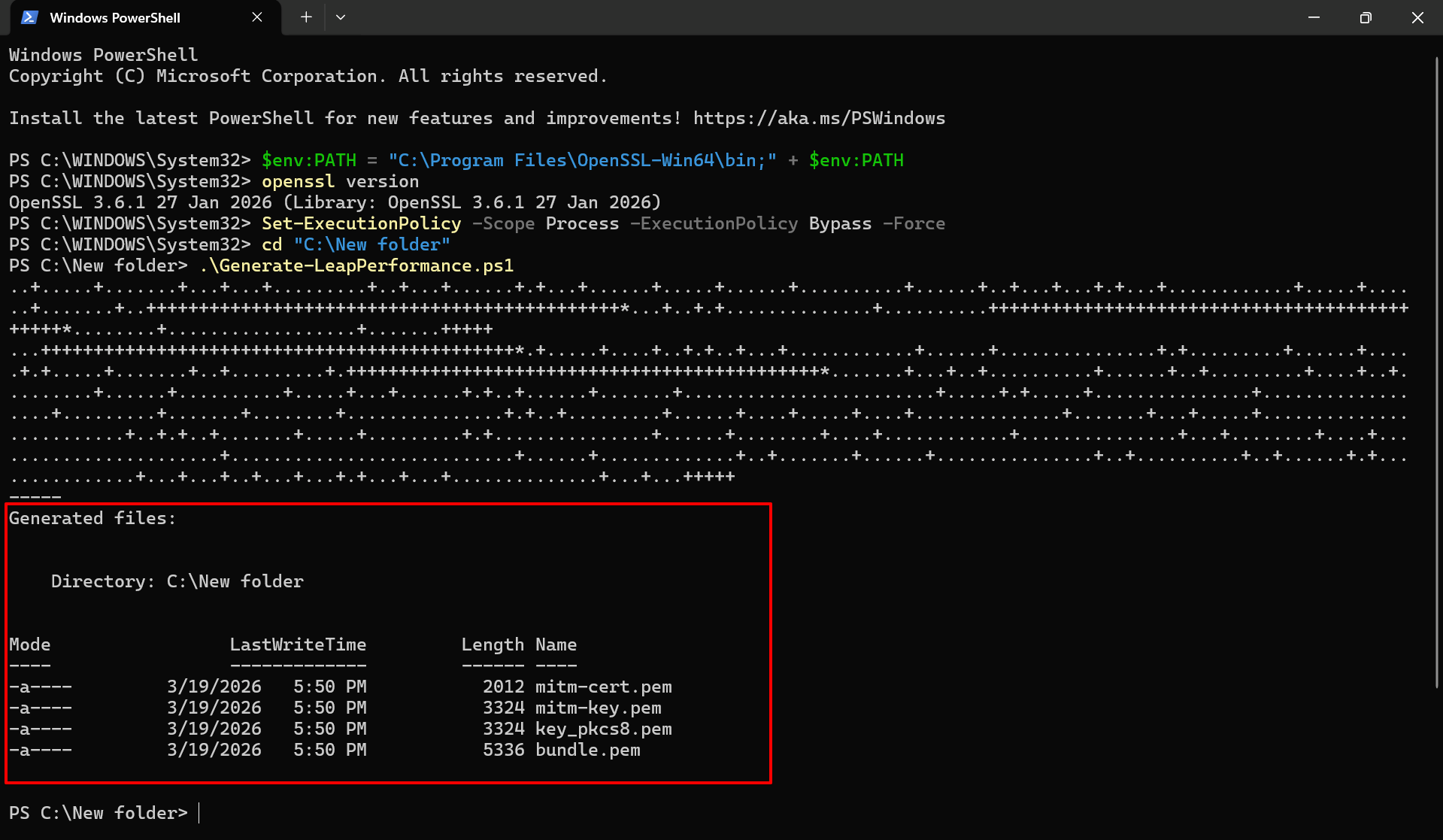
The scripts generate these files:
-
mitm-cert.pem: public certificate in PEM format. -
mitm-key.pem: private key in PEM format. -
key_pkcs8.pem: private key converted to PKCS#8 PEM format. -
bundle.pem: combined PEM file that includesmitm-cert.pemandkey_pkcs8.pemfor upload.
Keep mitm-key.pem, key_pkcs8.pem, and bundle.pem secure.
Upload the certificate to Leapwork Performance
-
Sign in to the Leapwork Admin Portal.
-
Open the profile section.
-
Use the certificate upload option.
-
Upload
bundle.pem.
Validate the generated files
To confirm that generation worked:
-
Check that
mitm-cert.pem,mitm-key.pem,key_pkcs8.pem, andbundle.pemexists in the folder. -
(Optional) Inspect the certificate:
openssl x509 -in mitm-cert.pem -noout -subject -issuer -dates
Troubleshooting common issues
1. Why do I see “openssl is not found”?
This means OpenSSL is not installed or not available in your system PATH.
Solution:
-
Install OpenSSL (see Install OpenSSL section).
-
Open a new terminal or PowerShell window.
-
Run
openssl versionto verify installation. -
If the command still fails but OpenSSL is installed, add it temporarily to your PATH:
$env:PATH = "C:\Program Files\OpenSSL-Win64\bin;" + $env:PATH
openssl version
This change applies only to the current session.
2. Why is PowerShell blocking the script?
PowerShell may prevent scripts from running due to execution policy restrictions.
Solution:
Run the following command before executing the script:
Set-ExecutionPolicy -Scope Process -ExecutionPolicy Bypass -Force
Then run the script again.
3. Why is bundle.pem missing?
This usually means one or more OpenSSL commands failed during execution.
Solution:
-
Check the console output for errors.
-
Ensure OpenSSL is installed and accessible.
-
Rerun the script in an empty folder to avoid conflicts.