
Leapwork Go is now Generally Available (GA) with a release focused on production‑readiness: clearer reporting, stronger governance in the Admin Portal, and more predictable runs. In 2026.5, you get improved run summaries, safer execution policies, and a series of reliability fixes that make day‑to‑day performance testing easier to trust.
What’s new
Leapwork Go GA
The platform is ready for use in production environments, with stable experiences for creating and running timelines, reviewing results, and managing access across your organization. Licensing, usage reporting, and governance for Leapwork Go are aligned with our standard commercial offerings, so administrators can manage it as a first‑class Leapwork product from the Admin Portal. Leapwork Go is available at https://performance.leapwork.ai, and the Leapwork Go Admin Portal is available at https://admin.leapwork.ai
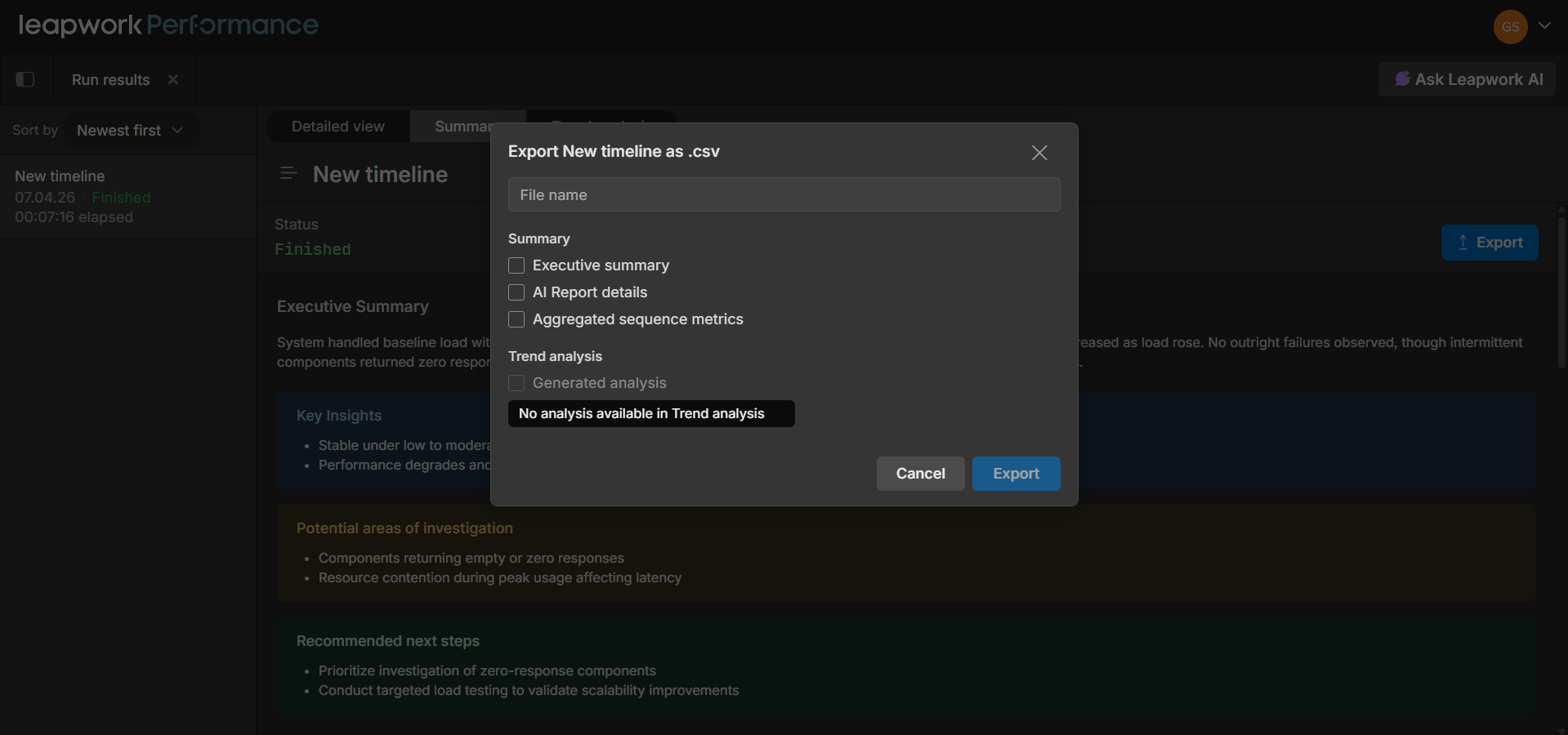
Improved report exports and executive summaries
Leapwork Go now offers improved run exports and expanded executive summaries for timeline runs. This makes it easier to share performance results with stakeholders who need a quick, high‑level view of how a run performed, without digging into detailed graphs or step‑by‑step logs.
Safer execution policies for long‑running timelines
Execution policies now enforce error‑count limits and retry rules more consistently across timelines. When you configure a run to stop after a specific number of errors with retries, Leapwork Go behaves as expected, reducing the risk of runs continuing indefinitely or ignoring configured limits.
Refined validation for timeline duration and end times
Validation rules for time‑based fields such as duration and end times have been refined so that invalid minute or second values surface clear validation messages instead of being silently adjusted. This helps you configure time‑boxed performance tests and fixed‑iteration scenarios with more confidence.
Integrations and API
The Leapwork Go Integrations API is now documented and available through an interactive Swagger UI. You can explore endpoints, review request and response formats, and try out calls directly in the browser at https://perfapi.leapwork.ai/swagger/integrations/index.html
What’s updated
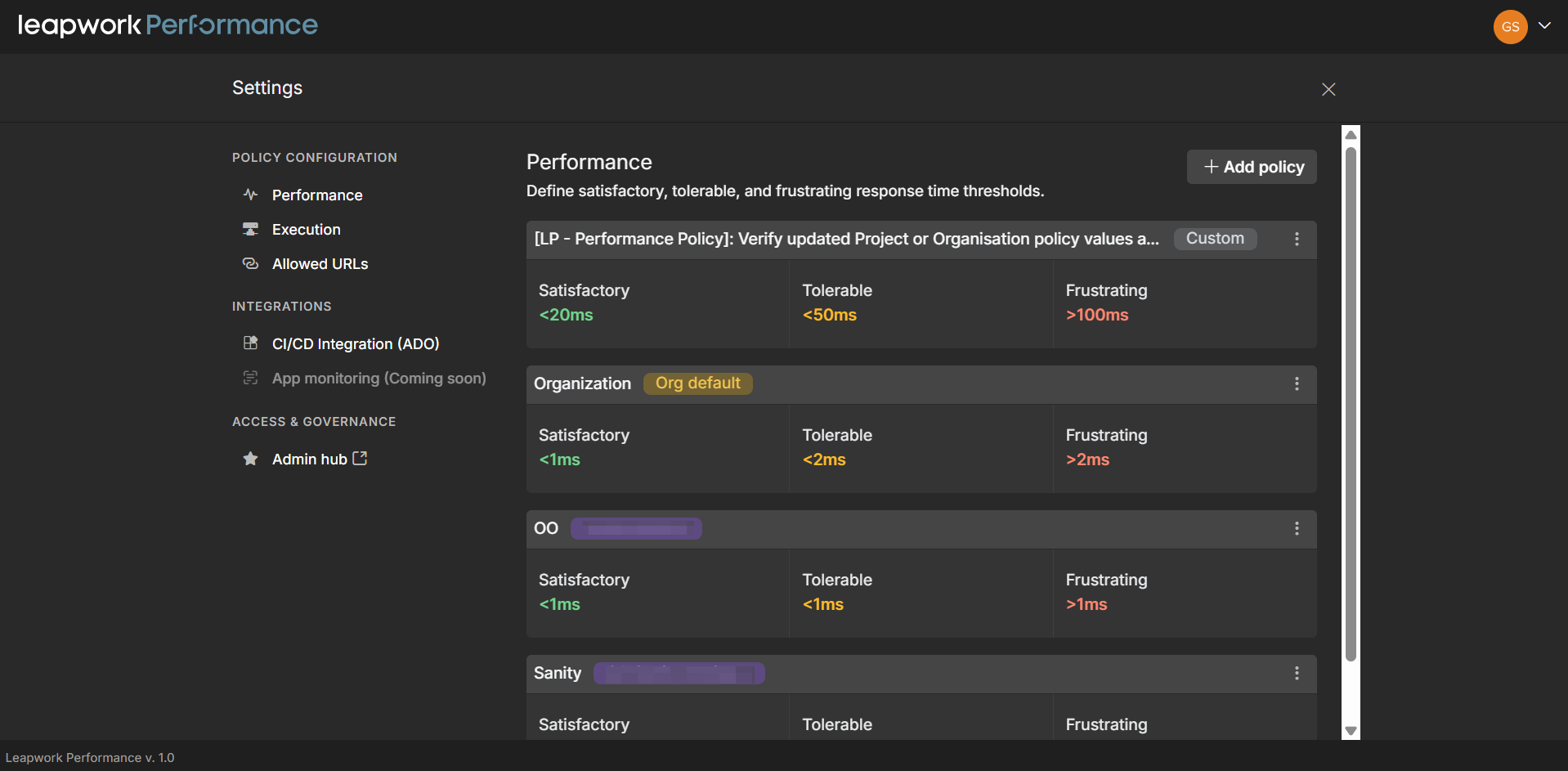
Settings Page UI Refresh
The Settings page UI has been refreshed to provide a clearer, more organized experience for managing your preferences and configurations. The updated design streamlines navigation and makes it easier to locate and adjust specific settings, ensuring a more intuitive user experience.
Timeline graphs and run results
The timeline detailed view and graphs on the Run results page have been refined to improve clarity and predictability. You get more consistent rendering of track‑item graphs, better alignment of trend analysis counts with underlying data, and fewer unexpected UI jumps when you switch between timelines or runs.
Timeline and asset usability in complex workspaces
Leapwork Go now provides a smoother experience when you work with larger or more complex workspaces:
-
Timeline names now truncate more cleanly in dense views so you can still distinguish between runs at a glance.
-
Sequences and related assets remain easier to access while runs are in progress, helping you review and adjust complex scenarios without losing context.
-
Delete confirmations and asset management interactions have been aligned for more consistent wording and behavior, reducing the risk of accidental removal of important assets.
Recorder and data item experience
The recorder and data‑driven executions have been updated to handle more complex datasets more reliably:
-
Scrollbars and primary actions remain accessible when importing or working with large table data items, improving usability for data‑heavy scenarios.
-
The Add cookie experience has been adjusted to reflect current capabilities and avoid confusion about unsupported options.
Admin Portal governance and usage clarity
The Leapwork Go Admin Portal includes several refinements to make governance and usage analysis more reliable:
-
Usage tracking in the Admin Portal has been updated from Virtual User Minutes (VUMs) to Virtual User Hours (VUH). Usage history exports now show a VUH balance column that matches how performance capacity is actually consumed, making it easier to understand and reconcile Leapwork Go usage across environments.
-
License and usage information is more accurate, including clearer trial vs. enterprise indicators and aligned dashboard wording for “Current tier / plan”.
-
Last‑login data is handled more reliably, ensuring that page refreshes and pending invitations do not surface misleading timestamps.
-
Column names in exported Usage history logs are better aligned with the UI, making it easier to reconcile exports with what you see on screen.
Bugs and Improvements
This release includes the following fixes to improve stability and reliability:
-
Fixed issues where timeline runs did not consistently respect error‑count limits and retries configured in execution policies.
-
Fixed issues where trend analysis counts and graphs did not always match the underlying run data in Run results.
-
Fixed a defect where Run results could scroll unexpectedly when switching between timelines, making it harder to review specific runs.
-
Fixed timeline name truncation so that longer names are displayed more predictably in dense views.
-
Fixed problems where large datasets in table data items could hide scrollbars or action buttons, making it difficult to complete configuration.
-
Fixed inconsistent delete confirmation behavior when removing assets, aligning messages and flows across the Leapwork Go client.
-
Fixed issues where sequential executions using table‑based data did not iterate correctly over all rows.
-
Fixed issues in the Admin Portal where:
-
Refreshing the page incorrectly updated a user’s last login time.
-
Pending invited users appeared with a last-login timestamp.
-
Trial license details appeared instead of enterprise license details in some views.
-
Exported Usage history files contained column headings that did not fully align with the on‑screen table.
-
-
Improved overall reliability of timeline runs, sequence handling, and run result displays in Leapwork Go and the Admin Portal.