
The Switch Session block changes the current terminal session used during automation. This enables flows to alternate between multiple active sessions, provided those sessions have been previously connected using a compatible block (such as a Desktop UI block inside a sub-flow).
This block is especially useful when managing parallel interactions across multiple terminal windows or sessions in the same flow.
The Green Screen Recorder and building blocks are available with Enterprise plans.
Fully expanded, the Switch Session block shows the following properties:
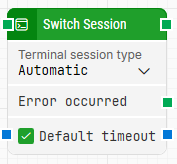
Note: The screenshot on this page uses the Elegance Design, introduced in 2025.3. If you are using an earlier version, your layout may look different.
Quick-start
-
Drag Switch Session onto the canvas.
-
Specify the basic parameters required for this block to operate: Terminal session type, Default timeout.
-
Run the flow when it’s ready.
Building block parameters
Resources
|
Topic |
Description |
|---|---|
|
Common questions about creating, running, and managing flows in Leapwork. |
|
|
Guidelines and solutions for identifying and fixing issues that occur when building or running flows in Leapwork. |