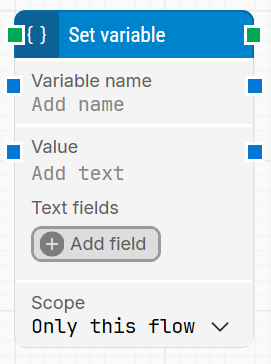
The Set variable block is used to assign a value to a variable. Variables can be scoped so they are only available during a single case run, across all cases in the same schedule run, or permanently for as long as the project exists.
Fully expanded, the Set variable block shows the following properties:
Note: The screenshot on this page uses the Elegance Design, introduced in 2025.3. If you are using an earlier version, your layout may look different.
Quick-start
Drag Set variable onto the canvas.
Enter a Variable name and Value (both required), and optionally adjust the Scope and add Text fields for dynamic content.
Run the flow when it’s ready.
For a minimal setup, provide a name and value, keep the default scope, and place the block where you want the variable to be updated.
Building block parameters
Parameters
Block header: Shows the current name of the Set variable block. You can rename it at any time by double-clicking the header and typing a new title to keep flows readable and organized.
Variable name: Defines the name of the variable to set. A variable name can contain any characters and is case-sensitive (for example, Status and status are different variables).
Value: Specifies the value that will be stored in the variable. This field can contain static text or dynamic content using tokens.
Right-click in the field and choose Insert token to insert one or more tokens from Text fields or other available sources.
Text fields: Allows you to add any number of custom fields that hold dynamic values (for example, results, IDs, timestamps).
Click Add field to create a field and assign it a value.
These fields can then be inserted into Value via Insert token, so the variable can store data that changes at runtime.
Scope: Controls where and for how long the variable exists:
Only this case (in the UI this may appear as Only this flow): the variable exists only during the execution of the current case/flow instance. This is the default and most commonly used scope.
Schedule: the variable is shared across all cases in the same schedule run and is reset when the schedule run finishes.
Permanent: the variable persists across runs and remains stored in the project until it is changed or deleted.
Variables with the same name but different scopes are treated as distinct. For example, a variable named test with Permanent scope is not the same as a variable named test with Only this case/flow scope.