
The Run Web Javascript building block executes a piece of JavaScript in an open browser window. This can be used to trigger events on a web page (for example “exit intent”). This block only works with browser windows that were previously opened using the Start Web Browser block (or their child windows).
Fully expanded, the Run Web JavaScript block shows the following properties:
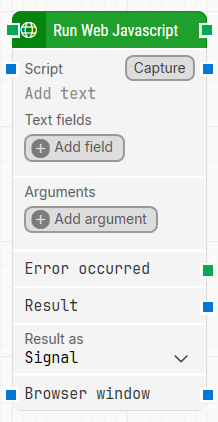
Note: The screenshot on this page uses the Elegance Design, introduced in 2025.3. If you are using an earlier version, your layout may look different.
Quick-start
-
Drag Run Web Javascript onto the canvas.
-
Connect the block in the flow and specify the basic parameters required for this block to operate: Script. Optionally, you can adjust other parameters if needed.
-
Run the flow when it’s ready.
Building block parameters
Parameters
-
Block header: The green input connector triggers the block to start executing. The green output connector triggers when the JavaScript has been executed in the browser window. You can rename the block title (“Run Web Javascript”) by double-clicking it and typing a new title.
-
Script: The JavaScript to run. Do not include
<script>tags. The script can contain tokens for values provided via Text fields. To insert tokens, right-click and select Insert token. -
Capture: Captures keystrokes into Script, which makes it easier to include special keys and key combinations. Special keys and combinations can also be entered manually by wrapping the key(s) with double percentage signs, for example %%CTRL+P%% or %%ENTER%%.
-
Text fields: Key–value fields that enable the use of external values in Script. To use a value, right-click the script field, select Insert token, and insert the field name.
-
Add field: Adds a field that can be inserted as a token into Script.
-
Arguments: Holds one or more arguments that will be sent to the JavaScript.
-
Add argument: Adds an argument to be passed to the JavaScript during execution.
-
Error occurred: Triggers if the command returns an error during execution, so you can branch your flow. Available from Release 2025.2 onward.
-
Result: Contains the result of the executed JavaScript in the format defined by Result as. This is exposed as an output that you can connect to other building blocks.
-
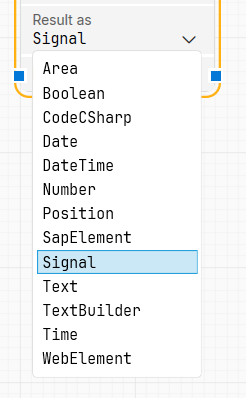
Result as: Selects how Leapwork should handle the JavaScript result. For example, selecting Web Element lets the script return a web element that can be used as the source element in another building block.
-
Browser window: By setting this property, the building block will use a specific browser window.
Resources
|
Topic |
Description |
|---|---|
|
Common questions about creating, running, and managing flows in Leapwork. |
|
|
Guidelines and solutions for identifying and fixing issues that occur when building or running flows in Leapwork. |