
Playwright storageState can start tests already authenticated, but the saved state has a lifetime. If a long Playwright run in Azure DevOps, Jenkins, or another CI system outlives that state, later tests can be redirected to sign-in even though the test code has not changed.
This guide shows the Playwright solution first: create authentication state inside the CI job that consumes it, move the freshness boundary closer to shards or workers when needed, and protect authentication state as sensitive data. Later, it shows the different execution model in Leapwork Play if you do not want QA authors maintaining the same authentication and browser infrastructure themselves.
|
Quick answer Generate storageState inside the CI job that will use it instead of carrying a long-lived auth file between runs. If one job can outlive the session, authenticate separately per shard; if parallel tests change shared data, use a separate account and authentication state per worker. If one individual test can outlive the session itself, split the journey or use an application-supported refresh mechanism. |
|
Already seeing authentication fail halfway through CI? Jump to the Play approach if you want to see how a reusable login test changes the problem at the test boundary. |
New to the terminology?
|
Term |
Meaning |
|
CI / Continuous Integration |
A system such as Azure DevOps, Jenkins, GitHub Actions, or GitLab CI that automatically triggers and runs the Playwright test suite. |
|
Authentication state |
The browser data that represents a signed-in session, usually cookies plus local storage or IndexedDB. |
|
Token / session lifetime |
How long the identity provider or application accepts the current sign-in before it must be refreshed or recreated. |
|
RunList |
A RunList is a collection of Play test cases that are executed together as a test run. Each test case runs independently in its own short-lived execution environment, and reusable subflows can be referenced by the individual test cases. |
Leapwork Play
How does Leapwork Play change the authentication-freshness problem?
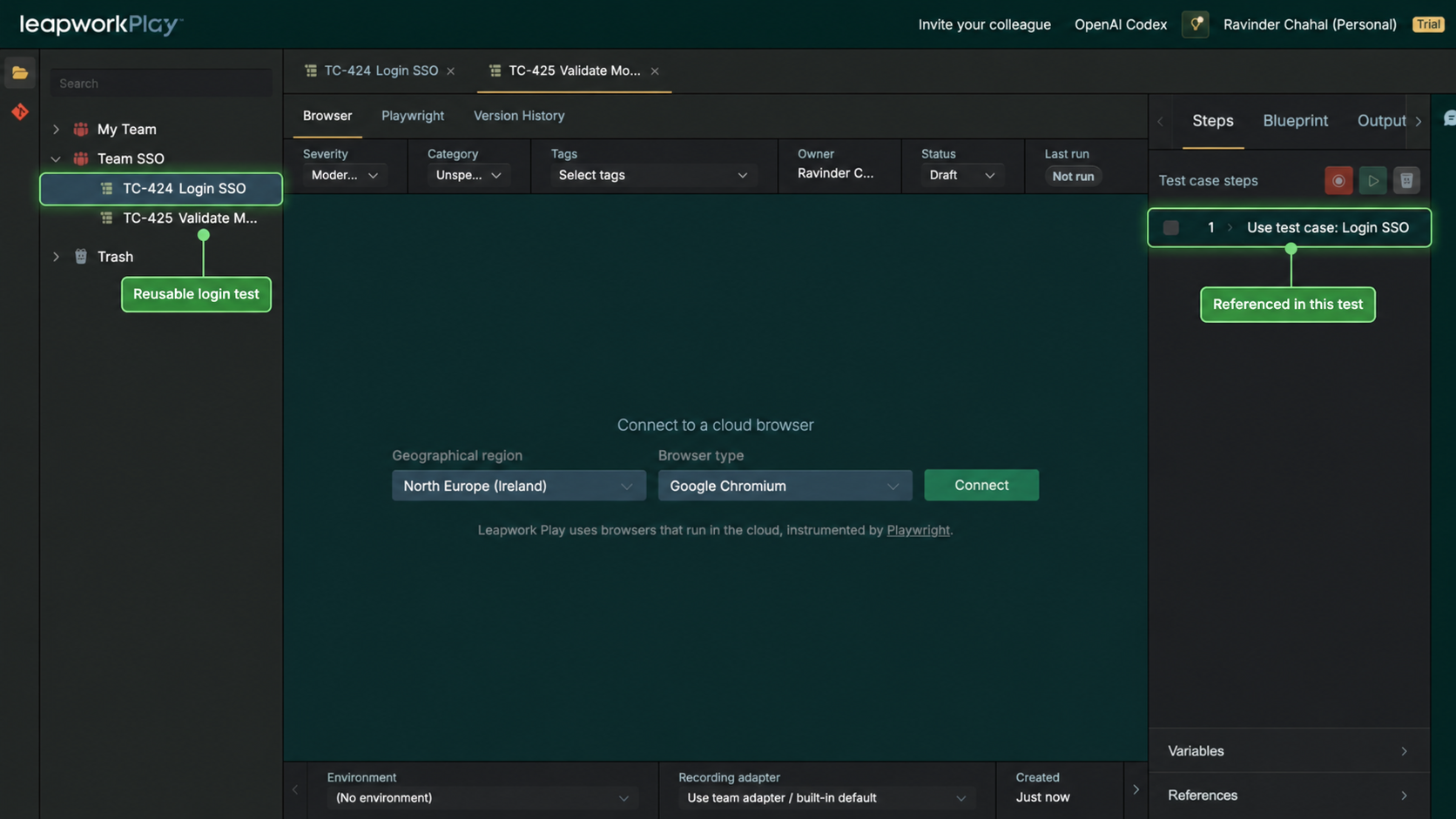
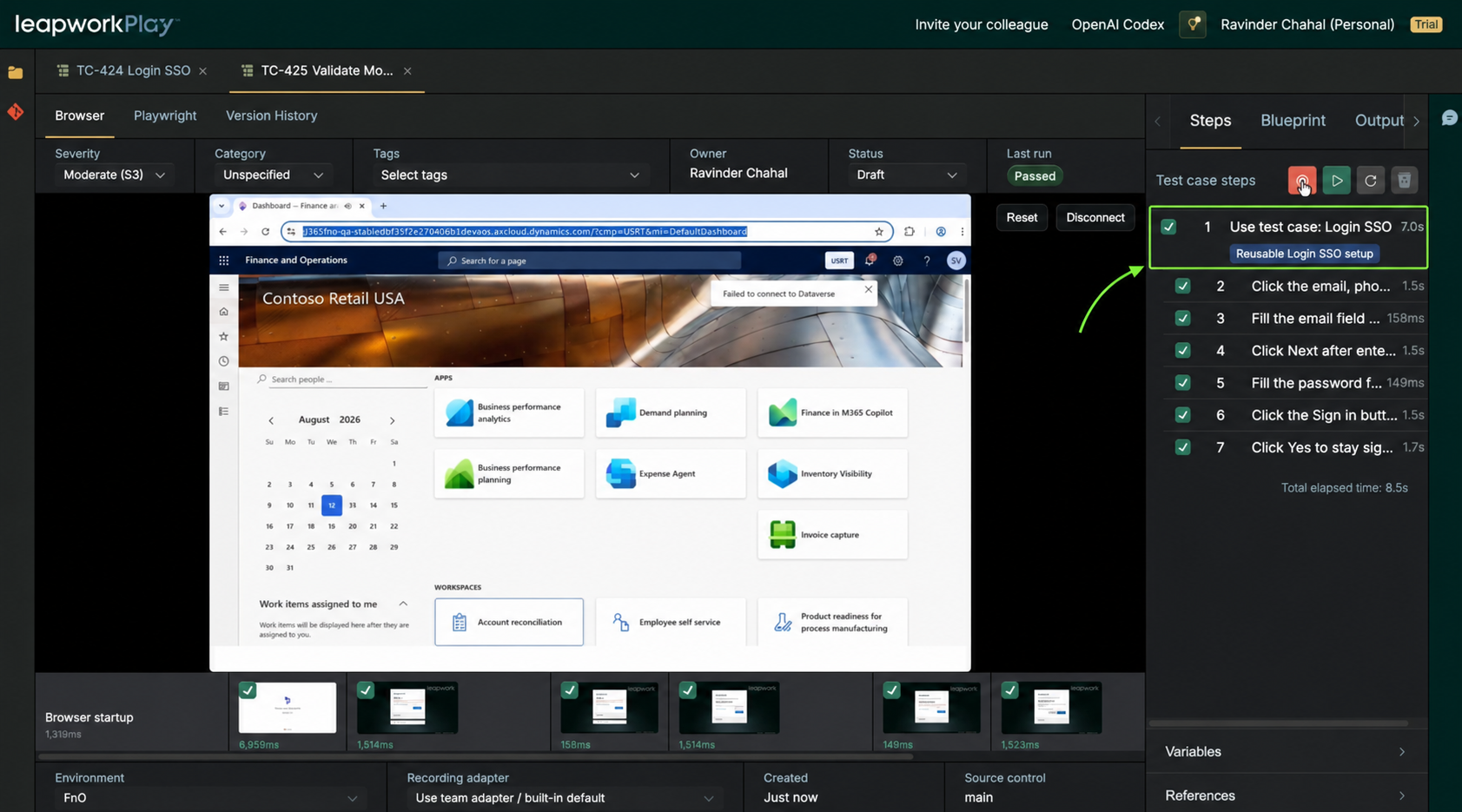
In Play, the SSO journey can be recorded once as a reusable LoginSSO test case. A business test that references LoginSSO runs that login flow before continuing with its own steps in Play's cloud browser. The login is a visible shared test asset rather than a JSON authentication-state file wired into the Playwright project.
For long CI runs, this changes the freshness boundary. A referenced login can create a new signed-in browser session at the beginning of the business test instead of relying on a state file created much earlier in the pipeline. storageState can still be faster while it remains valid because it can skip the login UI. Play reduces the setup and maintenance the QA author has to manage directly.
Why use Play for this workflow?
|
Trigger a Play RunList directly from CI
The CI pipeline does not have to be the machine that runs Playwright. With the Play API, Azure DevOps, Jenkins, or another CI system can trigger a Play RunList and let Play execute the test cases in its managed cloud environment.
|
CI pipeline |
Play API |
Play managed execution |
|
Azure DevOps or Jenkins starts the pipeline |
Call the Play API to start the selected RunList |
Play runs the RunList test cases in its managed cloud environment |
|
Keep the Play API credential in the CI secret store |
Pass the RunList/run configuration required by your Play setup |
Each test case runs in its own process on a short-lived execution container; the CI agent does not need Playwright or browser binaries for this path |
|
Read or poll the run status from the pipeline |
Use the Play RunList result exposed by the API |
Use pass/fail as part of the pipeline or deployment gate |
For this Play execution path, the CI agent does not need the Playwright runtime, browser binaries, or commands such as npx playwright install --with-deps. Play runs the RunList test cases in separate short-lived execution containers. The pipeline still owns the trigger, secure API credential, network access, environment or test-data inputs, and the rule that decides whether a failed Play run should stop deployment.
|
⚠ Security check Store the Play API key or token as a secret pipeline variable or in your approved secret manager. Do not hard-code it in YAML, scripts, or the repository. |
Use the reusable login at the test boundary
-
Record the approved SSO journey once and save it as LoginSSO.
-
Create the business test that needs an authenticated session.
-
Add “Use test case: LoginSSO” before the business-specific steps.
-
Run the test in Play. The referenced login executes first, then the business journey continues.
Play records LoginSSO once and reuses it by reference. The images demonstrates reuse
Playwright vs Leapwork Play for long CI authentication
|
Area |
Playwright |
Leapwork Play |
|
Freshness boundary |
Generate storageState at job, shard, or worker boundaries. |
Each RunList test case starts in its own short-lived execution environment and runs LoginSSO for that test case. |
|
Reuse mechanism |
Saved browser state loaded through configuration or fixtures. |
Reusable LoginSSO subflow. The login workflow is reused; authenticated state is not shared across test cases. |
|
Auth artifact |
Protect and expire a storage-state file. |
No shared storageState artifact is carried across test cases in this workflow; each test case performs its own login. |
|
Browser/runtime |
Team owns Playwright runtime and CI browser setup. |
Built-in cloud browser and cloud execution. |
|
CI execution model |
CI agent or maintained container runs Node, Playwright, and browser dependencies. |
CI can call the Play API to start a RunList. Play executes the test cases in its managed cloud environment, with separate short-lived execution containers. |
|
Speed |
Usually faster because the UI login can be skipped while state is valid. |
Login is replayed when referenced, so freshness trades off against sign-in time. |
|
Locator maintenance |
Update login locators and setup code when the UI changes. |
Play self-healing can help the reusable login adapt when locators change. |
|
Security policy |
IdP policy still applies. |
IdP policy still applies. |
|
Expired login |
Recreate storageState at the job, shard, or worker boundary you choose. |
A new test case performs its own login when it starts. A single long-running test can still hit the IdP session-expiry boundary. |
|
Parallel execution |
Use worker-scoped accounts and authentication state when tests change shared server-side data. |
Parallel test cases execute independently. Use different test users when sharing one account or application data could create conflicts. |
|
CI jobs and shards |
Repeat authentication setup and secret handling close to each job; avoid stale shared state files. |
The CI pipeline can trigger the RunList through the Play API without distributing storageState files or installing Playwright/browser binaries on the CI agent. |
|
Auth asset visibility |
Authentication lives in setup code, configuration, and saved state files. |
LoginSSO is a named reusable test case visible in the shared workspace. |
When should you consider moving this workflow to Play?
Consider Play when the authentication setup around the tests is becoming a recurring engineering responsibility, especially when QA authors are maintaining refresh logic, worker-scoped fixtures, test-user pools, CI browser setup, or sensitive state artifacts. Play keeps the login as a reusable test asset and moves browser authoring and execution into the shared Play environment.
|
Want to reduce authentication plumbing in the QA workflow?
|
Best practices
-
Know the session lifetime you are designing for. A 15-minute access token and an 8-hour refresh session are very different CI problems.
-
Generate authentication close to where tests run: per job, shard, or worker rather than once for the whole pipeline.
-
Never hard-code usernames, passwords, client secrets, tokens, or OTP seeds. Use environment variables or a secret manager and mask values in CI logs.
-
Keep storage-state files out of source control, persistent caches, and normal CI artifacts.
-
Use separate accounts when parallel tests modify shared server-side data.
-
Prefer a supported authentication API when it is more reliable than the login UI.
-
Do not weaken MFA or Conditional Access simply to make automation pass.
-
Do not silently reauthenticate in the middle of a test unless the scenario explicitly requires and validates that behavior.
Troubleshooting
Early tests pass but later tests return to sign-in - The session created at the start may have expired. Regenerate state closer to the tests, shard the suite, or reduce the amount of time one state file is reused.
Only one shard fails authentication - Make sure every shard runs its own authentication setup and is not downloading an old shared state file. Also check whether that shard is using a different test account or region.
Several parallel workers interfere with each other - If tests change server-side state, give each worker its own test account and worker-scoped authentication state.
The auth file is new but the browser still redirects to login - The application may rely on sessionStorage, browser-specific state, device policy, or another authentication mechanism not represented by the state you saved.
Authentication API succeeds but the UI is still signed out - Confirm that the API login actually creates the cookies or browser storage the web application expects. A successful API response does not automatically mean the browser session is authenticated.
A Play test loses authentication inside one long journey - The identity-provider session lifetime still applies. Split the journey or use an explicit supported refresh design rather than assuming LoginSSO refreshes a session in the middle of a running test.

Frequently asked questions
Does Playwright storageState refresh itself?
No. storageState is saved browser state. Playwright can load it into a new browser context, but it does not make an expired state file valid again. Your application may refresh tokens inside a live session if it is designed to do so.
Should I generate one auth file per pipeline or one per shard?
If authentication expiry is a risk, generate state inside each CI job or shard so it is created close to the tests that use it.
Can I share storageState between CI jobs as an artifact?
You technically can move files between jobs, but it is a poor default for sensitive, time-limited authentication state. It increases both staleness and credential exposure. Prefer regenerating state in the consuming job.
How often should I refresh authentication?
There is no universal interval. It depends on your identity-provider and application session policy. Design the refresh boundary to be comfortably shorter than the session lifetime.
What if a token expires in the middle of one test?
Split very long journeys where possible, or use an explicit application-supported refresh mechanism. Silent re-login can hide the behavior you are supposed to test.
Is LoginSSO in Play the same as storageState?
No. LoginSSO is a reusable login subflow. In a Play RunList, each test case runs in its own short-lived execution environment and performs the login when it references that subflow. storageState instead loads a saved browser-authentication snapshot and can start a Playwright test already signed in.
Does Leapwork Play guarantee that authentication will never expire?
No. Okta, Auth0, Microsoft Entra ID, or your configured identity provider still controls MFA, session lifetime, token expiry, Conditional Access, and related policy.
Does Play share one authenticated session across all test cases in a RunList?
No. Each test case has its own process and short-lived execution container. If LoginSSO is referenced, that test case performs its own login. When RunList test cases run in parallel, use different test users where sharing one account could create conflicts.