
You can automate TOTP-based multi-factor authentication (MFA) in Playwright by generating the one-time password at runtime from the account's shared secret. With standard Playwright, this typically means using a TOTP library to generate the code; with Leapwork Play, you can use leapwork.generateTOTP() with a securely stored Team Secret.
Generating the code at runtime is essential because a TOTP is time-based and changes frequently. A recorded or hardcoded verification code will therefore not work reliably in subsequent test runs.
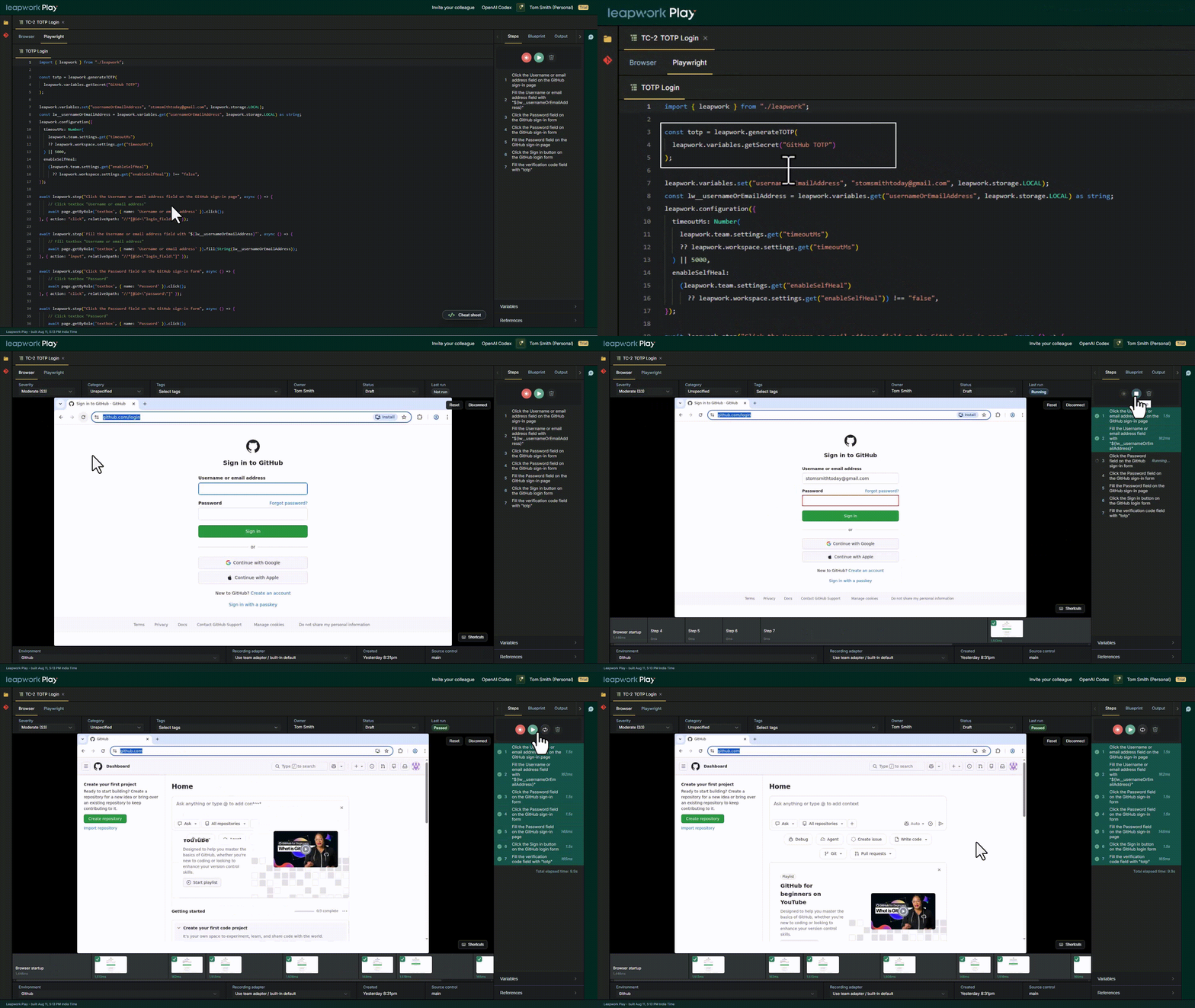
How does TOTP authentication work?
TOTP stands for time-based one-time password. It is commonly used as a second authentication factor after a user enters a username and password.
When TOTP-based MFA is configured, the account and authenticator share a secret. An authenticator app uses that secret together with the current time to generate a temporary verification code.
This is the same type of code you might normally retrieve from an authenticator app and enter into a verification field during login.
For test automation, the important part is that the verification code cannot simply be recorded and reused. The test needs access to the shared secret so that it can generate a valid TOTP when the MFA step is reached.
How do you get the TOTP secret?
When TOTP-based MFA is initially configured, the application commonly displays a QR code that can be scanned with an authenticator app. Applications may also provide a manual setup key.
That setup key represents the shared secret used to generate future TOTP codes.
For automation, store this secret securely rather than hardcoding it in the test source.
Important: Treat the TOTP shared secret like a password. Anyone with access to the secret may be able to generate valid verification codes for the account.
How do you automate TOTP with Playwright?
Playwright handles the browser interaction with the login page, but generating the TOTP itself requires additional logic.
One approach is to use a TOTP library such as otpauth. The library generates a current verification code from the shared secret, after which Playwright fills the generated value into the application's verification field.
For example:
import * as OTPAuth from "otpauth";
const totp = new OTPAuth.TOTP({
  issuer: "Example",
  label: "test-user",
  algorithm: "SHA1",
  digits: 6,
  period: 30,
  secret: process.env.MFA_SECRET,
});
const otp = totp.generate();
await page
  .getByLabel("Verification code")
  .fill(otp);
await page
  .getByRole("button", { name: "Verify code" })
  .click();
In this example, the TOTP secret is supplied through an environment variable rather than being written directly into the test.
The exact TOTP configuration depends on the application being automated. The important pattern is:
-
Store the shared secret securely.
-
Retrieve it when the test runs.
-
Generate the current TOTP.
-
Fill the generated code using Playwright.
-
Submit the MFA challenge.
How do you generate a TOTP with Leapwork Play?
Leapwork Play provides leapwork.generateTOTP() for generating the verification code at runtime.
Store the shared MFA secret as a Team Secret and retrieve it when the test executes:
const otp = leapwork.generateTOTP(
  leapwork.variables.getSecret("mfa-secret")
);
await page
  .getByLabel("Verification code", { exact: true })
  .fill(otp);
await page
  .getByRole("button", {
    name: "Verify code",
    exact: true
  })
  .click();
Here:
-
leapwork.variables.getSecret("mfa-secret")retrieves the stored Team Secret. -
leapwork.generateTOTP()generates the verification code at runtime. -
Playwright's
fill()enters the generated code into the MFA verification field.
This keeps the TOTP generation inside the test flow without placing the shared secret directly in the test source.
Playwright with a TOTP library vs. Leapwork Play
Both approaches generate the TOTP at runtime. The difference is how the generation and secret retrieval are handled.
|
Task |
Playwright with a TOTP library |
Leapwork Play |
|---|---|---|
|
Generate the TOTP |
Add and configure a TOTP library |
Use |
|
Store the secret |
Provide the secret securely to the test, for example through an environment variable |
Store the shared secret as a Team Secret |
|
Retrieve the secret |
Read it using the secret-management approach used by the test environment |
Use |
|
Enter the code |
Use a Playwright locator and |
Use a Playwright locator and |
|
Submit MFA |
Use the normal Playwright interaction |
Use the normal Playwright interaction |
The browser interaction remains Playwright code in both cases. Play changes how the TOTP can be generated and how the Team Secret can be retrieved for the test.
Why should the TOTP be generated at runtime?
A TOTP is temporary. Recording a login flow may capture the verification code that happened to be valid at recording time, but that value cannot be expected to work in a later test run.
For example, this is not a reliable automated test:
await page
  .getByLabel("Verification code")
  .fill("123456");
Instead, generate the code when the test reaches the MFA step:
const otp = leapwork.generateTOTP(
  leapwork.variables.getSecret("mfa-secret")
);
await page
  .getByLabel("Verification code")
  .fill(otp);
The generated value corresponds to the current TOTP rather than a value captured during an earlier login.
What are the best practices for automating TOTP?
-
Keep the shared secret out of the test source. Store it using an appropriate secret-management mechanism.
-
Generate the TOTP at runtime. Do not record or hardcode a verification code.
-
Generate the code close to the MFA step. TOTP codes are time-based, so avoid generating one significantly earlier in the login flow.
-
Use resilient Playwright locators. Prefer the visible label or accessible name of the verification field and submit button.
-
Protect the shared secret. Treat the TOTP secret as sensitive authentication material.
-
Use a dedicated test account where appropriate. Avoid unnecessarily exposing authentication credentials belonging to real users.
What if the application uses a different type of MFA?
The generateTOTP() applies to TOTP-based authentication. Not every MFA flow uses TOTP. An application might instead require an email verification code, SMS code, push approval, security key, or another authentication mechanism.
In those cases, automate the authentication mechanism used by the application rather than trying to generate a TOTP.
Need to store the TOTP secret securely?
Store the shared MFA secret as a Team Secret and retrieve it at runtime with leapwork.variables.getSecret().
Frequently asked questions
Can Playwright automate TOTP authentication?
Yes. Playwright can interact with the MFA verification page, while a TOTP library can generate the current code from the shared secret. The generated value can then be entered using a normal Playwright locator.
Why can't I record the MFA verification code?
Because a TOTP is time-based. A code captured while recording the login will expire and cannot be reliably reused when the test runs later.
Does Playwright generate TOTP codes itself?
The Playwright browser automation APIs handle the interaction with the authentication page. A standard Playwright implementation can use a TOTP library to generate the verification code.
How does Leapwork Play generate a TOTP?
Use leapwork.generateTOTP() with the shared secret:
const otp = leapwork.generateTOTP(
  leapwork.variables.getSecret("mfa-secret")
);
The generated value can then be passed to Playwright's fill() method.
Where should I store the TOTP secret in Play?
Store the shared secret as a Team Secret and retrieve it during test execution using leapwork.variables.getSecret().
Should I hardcode the TOTP secret in my Playwright test?
No. The shared secret should be treated as sensitive authentication material and kept out of the test source.
Can I use this approach for email or SMS verification codes?
No. generateTOTP() is for TOTP-based authentication. Email, SMS, push approval, and other MFA mechanisms require their corresponding authentication flows.