
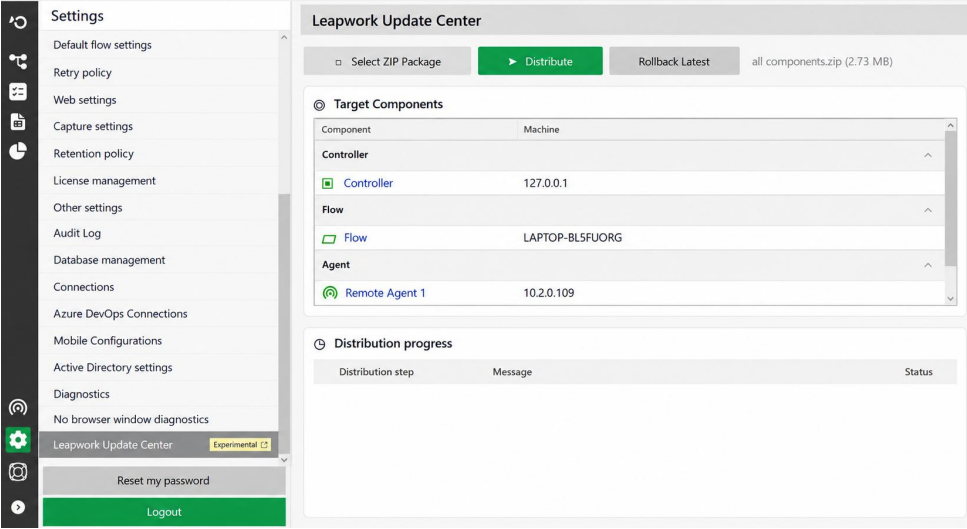
The Leapwork Update Center lets Install Administrators distribute an update package to connected Controller, Flow, and Agent machines from one place. You can review target status, monitor distribution progress, and roll back the latest package when needed.
Before you begin
-
Sign in as an Install Administrator.
-
Make sure the target Controller, Flow, and Agent machines are connected.
-
Obtain the update ZIP package from Leapwork.
Distribute an update
-
Open the Update Center.
-
Select Select ZIP Package and choose the update package.
-
Review the listed Controller, Flow, and Agent machines and their connection or activity status.
-
Select Distribute.
-
Monitor the component statuses and distribution progress.
-
Confirm that the distribution has completed for the applicable components.
The Update Center restarts required Leapwork services as part of the update process when needed.
Roll back the latest update
Use Rollback Latest to revert the most recently distributed package.
-
Open the Update Center.
-
Select Rollback Latest.
-
Monitor the component statuses and progress.
-
Confirm that the rollback has completed for the applicable components.
Rollback Latest provides a centralized way to revert the latest package without manually restoring it on each applicable machine.
Update Center status and controls
|
Control or area |
Description |
|---|---|
|
Select ZIP Package |
Selects the update package to distribute. |
|
Distribute |
Starts distributing the selected package. |
|
Rollback Latest |
Reverts the most recently distributed package. |
|
Target components |
Lists Controller, Flow, and Agent machines and their status. |
|
Distribution progress |
Shows update activity, messages, status, and progress. |