
Overview
Leapwork GO supports the Server-Sent Events (SSE) protocol during recording and execution (preview run and timeline run). SSE allows you to capture, display, and execute real-time events sent by backend services, ensuring accurate performance evaluation of real-time communication.
The SSE protocol works as follows:
-
The client establishes an HTTP connection to the backend.
-
The backend responds with headers and keeps the connection open.
-
The backend re-uses the connection to send messages back to the client at any time while the connection remains open.
-
The client may terminate the connection at any time, or when navigation occurs on the browser.
Leapwork GO provides three dedicated steps for SSE:
|
Step |
Description |
|---|---|
|
SSE Open |
Opens a new SSE connection with the server |
|
SSE Receive |
Client expects to receive a message from the server |
|
SSE Close |
Client closes the connection with the server |
SSE Steps
SSE Open
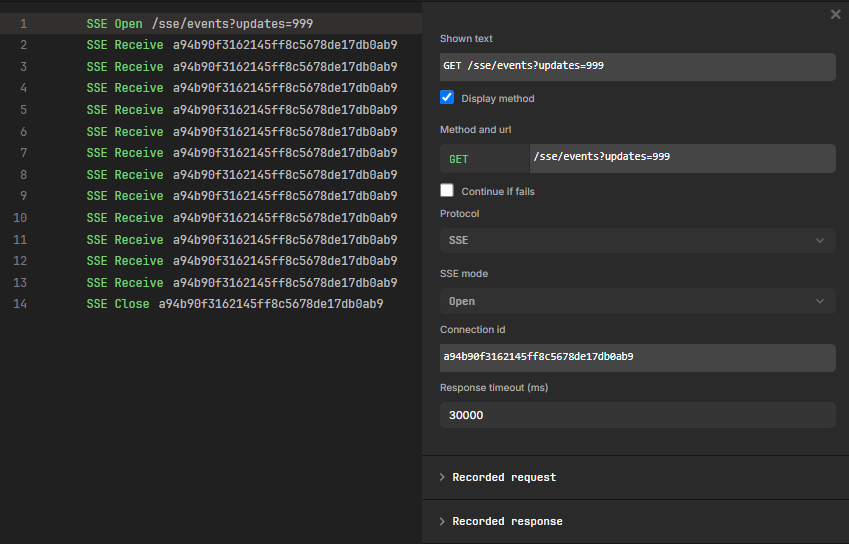
The SSE Open step establishes a new SSE connection with the server.
Inspector panel properties:
|
Property |
Description |
|---|---|
|
Shown text |
Display label for the step in the sequence |
|
Display method |
Checkbox to show or hide the method prefix in the step label |
|
Method and url |
The HTTP method (GET) and the endpoint URL for the SSE connection |
|
Continue if fails |
Checkbox to allow the sequence to continue if this step fails |
|
Protocol |
Set to SSE |
|
SSE mode |
Set to Open |
|
Connection id |
Auto-generated identifier that links the Open, Receive, and Close steps for the same connection |
|
Response timeout (ms) |
Maximum time (in milliseconds) to wait for a response. Default: 30000 |
The SSE Open step also contains expandable Recorded request and Recorded response sections.
SSE Receive
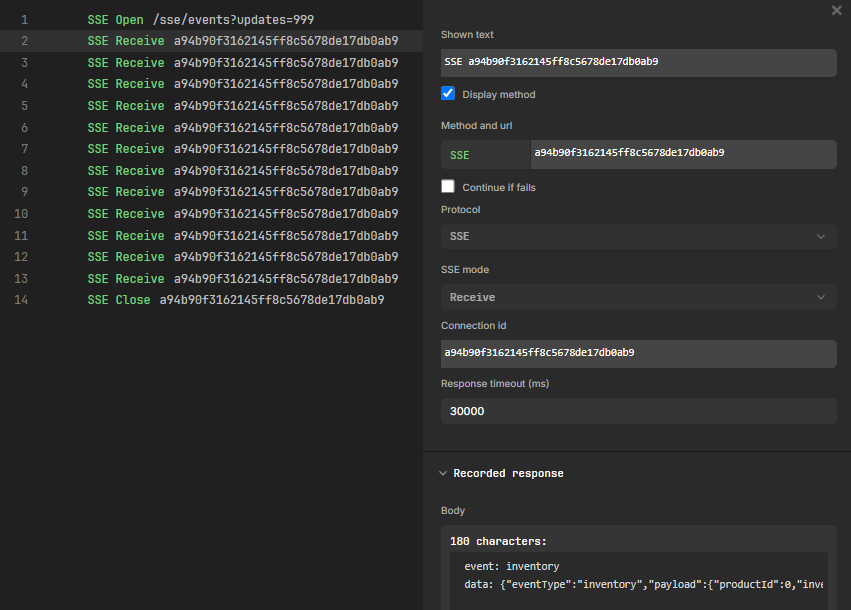
The SSE Receive step waits for the client to receive a message from the server. The step concludes when a message is received from the server, or when the timeout is reached.
-
If any message is received, the step passes.
-
If no message is received before the timeout, the step fails.
Inspector panel properties:
|
Property |
Description |
|---|---|
|
Shown text |
Display label for the step in the sequence |
|
Display method |
Checkbox to show or hide the method prefix in the step label |
|
Method and url |
Displays SSE followed by the connection identifier |
|
Continue if fails |
Checkbox to allow the sequence to continue if this step fails |
|
Protocol |
Set to SSE |
|
SSE mode |
Set to Receive |
|
Connection id |
The identifier linking this step to its corresponding SSE Open step |
|
Response timeout (ms) |
Maximum time (in milliseconds) to wait for a message. Default: 30000 |
The SSE Receive step contains a Recorded response section showing the received event body, including the event type and payload data.
SSE Close
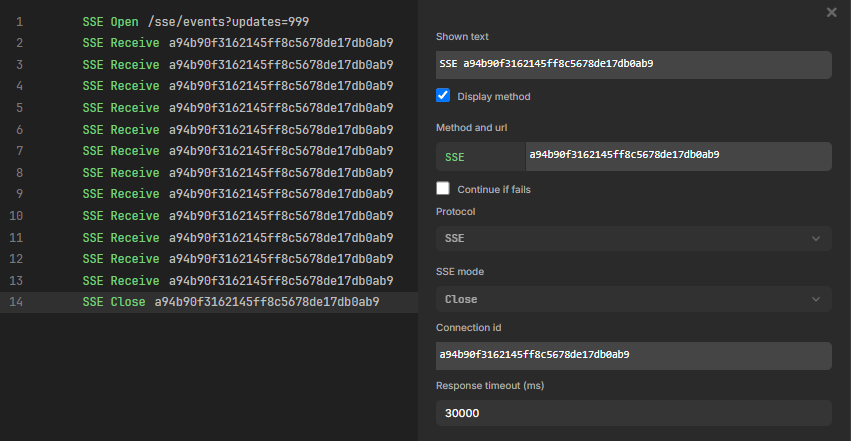
The SSE Close step closes the SSE connection with the server. The step concludes immediately after closing the connection.
Inspector panel properties:
|
Property |
Description |
|---|---|
|
Shown text |
Display label for the step in the sequence |
|
Display method |
Checkbox to show or hide the method prefix in the step label |
|
Method and url |
Displays SSE followed by the connection identifier |
|
Continue if fails |
Checkbox to allow the sequence to continue if this step fails |
|
Protocol |
Set to SSE |
|
SSE mode |
Set to Close |
|
Connection id |
The identifier linking this step to its corresponding SSE Open step |
|
Response timeout (ms) |
Maximum time (in milliseconds) to wait. Default: 30000 |
Recording SSE Traffic
SSE steps can be captured using the record functionality on a sequence. If the website being recorded uses SSE, the recorder automatically captures the SSE connection and traffic.
Record an SSE sequence
-
Open or create a sequence in Leapwork GO.
-
Click the Record button to start recording.
-
Navigate to the target website that uses SSE communication.
-
Interact with the application to trigger SSE events.
-
Stop the recording.
The recorder automatically generates the corresponding SSE Open, SSE Receive, and SSE Close steps in the sequence, with connection identifiers linking the related steps together.
Executing SSE Steps
SSE steps are supported in both preview run and timeline run execution modes.
During execution, the SSE steps replicate the exact communication sequence as it was captured or otherwise defined in the sequence, allowing you to evaluate the performance of your backend in relation to SSE events.