
Overview
Leapwork GO supports the WebSocket protocol during recording and execution (preview run and timeline run). WebSocket support enables you to capture, replay, and performance-test real-time bi-directional communication between a client and a server.
Leapwork GO provides four dedicated steps for WebSocket communication:
|
Step |
Description |
|---|---|
|
WS Open |
Opens a new WebSocket connection with the server |
|
WS Send |
Client sends a message to the server |
|
WS Receive |
Client expects to receive a message from the server |
|
WS Close |
Client closes the connection to the server |
Note: In all cases, recording and execution replay WebSocket states and messages in a strict, predictable order. If messages arrive out of order during execution, the step will fail.
WebSocket Steps
WS Open
The WS Open step establishes a new WebSocket connection with the server.
Inspector panel properties:
|
Property |
Description |
|---|---|
|
Shown text |
Display label for the step in the sequence |
|
Display method |
Checkbox to show or hide the method prefix in the step label |
|
Method and url |
The HTTP method and the endpoint URL for the WebSocket connection |
|
Continue if fails |
Checkbox to allow the sequence to continue if this step fails |
|
Protocol |
Set to WebSocket |
|
WebSocket mode |
Set to Open |
|
Application protocol |
The application-layer protocol for the connection. Options include Raw and SignalR |
|
Connection id |
Auto-generated identifier that links the Open, Send, Receive, and Close steps for the same connection |
|
Reconnect |
Checkbox to enable reconnection behavior |
|
Response timeout (ms) |
Maximum time (in milliseconds) to wait for a response. Default: 30000 |
|
Message type |
The message format. Default: Text |
The WS Open step also contains expandable Recorded request and Recorded response sections.
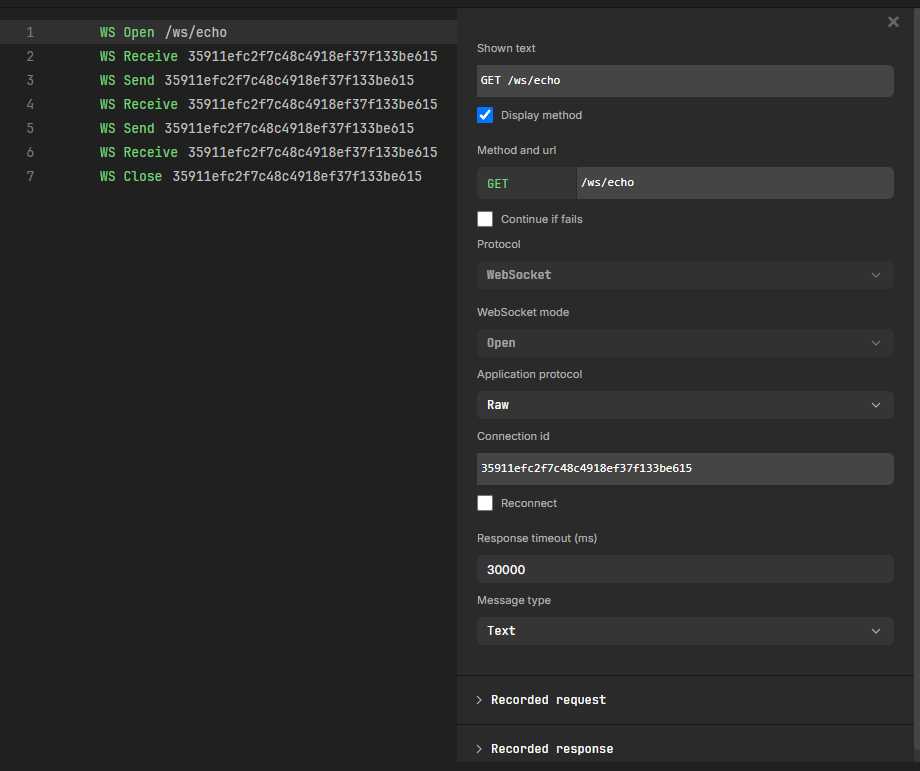
WS Send
The WS Send step sends a message from the client to the server. The step concludes immediately after the message has been sent to the network.
-
If the connection is not active, the step will fail.
Note: WS Send steps will always appear very fast in timeline run results. This is because the send is finalized once the message has gone to the network, not when it has been received by the server.
Inspector panel properties:
|
Property |
Description |
|---|---|
|
Shown text |
Display label for the step in the sequence |
|
Display method |
Checkbox to show or hide the method prefix in the step label |
|
Method and url |
Displays WEBSOCKET followed by the connection identifier |
|
Continue if fails |
Checkbox to allow the sequence to continue if this step fails |
|
Protocol |
Set to WebSocket |
|
WebSocket mode |
Set to Send |
|
Connection id |
The identifier linking this step to its corresponding WS Open step |
|
Reconnect |
Checkbox to enable reconnection behavior |
|
Response timeout (ms) |
Maximum time (in milliseconds) to wait. Default: 30000 |
|
Message type |
The message format. Default: Text |
The WS Send step contains a Recorded request section showing the message body sent to the server.
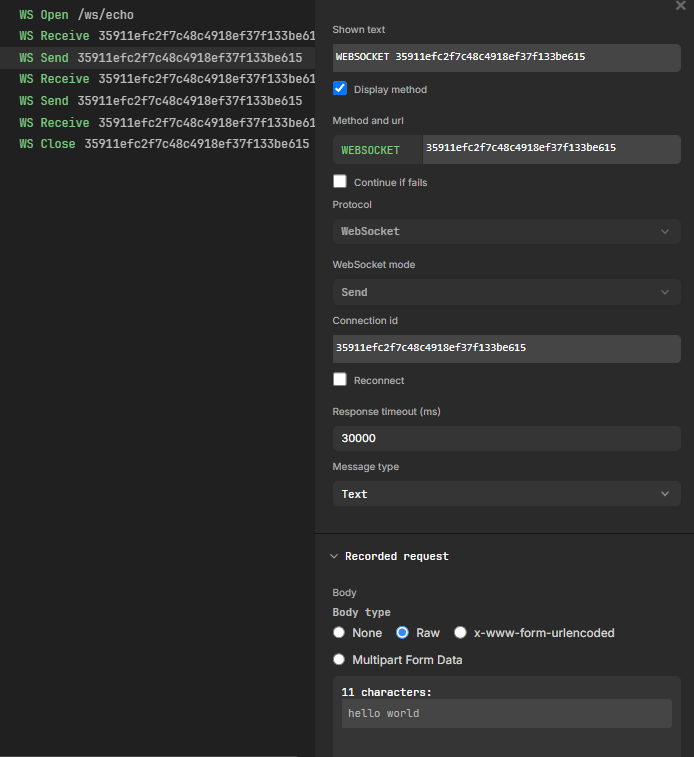
WS Receive
The WS Receive step waits for the client to receive a message from the server. The step concludes when a message is received from the server, or when the timeout is reached.
-
If any message is received, the step passes.
-
If no message is received before the timeout, the step fails.
-
If the connection is not active, the step will fail.
Note: WS Receive steps measure time from the moment the step starts to the moment the message arrives. Response time can vary depending on server behavior.
Inspector panel properties:
|
Property |
Description |
|---|---|
|
Shown text |
Display label for the step in the sequence |
|
Display method |
Checkbox to show or hide the method prefix in the step label |
|
Method and url |
Displays WEBSOCKET followed by the connection identifier |
|
Continue if fails |
Checkbox to allow the sequence to continue if this step fails |
|
Protocol |
Set to WebSocket |
|
WebSocket mode |
Set to Receive |
|
Connection id |
The identifier linking this step to its corresponding WS Open step |
|
Reconnect |
Checkbox to enable reconnection behavior |
|
Response timeout (ms) |
Maximum time (in milliseconds) to wait for a message. Default: 30000 |
|
Message type |
The message format. Default: Text |
The WS Receive step contains a Recorded response section showing the received message body.
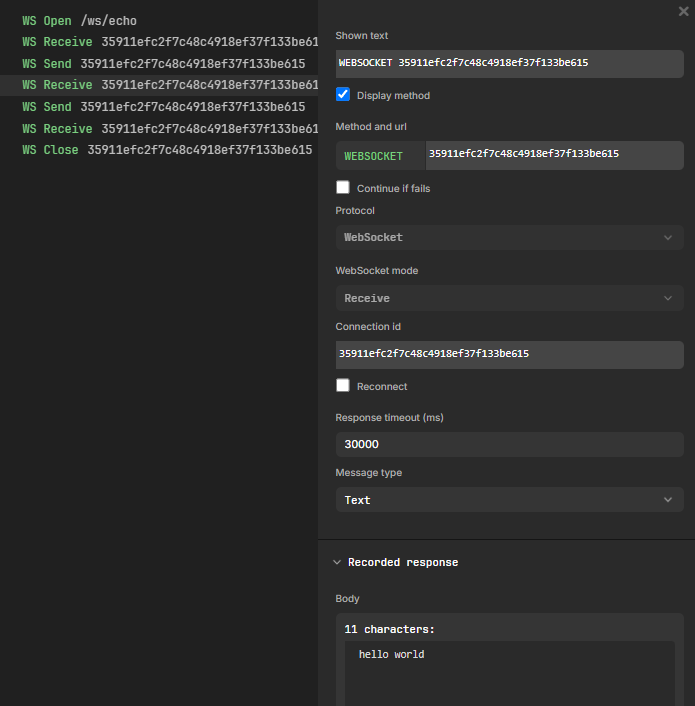
WS Close
The WS Close step closes the WebSocket connection to the server. The step concludes immediately after closing the connection.
Inspector panel properties:
|
Property |
Description |
|---|---|
|
Shown text |
Display label for the step in the sequence |
|
Display method |
Checkbox to show or hide the method prefix in the step label |
|
Method and url |
Displays WEBSOCKET followed by the connection identifier |
|
Continue if fails |
Checkbox to allow the sequence to continue if this step fails |
|
Protocol |
Set to WebSocket |
|
WebSocket mode |
Set to Close |
|
Connection id |
The identifier linking this step to its corresponding WS Open step |
|
Reconnect |
Checkbox to enable reconnection behavior |
|
Response timeout (ms) |
Maximum time (in milliseconds) to wait. Default: 30000 |
|
Message type |
Set to Close |
|
Close status |
The WebSocket close status code. Default: 1000 |
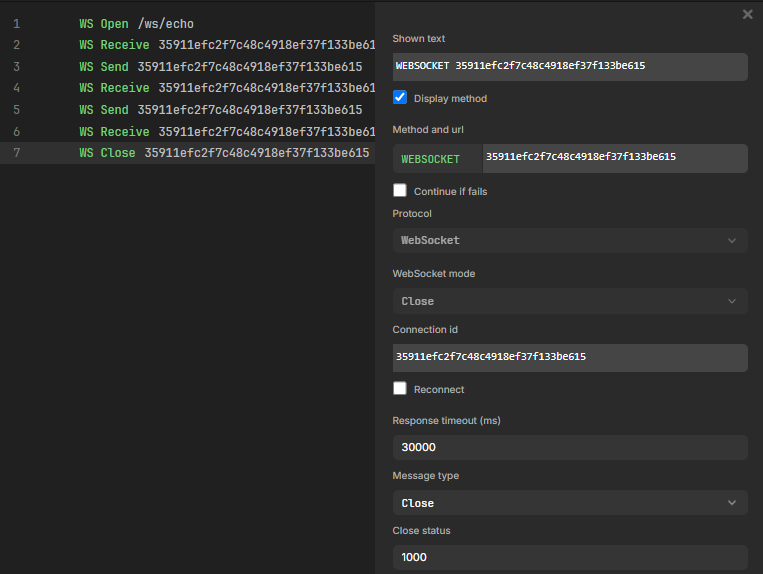
Recording WebSocket Traffic
WebSocket steps can be captured using the record functionality on a sequence. If the website being recorded uses WebSockets, the recorder automatically captures the WebSocket traffic.
Record a WebSocket sequence
-
Open or create a sequence in Leapwork GO.
-
Click the Record button to start recording.
-
Navigate to the target website that uses WebSocket communication.
-
Interact with the application to trigger WebSocket events.
-
Stop the recording.
The recorder automatically generates the corresponding WS Open, WS Send, WS Receive, and WS Close steps in the sequence, with connection identifiers linking the related steps together.
SignalR Compatibility Mode
WebSocket support includes a compatibility mode for SignalR. During recording of SignalR communication, the recorder can detect that the connection is SignalR and set up the handshake automatically.
When in SignalR mode, a single WebSocket message may contain many SignalR messages in a non-deterministic way. In SignalR mode, a single WebSocket message can contain one or more SignalR messages. The grouping is non-deterministic, meaning the number of SignalR messages contained within each WebSocket message cannot be predicted.
During execution, the WS Receive step completes only after the expected number of SignalR messages has been received, regardless of how they are grouped into WebSocket messages.
This differs from Raw mode, where the WS Receive step completes as soon as a single WebSocket message is received.
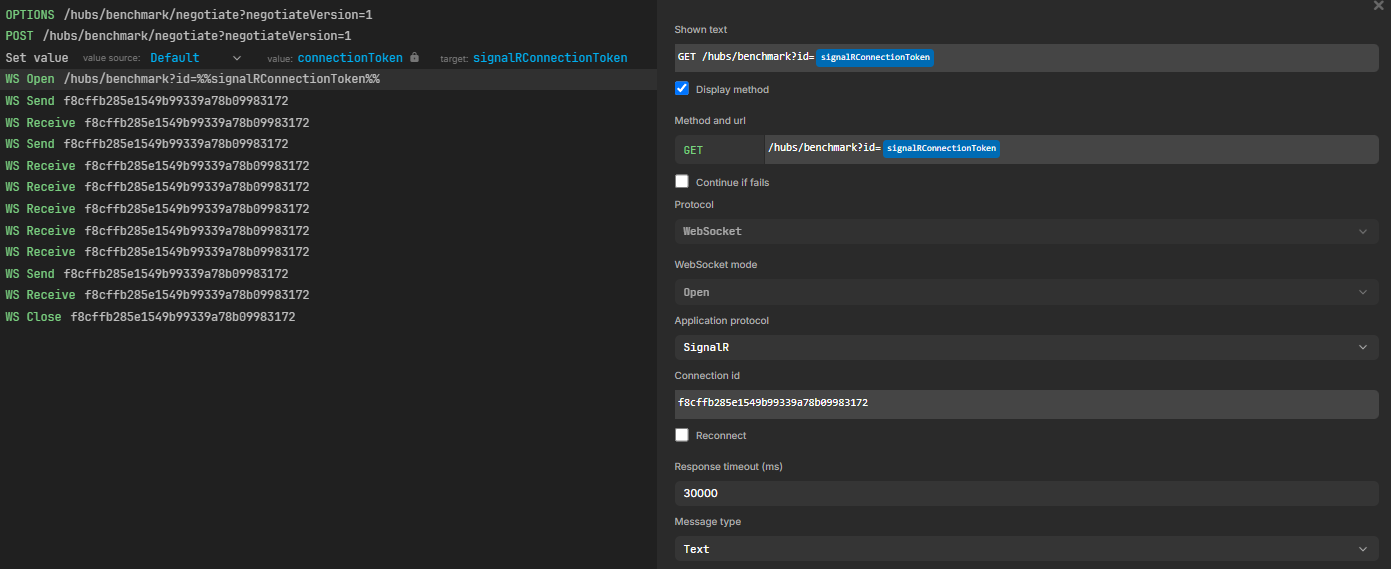
Configure a sequence for SignalR manually
If the SignalR connection is not auto-detected during recording, configure the sequence manually as follows:
-
In the negotiate endpoint step, use Set value to capture the
connectionTokenfrom the JSON response and assign it to a variable (for example,signalRConnectionToken). -
Open the WS Open step for the SignalR connection.
-
In the Method and url field, assign the variable to the
idparameter of the WebSocket URL. -
In the Application protocol field, change the value from Raw to SignalR.
GraphQL with WebSockets
GraphQL using WebSockets as the transport protocol is also supported. The recorder captures GraphQL-over-WebSocket traffic in the same way as any other WebSocket connection. Both preview run and timeline run can execute GraphQL-over-WebSocket sequences.