
Overview
Release 2026.7 introduces timeline scheduling, HTTP traffic capture, secure variables, and network emulation, four major capabilities that bring Leapwork Go closer to a complete, production‑grade performance testing platform. Alongside these, this release includes child‑sequence observability improvements, JSON variable handling, and a large number of stability and usability fixes across the client, server, and Admin Portal.
What's New
Timeline Scheduling
Leapwork Go now supports scheduling timeline runs directly from the User Interface. A new Schedule page is available under each project, where you can create, edit, and manage schedules without leaving the product.
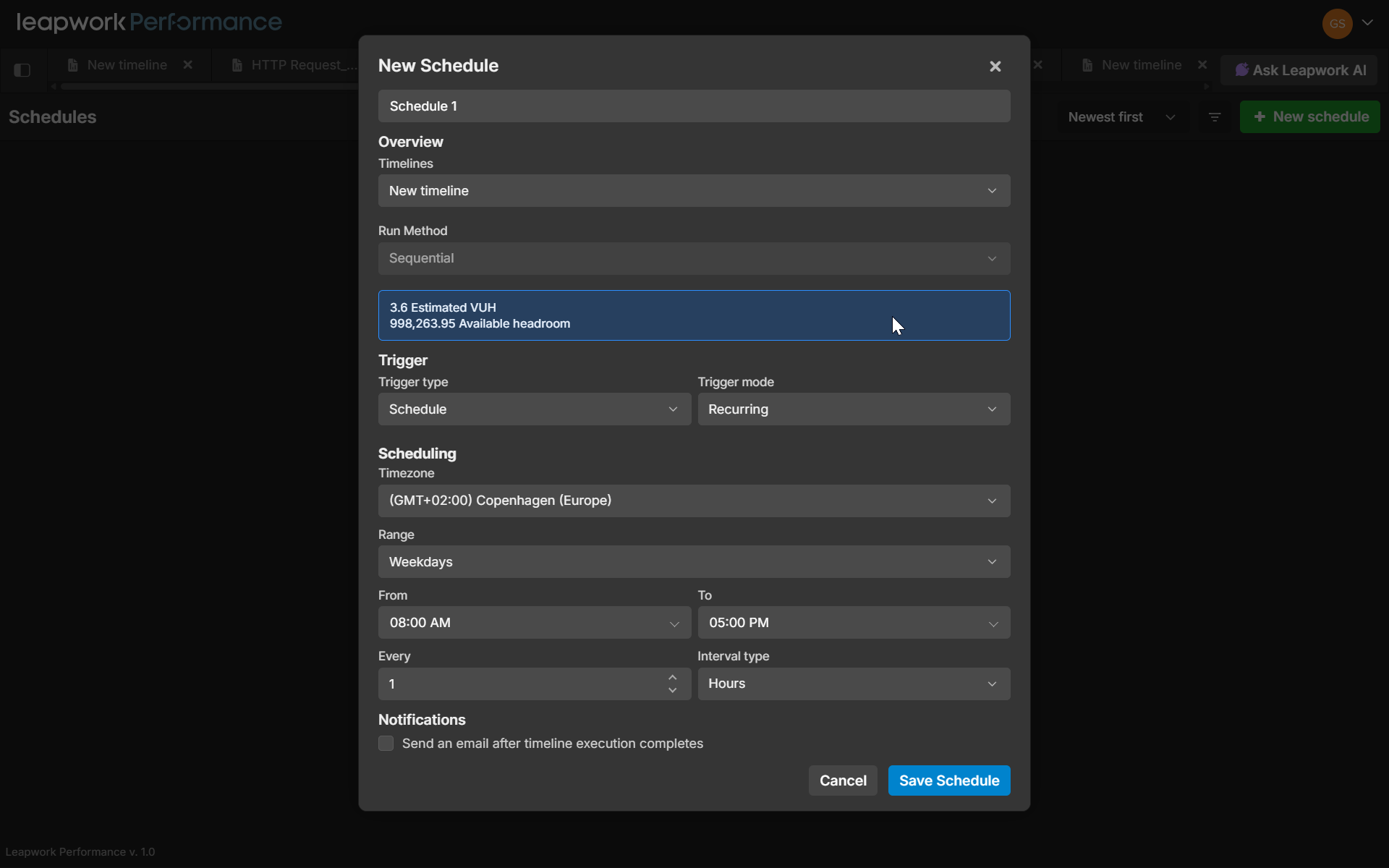
Schedules support two trigger modes: On Demand (manual) and Schedule (automatic). Automatic schedules can be configured as One-time or Recurring, with full timezone support, day‑scope selection (every day, weekdays, or custom), and interval‑based recurrence. You can select one or more timelines per schedule and choose whether they run sequentially or in parallel.
HTTP Traffic Capture
You can now capture HTTP traffic during timeline runs to inspect request and response samples after a run completes, without storing all traffic.
Capture is controlled per timeline with three modes: Off (default), Focused, and Error Only. In Focused mode, Leapwork Go failures are captured by default, repeated identical failures are limited, and the first 3 occurrences of successful samples are retained for relevant request patterns. In Error Only mode, only error samples are captured. Captured data is available in a new Captures tab in run results, where you can view summary metrics. Response bodies that exceed the size limit are clearly marked as Truncated. Captures can be exported as JSON.
Secure Set Value Variables
Set Value steps now support secure variables for protecting sensitive values like tokens, passwords, API keys, and secrets. You can mark any Set Value step as secure once saved, the original value is masked in the UI and stored encrypted in the database.
During execution, the real value is used in HTTP steps, but it is never shown in logs in plain text. When a sequence containing secure variables is exported, the secure values are exported as masked and must be re‑entered on import. If an imported sequence contains secure variables, Leapwork Go informs the user that secure values are empty and need to be entered.
Network Emulation Controls
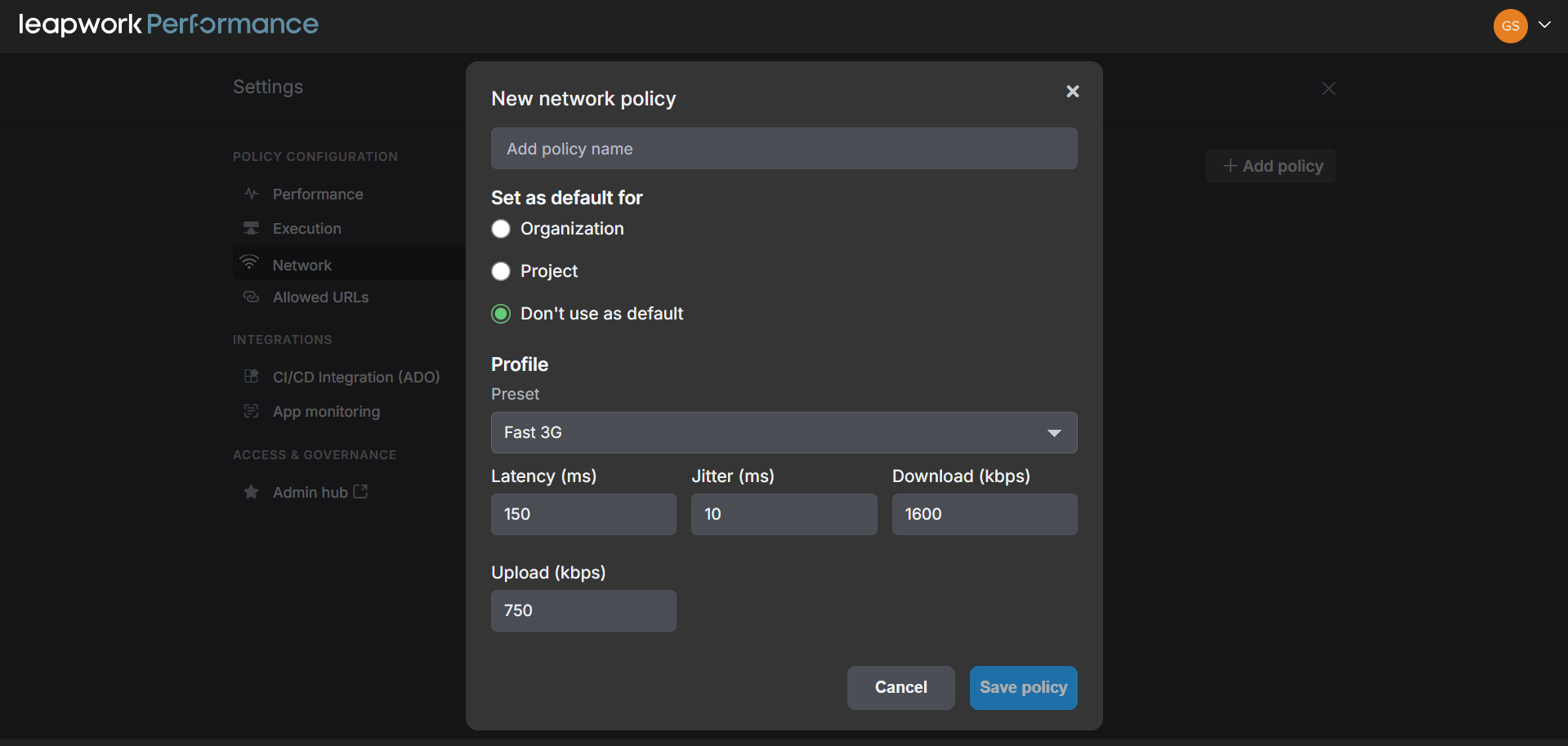
Leapwork Go now supports network emulation policies that let you simulate slower network conditions during timeline runs. You can create, edit, and delete network policies in Settings > Network, with controls for latency, jitter, download bandwidth, and upload bandwidth. Policies can be set as an organization default or project default, and assigned to individual timeline tracks as Automatic default, Disabled, or a specific manual policy. For non‑custom presets, predefined values are used and inputs are read‑only. For Custom presets, you can enter values within allowed limits
What's Updated
Unquoted Variable Support in JSON Request Bodies
Variables can now be used without quotes in JSON request bodies. When a variable like %%userId%% is used unquoted, the system resolves its runtime value and infers the correct JSON type numbers, booleans, and null are sent as proper JSON types instead of strings. Quoted variables continue to work as before, always sending the resolved value as a string.
Child Sequence Stats in Run Results
The Overall Snapshot Metrics section in Run Results now displays child and sub‑sequence names correctly, with expandable grouped rows. You can switch between a Groups view (showing child‑sequence headings with collapsible steps) and a Steps view (flat list without grouping). A new scope filter lets you choose between All Steps and HTTP Groups for more targeted analysis.
Enhanced Inspector Panel for Child Sequences
When a sequence contains child sequences with HTTP steps, you can now click those child HTTP steps and inspect their recorded request and response details in the inspector panel, just like top‑level HTTP steps. Editing still happens in the child sequence itself.
JMX Import AuthManager Support
JMX imports now parse and import the AuthManager element, preserving authentication configurations so they are applied during test execution without manual rework.
Run Results Go Optimization
Loading run results data has been significantly optimized. Investigation identified and resolved performance bottlenecks that caused slow data loading, resulting in faster and more responsive run result views.
Bug Fixes
-
Fixed a critical issue where creating Data Items (Table, AD User, Auth Script, Script) could cause the page to become blank and require browser history deletion to recover.
-
Fixed critical issues affecting timeline execution, including runs not starting when Capture Mode was set to Off, incorrect run status updates, and timeline closing behavior.
-
Fixed a critical issue where D365 flows failed to authenticate with AD User credentials during scheduled runs.
-
Fixed multiple scheduling and recurring run issues, including duplicate run triggers, incorrect status synchronization, and problems with the Stop All action.
-
Fixed an issue where sequences could stop unexpectedly during execution despite successful API responses.
-
Improved security by preventing Grafana and Datadog API key details from being exposed in browser network requests.
-
Fixed data integrity issues, including duplicate column names in Table Data Items, duplicate sequence names after restore operations, and incorrect handling of double quotes in Dictionary values.
-
Fixed reporting and analytics issues, including inconsistent error rate calculations, incorrect Trend Analysis metrics, and date formatting problems in exported reports.
-
Fixed multiple Capture and Timeline UI issues, including missing or incorrect data, graph rendering problems, tooltip behavior, search functionality, and display issues caused by long names.
-
Fixed several Preview Run and sequence management issues, including missing authentication details, duplicate API calls when switching sequences, incorrect step alignment, and inconsistencies between Capture Details and Preview Run data.