
Set Clipboard

The Set Clipboard block sets the machine clipboard to a specific value during execution. This is similar to copying content (for example via a context menu or a keyboard shortcut) so it can be reused later in the flow, such as when pasting into an input field.

See the Using the clipboard to insert text lesson for an example of how to use the Set clipboard block.

Fully expanded, the Set Clipboard block shows the following properties:
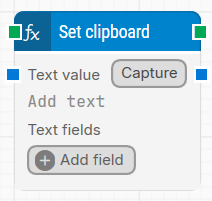
image-20260127-143145.png

Note: The screenshot on this page uses the Elegance Design, introduced in 2025.3. If you are using an earlier version, your layout may look different.

Quick-start

  1. Drag Set Clipboard onto the canvas.

  2. Connect the block in the flow and, if needed, specify basic parameters such as Text value and Text fields.

  3. Run the flow when it’s ready.

Building block parameters

Parameters
  • Block header: Shows the current title of the Set Clipboard block. You can rename it by double-clicking the header and typing a new title. The green input connector triggers the block when the flow reaches it, and the green output connector triggers when the clipboard has been set to the specified value.

  • Text value: Defines the text that will be placed on the clipboard. This field can include dynamic values by inserting tokens from Text fields (right-click in Text value and select Insert token).

  • Capture: Captures keystrokes into Text value, which is useful for adding special keys and key combinations (for example, CTRL+C or ENTER). Special keys and key combinations can also be entered manually by wrapping them in double percentage signs, such as %%CTRL+P%% or %%ENTER%%.

  • Text fields: Stores custom fields whose values can be inserted as dynamic tokens into Text value using Insert token. This is useful when the clipboard value must be built from values created earlier in the flow.

Resources

Topic

Description

Flows FAQ

Common questions about creating, running, and managing flows in Leapwork.

Flows Troubleshooting

Guidelines and solutions for identifying and fixing issues that occur when building or running flows in Leapwork.