
The Leapwork Automation Platform is licensed on an annual subscription basis. The subscription covers the platform and its features.
Platform components
The platform includes these components:
-
Controller: The server that stores automation assets and orchestrates execution and results collection.
-
Agent: The runtime component that executes automation cases on a machine (virtual, physical, or cloud-hosted).
-
Flow: The visual designer used to build and maintain automation cases and review results.
You can start using Flow after you install a Controller and at least one Agent in your infrastructure or in the cloud.
For an overview of the components, supported environments, and how the components interact, see Architecture overview and the Learning Center.
Example: baseline deployment
A typical starting configuration uses:
-
One virtual machine for the Controller
-
Two virtual machines for Agents
-
Flow installed on laptops or workstations (PCs) based on your agreed requirements
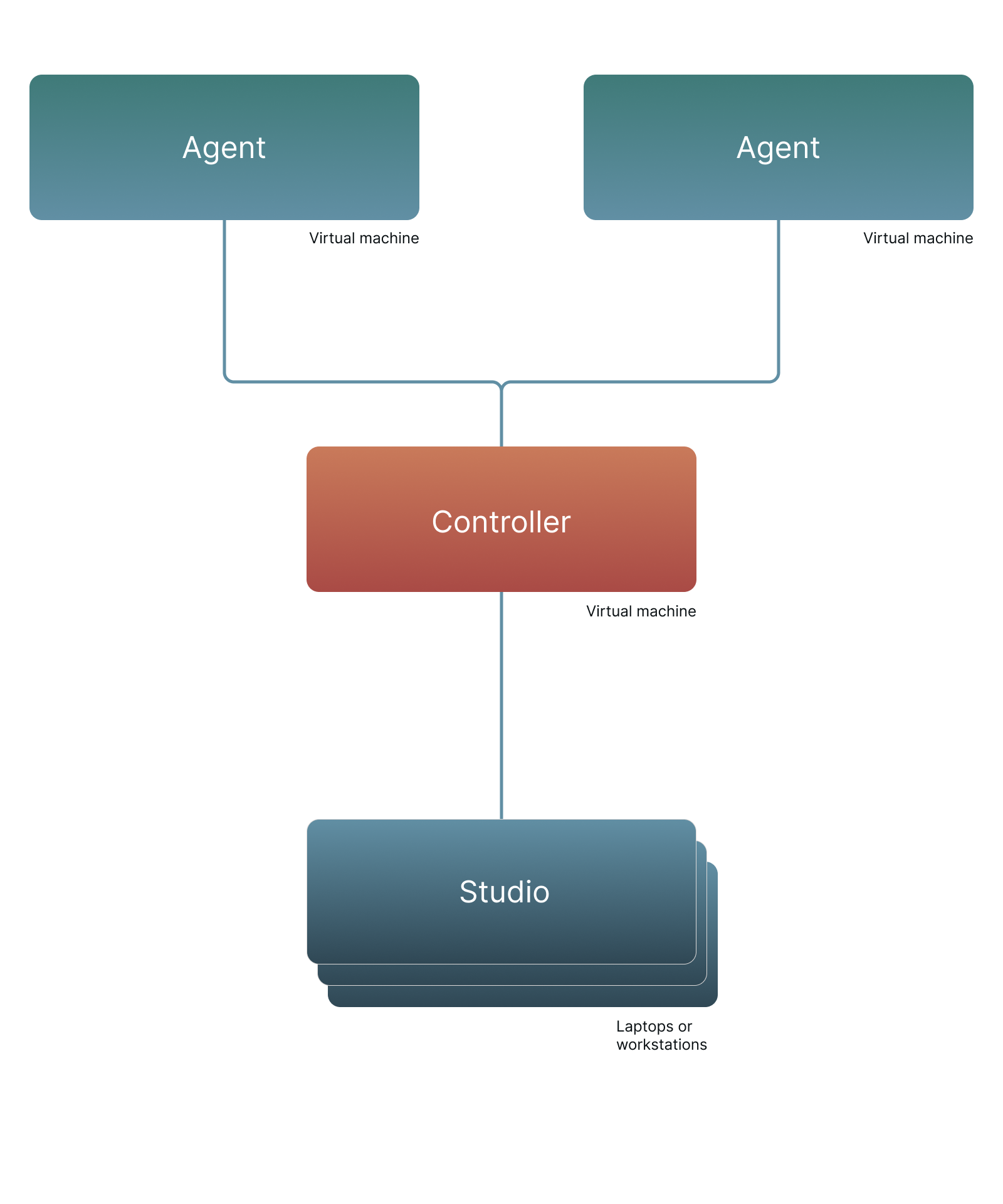
This setup lets multiple team members design and preview-run automation cases in Flow while sharing Agents for scheduled execution, such as running cases in separate test and pre-production environments.
Add extra Agents as usage grows
Only one automation case can run at a time on an Agent. If you need more parallel execution, add more machines and install an Agent on each one.
Agents take control of the machine where they run. They can move and click the mouse and type on the keyboard to interact with applications like a user. This type of execution does not support parallelism on a single machine.
When extra Agents help
Adding Agents can be especially useful in these scenarios:
-
You need more parallel runs. Each additional Agent increases the number of cases you can execute at the same time.
-
You use image and text recognition building blocks. Image recognition works best when Flow and the Agent use the same screen resolution and Windows setup (for example background color and font sizes). In these cases, use Flow’s built-in ability to work directly on the Agent.
-
You automate across large networks. You can deploy Agents closer to the systems you automate to reduce latency. For example, a US-based organization might run Flow and the Controller in the US while deploying additional Agents in a South-East Asia data center.
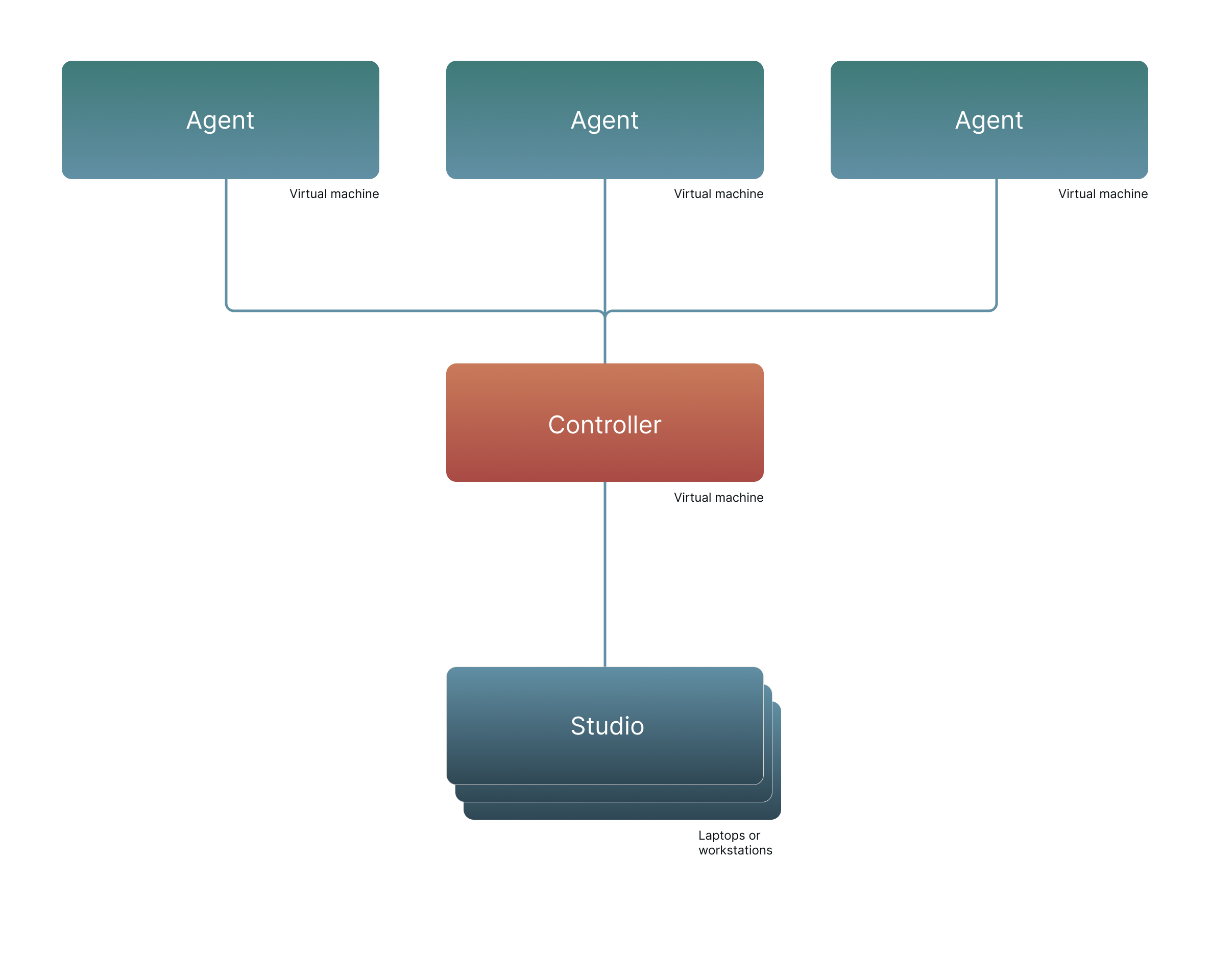
This configuration consists of one Leapwork Automation Platform and one additional Agent.
Parallelize web automation
Agents can run automation cases that use web, desktop, and image and text recognition building blocks.
If web automation (including mobile web apps) is a major use case, you can also parallelize web automation execution using:
-
Selenium Grid in your own network infrastructure
-
Cloud browser providers such as Sauce Labs or BrowserStack
-
Leapwork Cloud agents hosted by Leapwork
Selenium Grid
Selenium Grid is open-source software for running many web automation cases in parallel. Leapwork integrates with Selenium Grid for executing web automation cases efficiently across different environments, as described in the Learning Center.
Use Selenium Grid when:
-
You need to run many web automation cases in parallel in your own network.
-
You want to manage the execution infrastructure internally.
Use cloud browser providers
Cloud browser providers let you run web automation cases on remote browser and device configurations without hosting the execution environments yourself. You build the automation cases in Flow and run them in the provider’s cloud across different browsers, operating systems, and devices.
Use a cloud browser provider when:
-
You need broad coverage of browser and device combinations.
-
You want to avoid maintaining the browser/device execution environments in your own infrastructure.
-
You want to scale web execution capacity without adding machines to your network.
Use Leapwork Cloud agents
Leapwork Cloud agents are Agents hosted by Leapwork. You can use them if you prefer a fully cloud-based setup or if you want to supplement your existing infrastructure with additional execution capacity.
Use Leapwork Cloud agents when:
-
You want Agents hosted and managed outside your infrastructure.
-
You need to add execution capacity without provisioning additional Windows machines.
Licensing impact for external execution options
Sauce Labs, BrowserStack, LambdaTest, and Selenium Grid are supported and must be included in the total agent count for your Leapwork license. Usage of these external services deducts from your agent pool as specified in your license agreement.
If you plan to use these services, specify the number of agents (including cloud and remote agents) when purchasing or updating your Leapwork license.
Note: Licenses for external cloud services (for example Sauce Labs, BrowserStack, and LambdaTest) are not included in your Leapwork subscription. Purchase these directly from the providers.
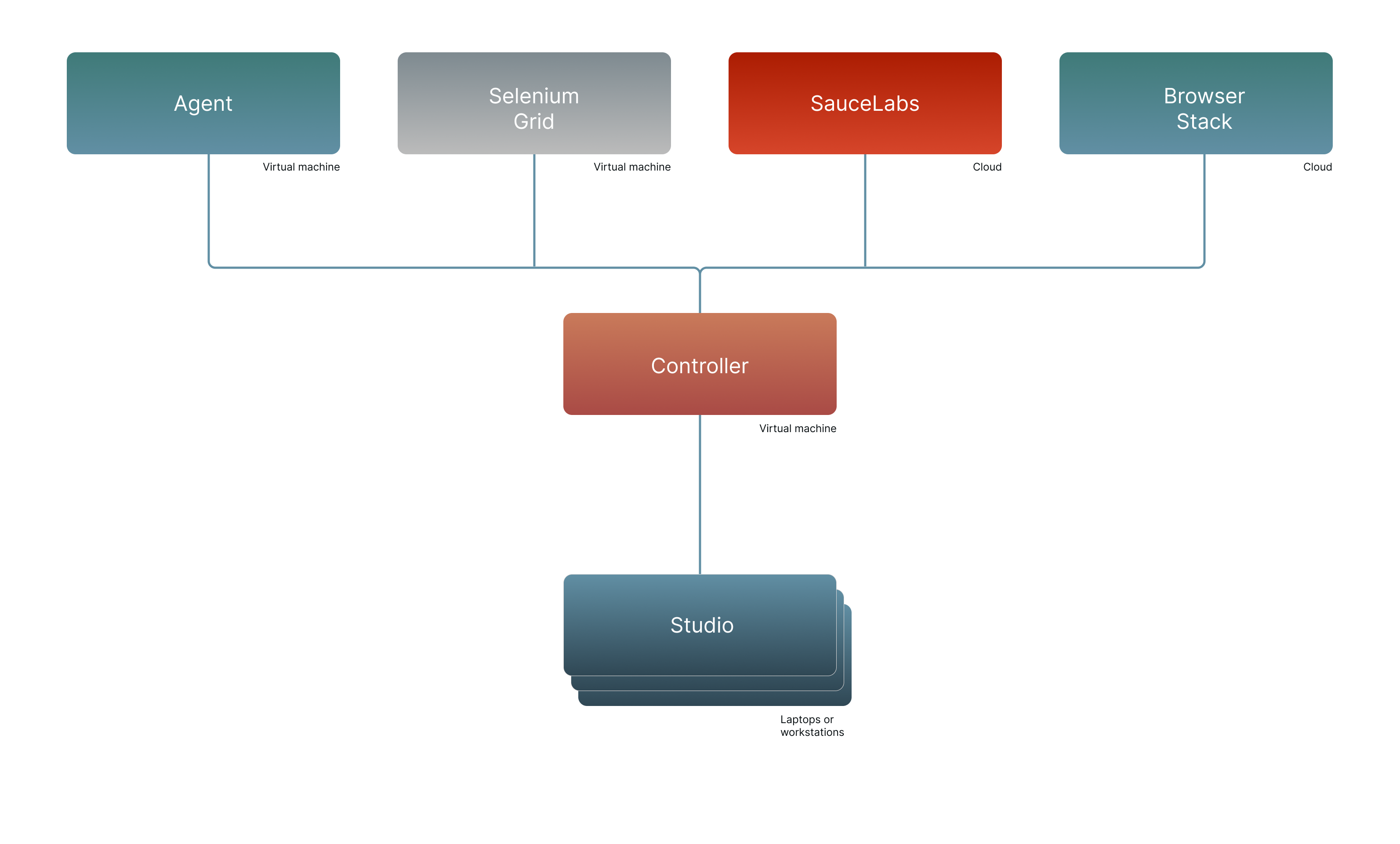
This configuration consists of one Leapwork Automation Platform (only one Agent shown) plus external cloud service licenses as needed.
Mobile application scope
When using Selenium Grid, Sauce Labs, or BrowserStack, Leapwork supports web automation cases only, not native mobile applications.
To automate native applications, install Leapwork Agents on Windows and use them to automate iOS simulators and Android emulators with image and text recognition blocks.
For details on how to use each Agent type and how to add additional Agents,
Separate work into multiple teams
All assets on a Leapwork Controller are shared across Flow users. This includes automation cases, Agent resources, results, and dashboards. This supports collaboration, but it also means everything is visible to all users connected to that Controller.
Some organizations separate automation assets into multiple Controllers, for:
-
Security or regulatory requirements that require separation between teams
-
Heavy usage scenarios
-
Network latency across large geographic distances
-
Many Agents running in parallel while streaming video to the Controller
The preferred approach is to add one or more Controllers (and Agents).
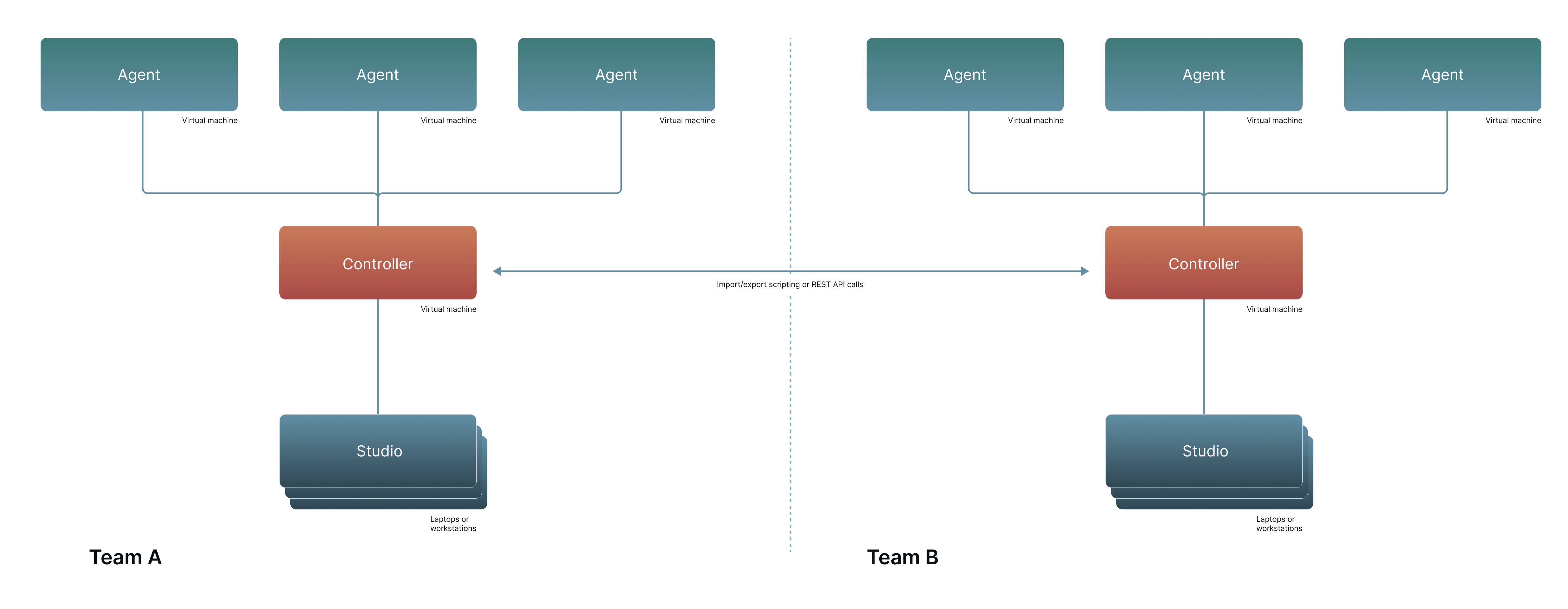
Important: Each additional Controller requires a separate license as part of your Leapwork subscription.
This configuration consists of two Leapwork Automation Platforms plus two additional Agents.
If the Controllers must share assets or trigger actions in each other, you can use scripted asset import/export and Leapwork’s open REST API.
Work with a partner over a VPN connection
When two organizations need to work together, one option is to use separate Leapwork Automation Platform installations.
If users from one organization can access the other organization’s network over a fast, high-bandwidth VPN connection, you can also use a single Leapwork Automation Platform installation.
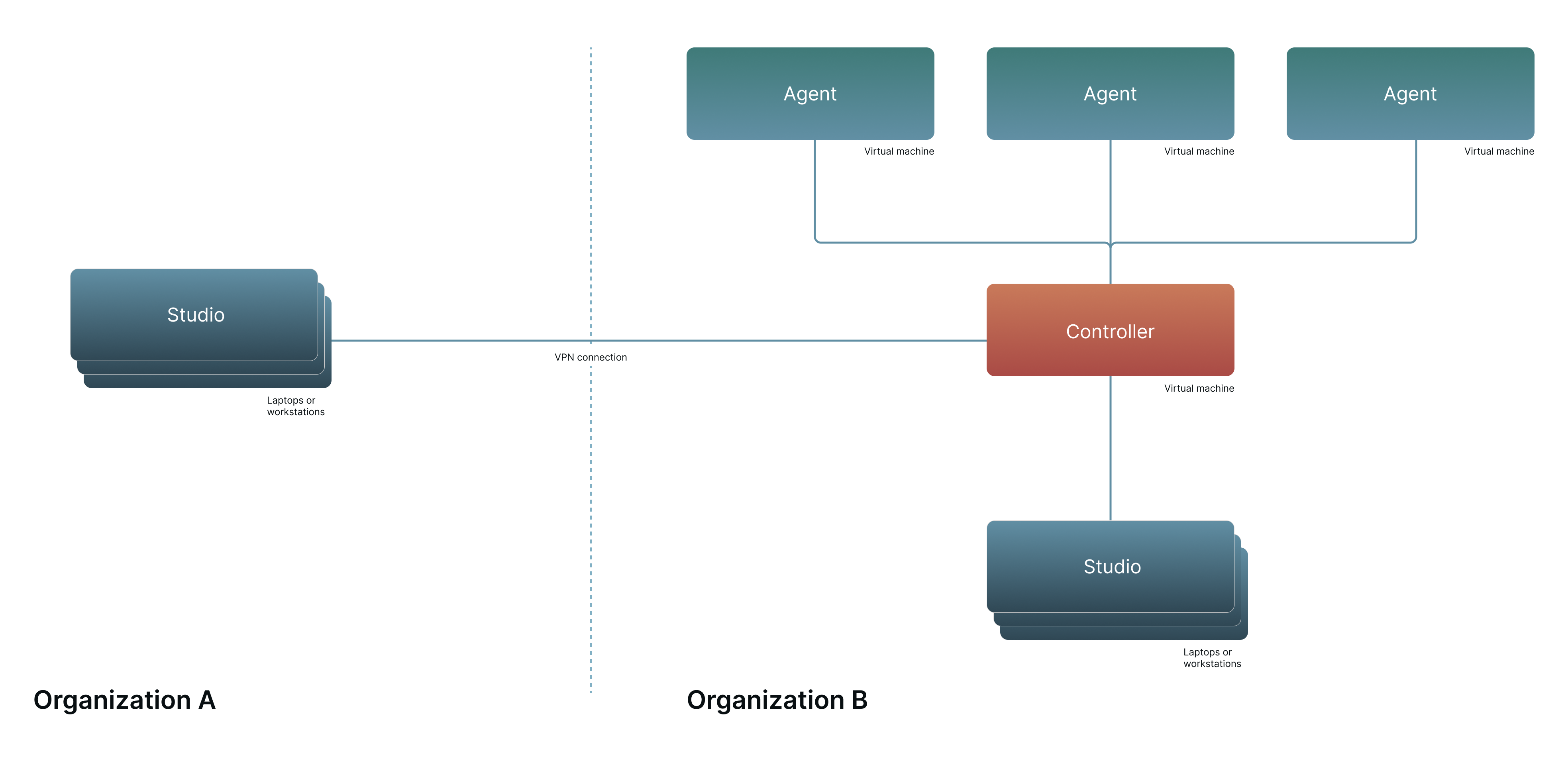
This configuration consists of one Leapwork Automation Platform and one additional Agent.
In this setup, Flow users connect to the Controller over the VPN in the same way as users inside the hosting organization.
Deploy Leapwork in the cloud
Leapwork can be deployed in the cloud in two different ways, depending on who hosts the core components.
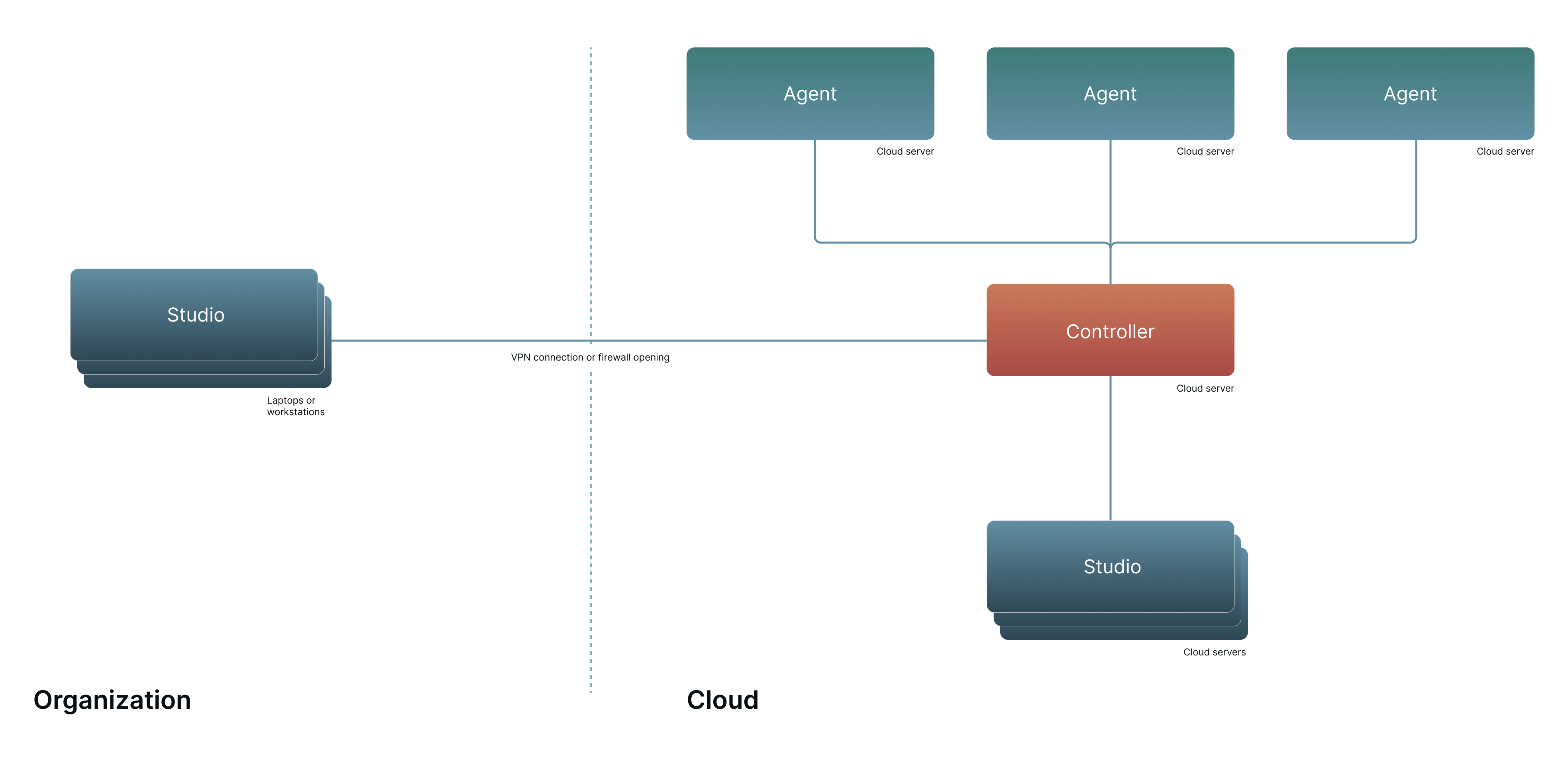
Customer self-hosted cloud
If your organization is looking to automate cloud-based software, you can install some or all Leapwork components in your own cloud infrastructure. A common setup is:
-
Flow installed on users’ laptops or workstations
-
Controller and Agents installed on customer-managed cloud servers
Flow can also be installed in your cloud if your users access it through a remote desktop setup. Leapwork supports Windows-based cloud machines with a built-in graphics interface, such Microsoft Azure.
Hybrid options
Customer self hosted cloud setups are flexible and can be combined with other environments to match where your applications and test data live, for example:
-
Controller in your cloud, with Agents distributed across your cloud and on premises environments
-
Cloud hosted platform combined with a remote execution setup for systems that must be reached from a different network segment
Notes:
-
Agent capacity determines how many executions can run in parallel. If you need more parallel runs, you typically need additional Agent capacity.
-
You can redistribute your available Agents across environments as your needs change, as long as you stay within your licensed Agent entitlement.
Warning:
When using Leapwork Flow on cloud or virtual machines, install Flow and Agents on separate machines. Otherwise, the Flow remote session can be disconnected when an Agent starts executing, due to Windows remote desktop limitations.
Leapwork Cloud
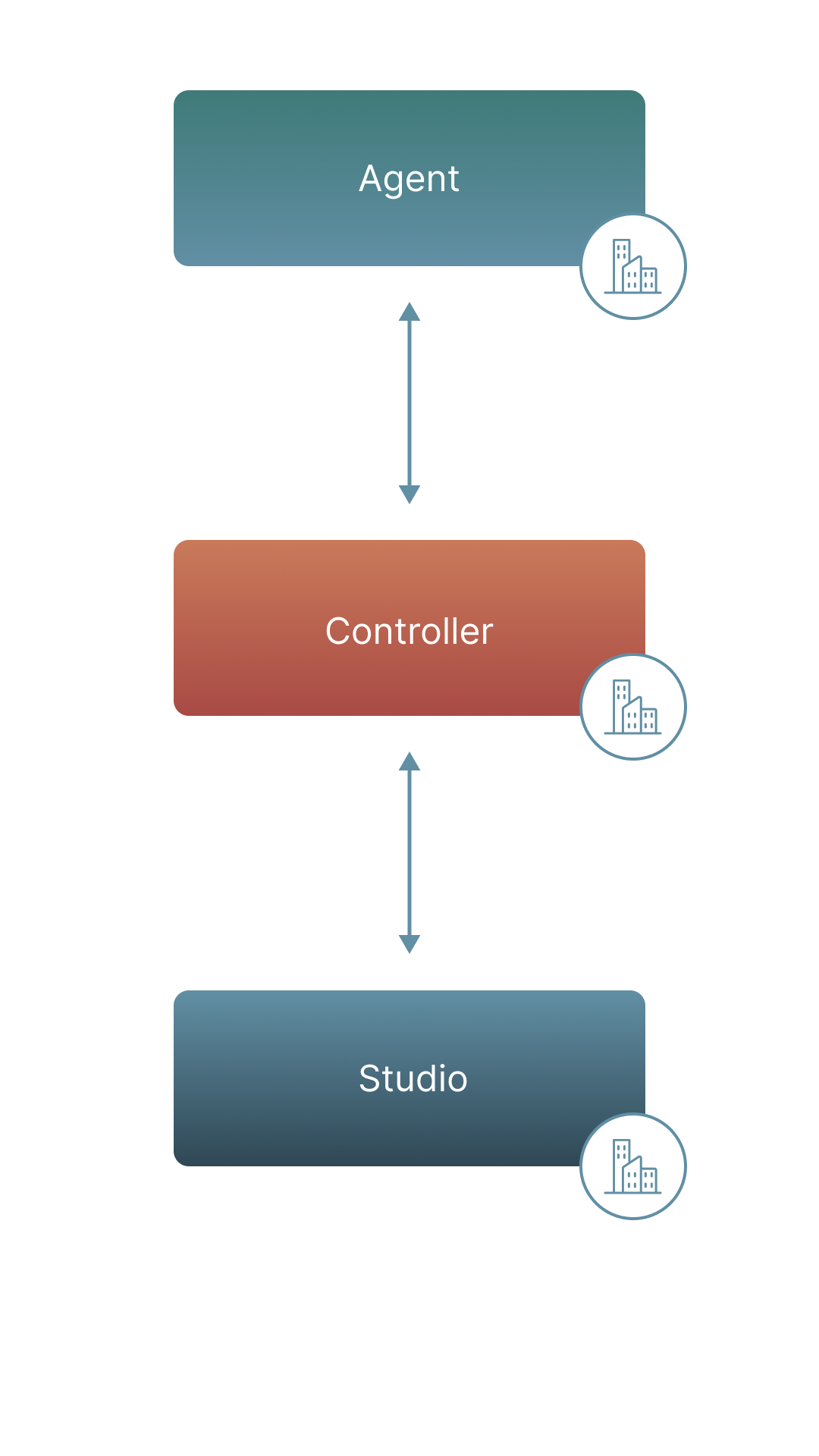
In Leapwork Cloud, Leapwork hosts the Controller and Cloud Agents as a managed service. Your users connect from Flow in their environment to the Leapwork Cloud platform.
Hybrid environment options
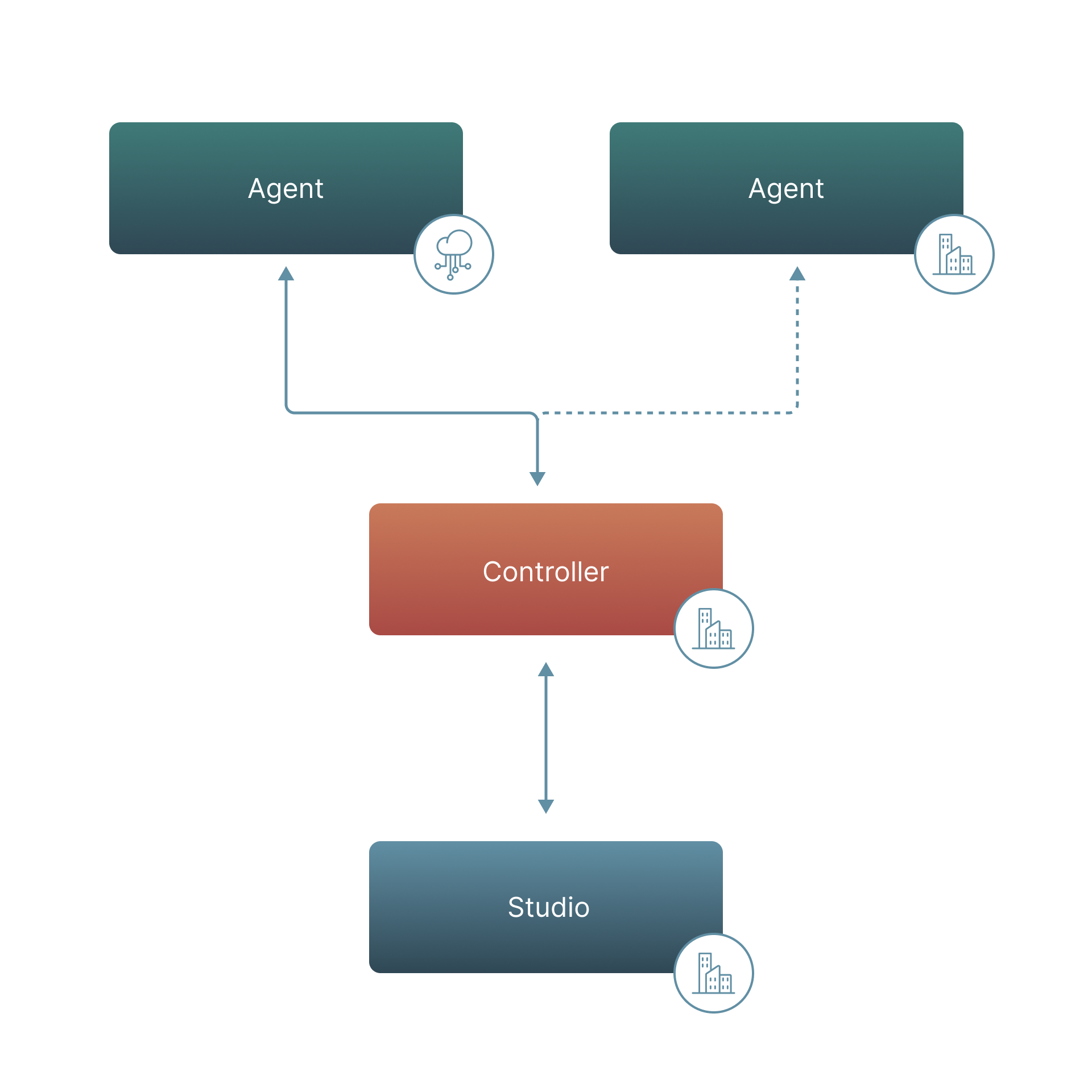
Leapwork Cloud can also be combined with customer hosted execution, for example:
-
Leapwork Cloud Controller and Cloud Agents for standard execution workloads
-
Leapwork Cloud combined with Remote Agents hosted in your environment when target applications, data, or network access are only available from the customer side
-
Mixed execution where some runs use Cloud Agents and others use Remote Agents, depending on the application under automation
Licensing considerations:
-
There is no separate license type for Cloud Agents versus Remote Agents. Agent capacity can be allocated across Cloud Agents and Remote Agents depending on your needs and entitlement.
-
If you require additional parallel execution, you will need additional Agent capacity.
Warning:
When using Leapwork Flow on cloud or virtual machines, install Flow and Agents on separate machines. Otherwise, the Flow remote session can be disconnected when an Agent starts executing, due to Windows remote desktop limitations.
Run tests in different network environments
You can create and maintain automation cases in one environment and run them in multiple other environments using a single Leapwork Automation Platform. Deploy Agents in each environment where execution must occur.
This is common for:
-
Regression tests across test, pre-production, and production environments
-
Monitoring customer systems in their networks
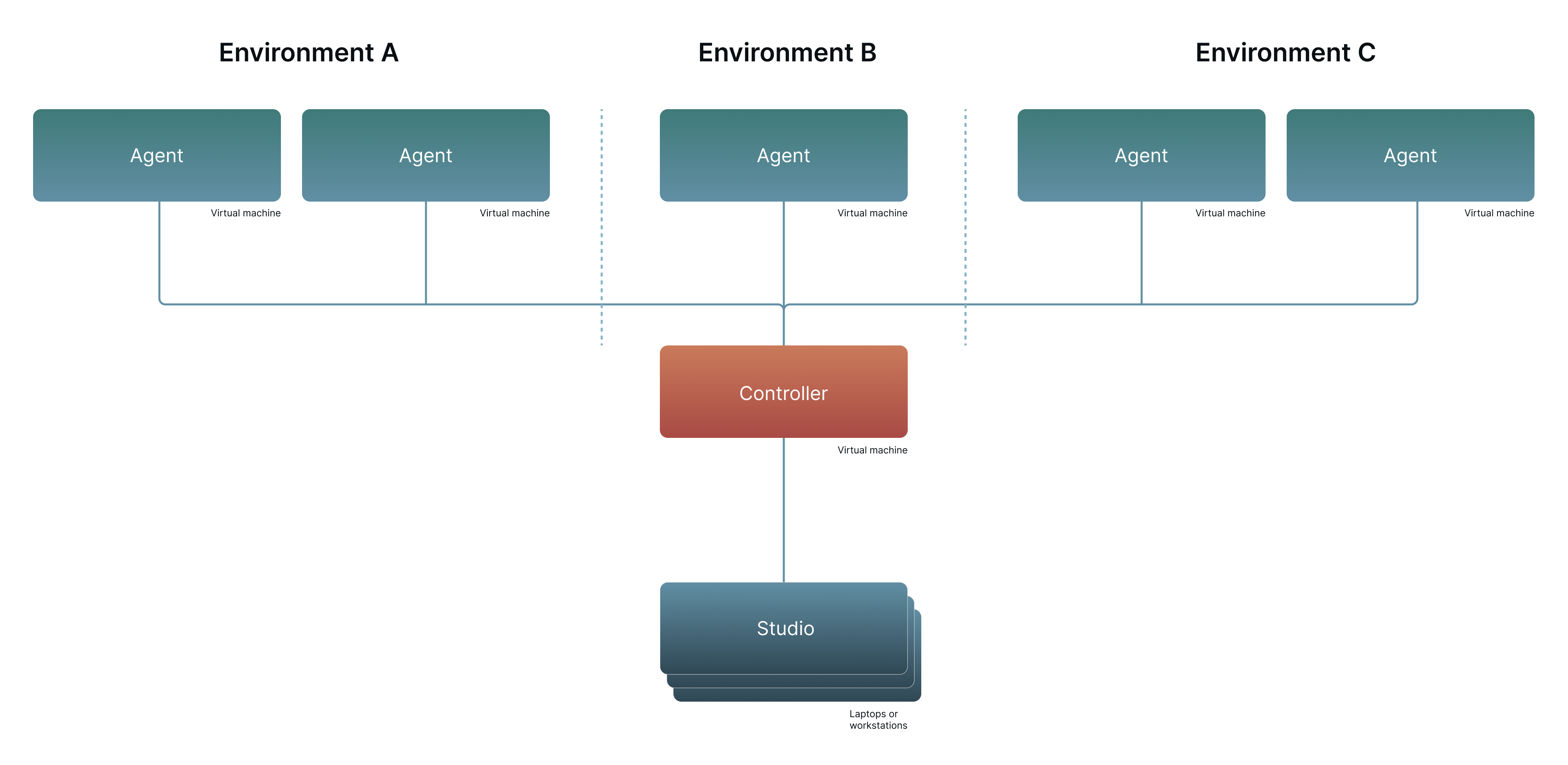
This configuration consists of one Leapwork Automation Platform and three additional Agents.
Enterprise edition database requirement
The Enterprise edition targets deployment across the organization and supports scaling in user count and execution capacity.
The Enterprise edition requires an MS SQL Server database. The Platform edition uses an onboard SQLite database.
The MS SQL Server license is not included in a Leapwork license. Any SQL Server edition beyond Express is supported.