
This release brings powerful new capabilities including Script Data Items, Postman & JMX import enhancements, APM integrations with Datadog and Grafana, sub-sequence creation from steps, variable support in HTTP parameters, HTML/PDF run result reports, and a large number of bug fixes and usability improvements across Leapwork Go.
What's New
Script Data Item
A new Script data item type has been introduced, allowing users to define reusable JavaScript snippets as data items. Users can write JavaScript in a built-in editor, preview output with sample variables, and use script results in Set Value steps. Script Data Items are fully supported in export/import workflows.
Postman Collection Import
Leapwork Go now supports importing Postman Collections. The import handles reliable asset refresh, preserves open folder/project states, avoids URL path duplication, supports multipart form data at the configured size limit, and masks sensitive values in the UI.
JMX Import JSON Post Processor Support
JMX imports now support JSONPostProcessor elements. On import, Set Value steps are automatically created to extract values from HTTP response bodies using JSON paths, making them available to subsequent steps.
JMX Import CSV Data Set Config Support
JMX imports now support CSVDataSetConfig. Users are prompted to upload .csv files during import, and the system creates table data items and Set Value steps that populate request variables from uploaded CSV data during execution.
APM Integration with Datadog
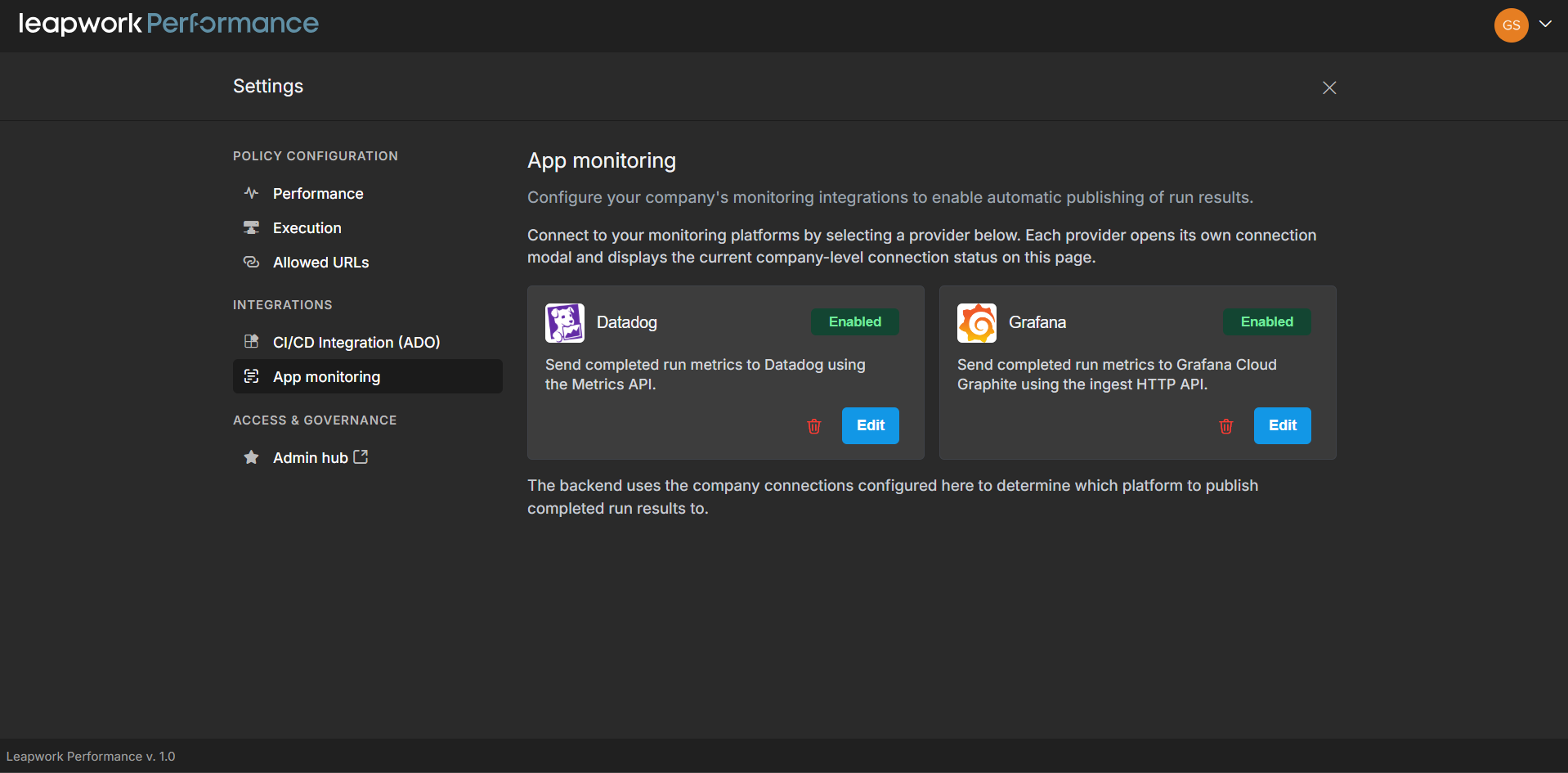
Leapwork Go now integrates with Datadog for real-time monitoring and correlation of performance test results with system and application metrics. Correlate latency, throughput, and error metrics with Datadog's infrastructure and APM data to identify performance bottlenecks during test execution.
APM Integration with Grafana
A new Grafana integration enables users to connect Leapwork Go with Grafana for advanced application performance monitoring. Correlate run results with system and application metrics in Grafana to gain deeper insights into performance bottlenecks and infrastructure behavior.
Note: Grafana integration is currently supported only with the Graphite data source.
Run Result Reports in HTML and PDF
Users can now export run results as HTML and PDF reports. Tables and charts render correctly, branding and typography are aligned, and the reports are presentable for both technical and business stakeholders.
Create Sub-Sequence from Steps
Users can now select a group of contiguous HTTP call steps and create a new reusable sub-sequence directly from the context menu. The selected steps are moved into the new sequence, and a Run Sequence step is inserted at the original location.
What's Updated
Variable Support in HTTP Parameters
Variables can now be inserted into header values, query parameter values, and form-style request body values. Variables display as blue chips in non-edit mode, and Actual Request shows executed values after preview.
Previous Variable Support in Set Value Step
A new "Previous Variable" dropdown in the Set Value step allows users to edit previously generated date-type variables and apply offsets (days, months, years, weeks, etc.).
Multi-Delete in Project Explorer
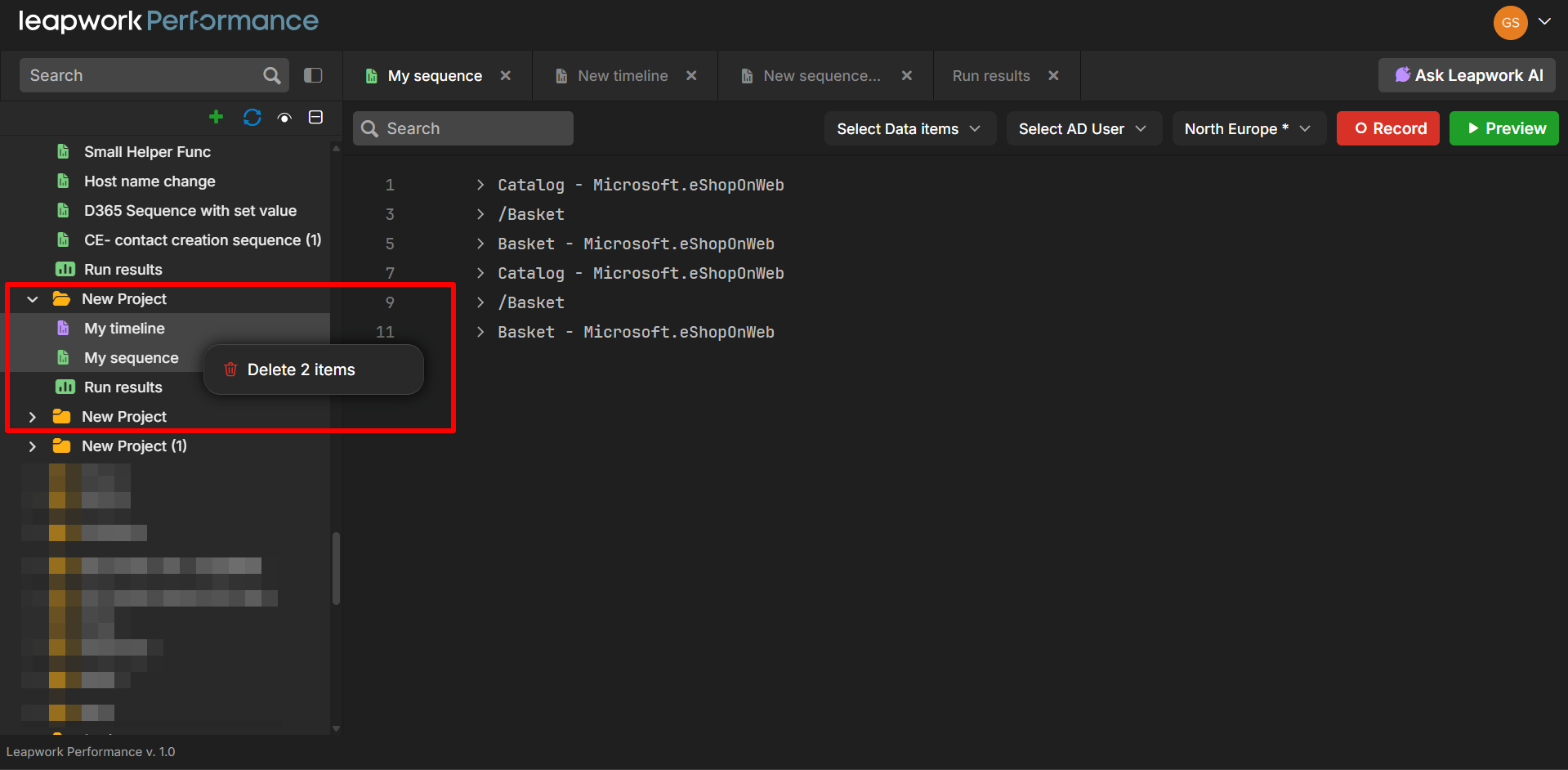
Users can now select and delete multiple assets from Project Explorer at once using Ctrl/Cmd + Click and Shift + Click. Right-click shows Delete N items, and the Delete key works on multi-selections.
Open Sequence from Timeline (Right-Click)
Right-clicking a sequence item inside a timeline track now shows a context menu with Open Sequence, allowing quick navigation to the referenced sequence.
Run Results Name Filter
A new name filter has been added within run results, allowing users to filter and find specific timelines from a long list of timeline runs.
Save Value Step Go Optimizations
Significant performance improvements to the Save Value step and Table Data Items. Data item rows are now stored more efficiently, reducing memory pressure, improving read/write performance, and enabling pagination and virtualized rendering for large tables.
Refined Run Observability
Structured log context (RunId, TrackItemId, Region, ExecutionName, ServiceName) is now included in App Insights logs, making it easier to trace specific runs end-to-end across Go Server, Runner, Agent, AuthAgent, and Container services..
Bug Fixes
-
Fixed loop iteration not working correctly for sequential table execution values now iterate sequentially through rows as expected.
-
Fixed preview run not working properly when there is a GraphQL call in the sequence.
-
Fixed sequential execution not iterating through table rows correctly only first-row value was being picked.
-
Fixed D365 timeline run OutOfMemoryException under load caused by correlation metadata serialization and table-data allocation pressure.
-
Fixed context menu displaying only on the first policy when editing another policy in Settings > Go.
-
Fixed HAR import response body appearing blank in imported sequence APIs.
-
Fixed incorrect sequence and timeline names appearing in run results after renaming.
-
Fixed sequences on different tracks not starting at the same time, causing APIs to not execute in some tracks.
-
Fixed cURL paste not importing empty headers.
-
Fixed newly created sequence or timeline not opening automatically after creation.
-
Fixed preview run logs of the first added sequence being overwritten when the second added sequence executes.
-
Fixed performance degradation when timeline runs are executed for sequences with large Table Data Items.
-
Fixed Set Value block failing when used with a dictionary having a single character as key value.
-
Fixed large number of APIs being triggered when Delete View is enabled for large data sets, causing asset load slowness.
-
Fixed run log numbers not appearing during preview run when reusable sequence is in collapsed state.
-
Fixed Table Data Item showing error for "TimeStamp" name when column was added from a Save Value entry (customer ticket).
-
Fixed execution checkmarks not appearing correctly and step numbers missing for sub-steps.
-
Fixed multiple API calls being triggered when switching sequences during preview run.
-
Fixed duplicate sequence names allowed in Project Explorer when restoring from deleted items.