
You can easily integrate external components with Leapwork using the open REST API exposed on the Controller. In order for the specific component to gain access to Leapwork, an API key is required.
Note: API Access Keys settings would be available if you are logged in as an administrator.
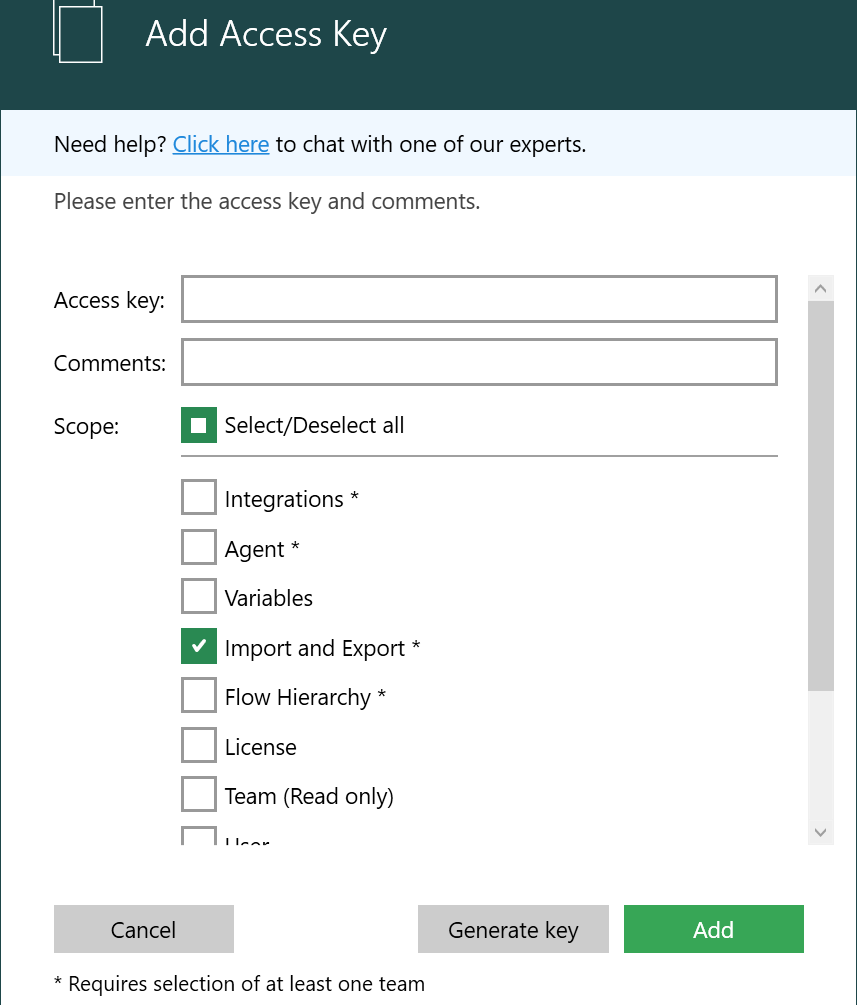
Adding an API Access Key
-
Go to Settings and select API Access Key.
-
Click Add Key.
-
Enter the required comments and select the appropriate scope.
-
Click Generate Key.
-
Click Add to create the key.
Managing API Access Key Scopes
When adding a new API Access Key, you can manage permissions efficiently using a Select/Deselect all checkbox:
-
Selecting this option grants all scopes.
-
If any scope is deselected after selecting all, the Select/Deselect all checkbox unchecks automatically.
-
If users select all individual scopes manually, the Select/Deselect all checkbox checks automatically. This enhancement simplifies API key management and improves control over access permissions.
-
Use the comment field to identify which external component is using the generated key.
Please see REST API Documentation for more detailed instructions on how to use the REST API and the API Access keys.