
The Generate number building block generates whole or decimal numbers within a minimum and maximum range, and it can optionally generate only odd or even values.
See the Drive data with Excel lesson for examples on how to use the Generate number block.
Fully expanded, the Generate number block shows the following properties:
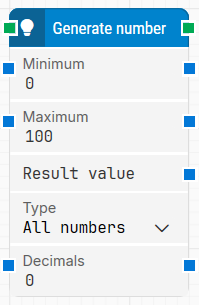
Note: The screenshot on this page uses the Elegance Design, introduced in 2025.3. If you are using an earlier version, your layout may look different.
Quick-start
-
Drag Generate number onto the canvas.
-
Connect the block in the flow and specify the basic parameters required for this block to operate: Minimum, Maximum. Optionally, you can adjust other parameters if needed.
-
Run the flow when it’s ready.
Building block parameters
Resources
|
Topic |
Description |
|---|---|
|
Common questions about creating, running, and managing flows in Leapwork. |
|
|
Guidelines and solutions for identifying and fixing issues that occur when building or running flows in Leapwork. |