
The Generate password block creates a random string suitable for use as a secure password. You can customize the output by specifying the desired length and choosing whether to include uppercase letters, numbers, and symbols. This block is useful for dynamic test data generation, particularly in account creation or security-related automation flows.
Fully expanded, the Generate password block shows the following properties:
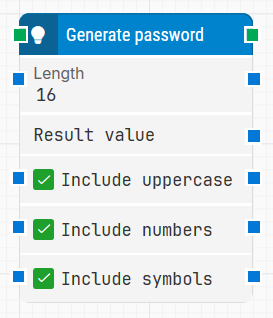
Note: The screenshot on this page uses the Elegance Design, introduced in 2025.3. If you are using an earlier version, your layout may look different.
Quick-start
-
Drag Generate password onto the canvas.
-
Connect the block in the flow and optionally configure basic parameters such as Length, Include uppercase, Include numbers, and Include symbols.
-
Run the flow when it’s ready. The generated password will be available in Result value for use in other blocks.
Building block parameters
Resources
|
Topic |
Description |
|---|---|
|
Common questions about creating, running, and managing flows in Leapwork. |
|
|
Guidelines and solutions for identifying and fixing issues that occur when building or running flows in Leapwork. |