
The Set area block is used to define an area value, typically a region of the screen, using a position and size. This area value is then reused in other blocks such as Find text or Click image to limit their operation to a specific part of the screen.
The Set area block has only one property:
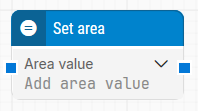
Note: The screenshot on this page uses the Elegance Design, introduced in 2025.3. If you are using an earlier version, your layout may look different.
Quick-start
-
Drag Set area onto the canvas.
-
Specify the Area value and connect it to the blocks that should use this area.
-
Run the flow when it’s ready.
Building block parameters
Resources
|
Topic |
Description |
|---|---|
|
Common questions about creating, running, and managing flows in Leapwork. |
|
|
Guidelines and solutions for identifying and fixing issues that occur when building or running flows in Leapwork. |