
The Set text block is used to define a reusable text value within an automation flow. This value can then be passed to other building blocks that require input, such as Type text, Get text, or Set UI Element Value. It is especially useful when the same value needs to be used in multiple places, or when working with dynamic content managed via tokens.
Unlike action blocks, Set text is not executed directly. It acts as a source of data, feeding downstream blocks that reference its value. See the HTTP Request and the Using the Clipboard to insert text lesson
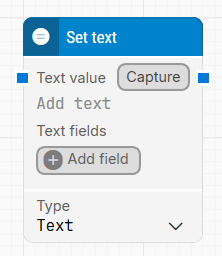
Fully expanded, the Set text block shows the following properties:
Quick-start
-
Drag Set text onto the canvas.
-
Enter a value in the Text value field.
-
Reference this block in other blocks by inserting its output as a token.
-
Run the flow when it’s ready.
Building block parameters
Resources
|
Topic |
Description |
|---|---|
|
Common questions about creating, running, and managing flows in Leapwork. |
|
|
Guidelines and solutions for identifying and fixing issues that occur when building or running flows in Leapwork. |