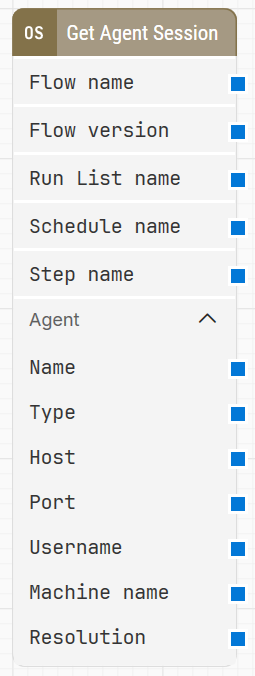
The Get Agent Session building block fetches details about the current flow execution (for example when running from a run list), so the values can be used at runtime for decisions or alternative flow paths.
Note: The screenshot on this page uses the Elegance Design, introduced in 2025.3. If you are using an earlier version, your layout may look different.
Quick-start
Drag Get Agent Session onto the canvas.
Connect the block in the flow. Use the output values (for example Flow name, Run List name, or Agent > Type) in later blocks for logging or branching.
Run the flow when it’s ready.
Building block parameters
Parameters
Block header: The block title (“Get Agent Session”) can be renamed by double-clicking it and typing in a new title.
Flow name: Contains the name of the flow at the time of execution.
Flow version: Contains the version of the running flow at the time of execution.
Run List name: Contains the name of the run list that executes the flow containing the block.
Schedule name: Contains the name of the schedule that executes the flow containing the block.
Step name: Contains the name of the specific step inside the run list that executes the flow containing the block.
Agent: Contains information about the agent environment the flow is executed on, and can be expanded into sub-properties such as Name, Type, Host, and Port.
Name: The agent name as defined in the agent configuration.
Type: The agent type (for example Remote Agent, Selenium Grid, Sauce Labs, Browser Stack, or Gridlastic).
Host: The agent host name as defined in the agent configuration.
Port: The agent port number as defined in the agent configuration.
Username: Contains the name of the user under which the flow is executed.
Machine name: Contains the name of the machine on which the flow is executed.
Resolution: Contains the screen resolution at the time of execution.