
Logout

The Logout block is used to perform a system logout for the Leapwork user on the Agent machine. Place it near the end of a flow when you want to end the current desktop session as part of your automation.

Fully expanded, the Logout block shows the following properties:
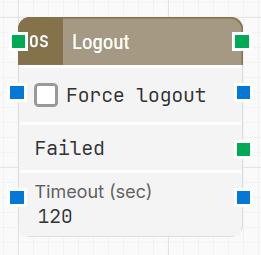
image-20260115-112918.png

Note: The screenshot on this page uses the Elegance Design, introduced in 2025.3. If you are using an earlier version, your layout may look different.

Quick-start

  1. Drag Logout onto the canvas.

  2. Configure the basic parameters for the logout step in your flow: optionally enable Force logout and adjust Timeout (sec), then connect the block where the session should end.

  3. Run the flow when it’s ready.


Building block parameters

Parameters
  • Block header: Shows the current name of the Logout block. You can rename it by double-clicking the header and typing a new title. The green input connector starts the logout operation when the flow reaches this block, and the green output connector triggers when the logout has completed successfully.

  • Force logout: When selected, forces the system logout by terminating the user session process on the Agent machine. Use this option when a normal logout might hang or not complete due to open applications or dialogs.

  • Failed: Green output connector that triggers if the system logout is not completed within the configured timeout. Use this connector to branch the flow for error handling, logging, or recovery actions.

  • Timeout (sec): Specifies the maximum number of seconds the Logout block will wait for the system logout operation to complete before triggering the Failed output.

Resources

Topic

Description

Flows FAQ

Common questions about creating, running, and managing flows in Leapwork.

Flows Troubleshooting

Guidelines and solutions for identifying and fixing issues that occur when building or running flows in Leapwork.