
Modernize version control, accelerate deployments with CLI automation, and run with next-gen .NET 10 performance 🚀
Leapwork 2026.3 delivers major milestones across enterprise source code management, infrastructure automation, runtime modernization, and AI-driven testing. This release introduces native Git Version Control for flows across major enterprise Git providers, a flexible CLI Installer for automated and silent headless deployments, full runtime migration to .NET 10, unique synthetic test data generation via the AI Generate block, and targeted synchronization enhancements across Salesforce and Dynamics 365 F&O.
Before upgrading, we recommend reviewing:
-
Upgrade Matrix: https://docs.leapwork.com/leapwork-flow/latest/download-and-install/download/upgrade-matrix
-
System Requirements: https://docs.leapwork.com/leapwork-flow/latest/download-and-install/download/system-requirements
-
Salesforce Login block docs (MFA/Fusion): https://docs.leapwork.com/leapwork-flow/latest/building-blocks/salesforce/login
Important Upgrade Notes:
-
Runtime Modernization (.NET 10): Release 2026.3 transitions core binaries and microservices to .NET 10. For full regression support and stability, ensure target environments have compatible prerequisites.
-
Recommended Upgrade Paths:
-
Automation Path:
2026.2.0 (.NET 8)→2026.3 (.NET 10) -
Multi-hop / Legacy Path:
2024.2.32→2025.4.151→2026.3 (.NET 10)
-
Why upgrade?
-
Decouple flow versioning from databases with native Git Version Control supporting GitHub, Azure DevOps, and Bitbucket Cloud, complete with visual side-by-side diffing and safe restores.
-
Automate enterprise rollouts using the new CLI Installer, enabling silent, non-interactive installations, repairs, updates, and headless activations.
-
Boost execution performance and security by upgrading to the .NET 10 runtime across Controller, Agent, and Studio microservices.
-
Eliminate duplicate test data using the enhanced AI Generate block, ensuring unique dynamic values on every loop iteration or sequential run.
-
Gain finer synchronization control with block-level Await DOM Change and Await Requests in Salesforce and D365 F&O Fusion blocks.
-
Stay up to date with browser runtimes with validated support for Chrome and Edge drivers up to version 154.
-
Benefit from extensive enterprise stability across large-flow canvas navigation, multi-monitor setups, Azure DevOps synchronization, and Selenium Grid management.
🚨 New features
Git Version Control for Leapwork Flow
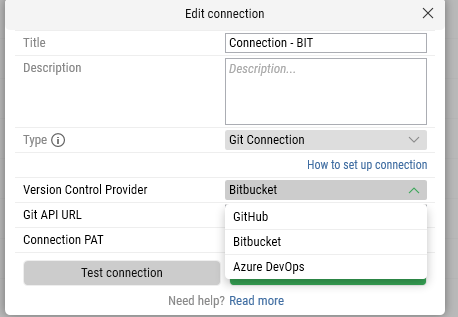
Take software lifecycle management to the next level by storing and managing your Flow and Sub-flow revision histories directly in enterprise Git repositories instead of inflating the Controller database. Supported Git Providers: GitHub (Cloud & Enterprise), Azure DevOps (ADO) and Bitbucket Cloud. Find more information here.
Key Capabilities:
-
Team-Level Repository Mapping: Administrators can enable Git per team under
Settings > Git Connections, mapping specific repositories to designated teams. -
Seamless Flow Migration: Guided
Save & Migrateworkflow transfers existing flows, sub-flows, and historical revisions into structured Git directories without interrupting active work. -
Continuous Auto-Synchronization: Every newly saved flow version, edit, or imported flow is automatically committed to the configured branch with full author attribution, timestamp, commit messages, and metadata.
-
Visual Version Comparison: Select any previous flow version to compare side-by-side against the latest revision (or compare any two arbitrary versions). Added, removed, and modified blocks/connections are clearly color-coded.
-
Safe Flow Restoration: Restore any historical revision with one click. Restores create a new sequential version in Studio and commit directly to Git while keeping the entire historical audit trail intact.
-
Role-Based Version Governance: Controlled access based on user role (
Admin,Contributor,Reader), ensuring only authorized team members can alter repository mappings or trigger migrations.
Leapwork Update Center & Dynamic DLL Distribution
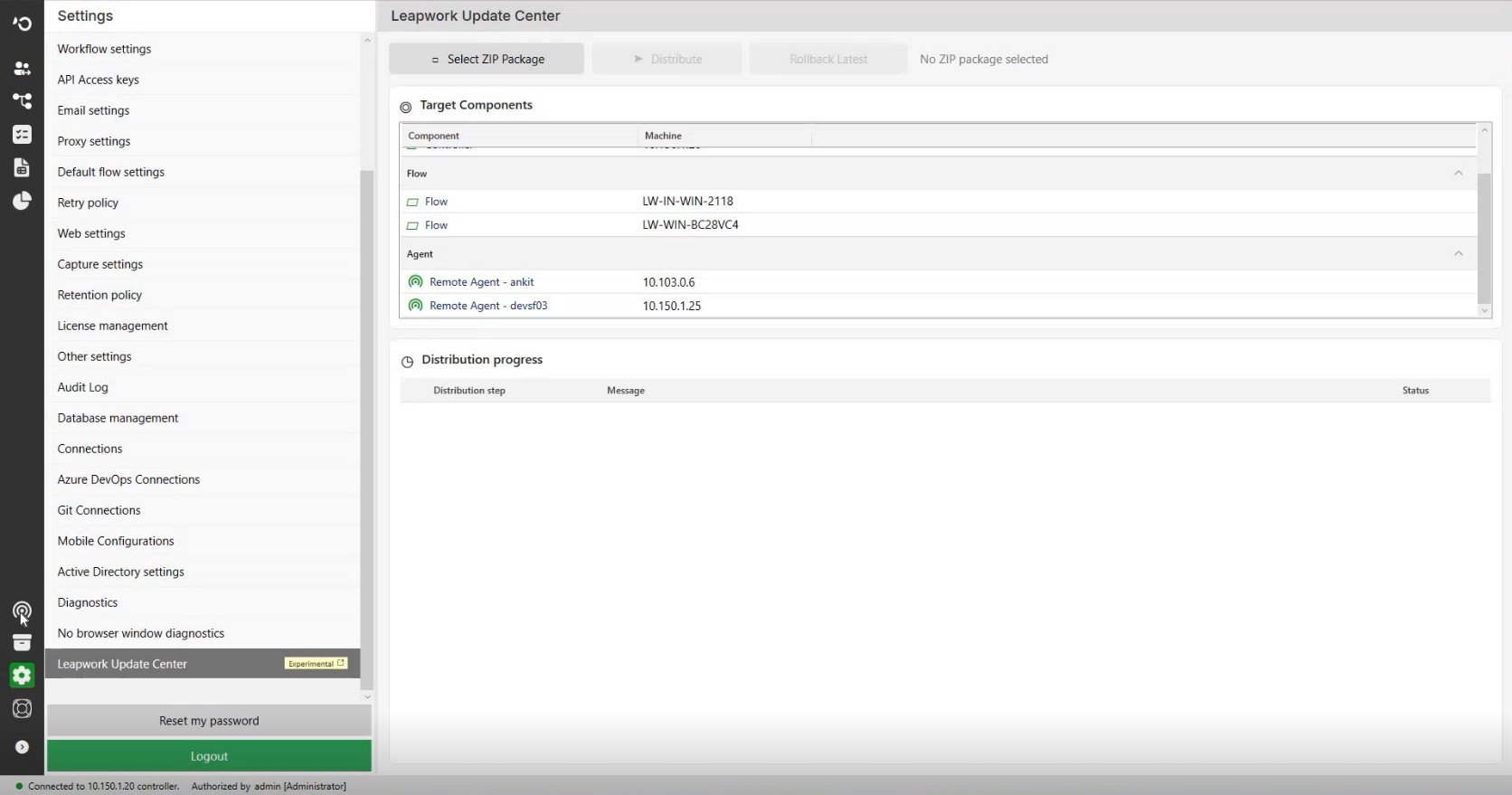
The Leapwork Update Center provides Install Administrators with a centralized way to distribute Leapwork update packages across the connected components of a Leapwork environment.
-
Hot-Patch Distribution: Enables administrative deployment and updating of specific DLL packages across Studio, Controller, and Agent instances directly from Studio Settings without requiring a full release reinstall.
-
Automated Rollback Engine: If an updated component experiences issues, the system can automatically revert to the previous verified DLL state from
C:\ProgramData\Leapwork\DllUpdate\RollbackJobswith full audit logging.
Command-Line (CLI) Headless Installer
Leapwork Flow can now be installed, upgraded, repaired, and uninstalled completely from the command line using an executable CLI package (.exe + .zip), eliminating dependencies on interactive Windows Installer (.msi) wizards.
What this unlocks:
-
Automated CI/CD & Enterprise Rollouts: Script silent installations across hundreds of VMs or containerized environments using PowerShell or shell scripts with
--force-silent-enterprise-install. -
Configuration Reusability: Pass
--reuse-configurationduring upgrades or redeployments to maintain established ports, agent configurations, and controller parameters. -
Automated Database Provisioning: Automatically initializes Trial/Platform SQLite databases or configures Enterprise MSSQL (SQL Server Authentication, Windows Trusted Connection, or Azure SQL).
-
Offline License Activation: Generate
.REQfiles and ingest.LICresponse files headlessly in air-gapped or restricted network environments. -
Clean System Management: Ensures all firewall rules, Windows Services, registry entries, and shortcuts are idempotently created or purged on teardown.
AI Generate Block: Unique Test Data Generation
Avoid data collisions and workflow failures with built-in uniqueness guarantees in the AI Generate block.
Key Benefits:
-
Collision-Free Execution: Dynamically creates unique usernames, email addresses, order IDs, or customer records on every execution step without writing complex custom counter or timestamp logic.
-
Loop & Repetition Aware: Guarantees that iterative executions within a loop block or recurring schedule receive distinct values throughout the sequence.
-
Canvas Cache Management: Clear generated test data caches on demand via the canvas right-click context menu (
Clear Cache) to reset synthetic data pools during test authoring.
🛠️ Feature enhancements
Runtime Modernization: .NET 10 Migration
Leapwork has transitioned from .NET 8 to .NET 10 across the core platform architecture.
-
Lower CPU & Memory Overhead: Substantial performance gains during heavy parallel schedule executions and high-throughput canvas operations.
-
Enhanced Platform Security: Adopts modern cryptographic standards, updated dependencies, and improved socket handling for Controller-to-Agent communication.
-
Upgraded SignalR & Router Runtimes: Enhanced throughput and reduced latency for real-time preview runs and remote agent job streaming.
Block-Level Synchronization: Await DOM Change & Await Requests
Building on the flow-level settings introduced in 2026.2, Leapwork 2026.3 adds granular, per-block override controls for Dynamics 365 F&O and Salesforce Fusion blocks.
-
Granular Block Control: Configure each individual block to wait for DOM changes, wait for active network requests, wait for both, or bypass synchronization entirely.
-
Eliminate Flakiness: Overcomes unpredictable asynchronous network delays in heavy Single Page Applications (SPAs) without forcing users to insert arbitrary fixed Wait blocks.
Microsoft Ecosystem & D365 F&O Updates
-
D365 F&O Version 10.0.49 Compatibility: Fully certified and validated against Microsoft Dynamics 365 Finance & Operations version 10.0.49 using both the Fusion Recorder and Classic Recorder.
-
Enhanced Dropdown & Grid Handling: Resolved multi-combobox, index-based row selection, and text-area capture behaviors in Dynamics 365 forms.
-
Azure DevOps (ADO) Multi-Instance Integration: Hardened synchronization when importing and syncing test cases across different ADO organizations and projects sharing similar custom field definitions.
Flow Productivity & In-Flow Search
-
Canvas Search Refinements: Find blocks, sub-flows, and variables faster with highlighted canvas focusing and automatic 100% zoom-to-fit framing.
-
Virtual Canvas Panning: Significantly smoothed viewport rendering, eliminating UI freezes when panning across massive flows containing hundreds of blocks.
-
Subflow Renaming Synchronization: Renaming subflows in the Flow Tree now propagates immediately across all canvas block instances and persists across file re-openings.
-
Design & UX Polish: Standardized typography, modal button styles, and input field strokes across Run Lists and Schedules.
Browser, Driver & Execution Ecosystem
-
Chrome & Edge Driver 154: Built-in compatibility and automated driver support for Chrome and Microsoft Edge up to version 154.
🔒 Platform, Cloud & Infrastructure
Enhanced Flow Lifecycle Logging
-
Complete application audit logging for flow creation, editing, updating, and deletion with correlation IDs, timestamps, and stack traces providing clear auditability without exposing confidential payload data.
🐞 Bugs & improvements
Installation & System Maintenance
-
CLI Installer Silent Mode: Resolved an issue where
--force-silent-enterprise-installfailed to deactivate licenses on uninstallation or demanded an unnecessary license key during repairs. -
Upgrade State Recovery: Fixed an issue where the Studio could become stuck in a migration-completed state following an upgrade from earlier builds.
-
Database Maintenance Scripts: Validated updated stored procedures for historical flow version trimming (
dbo.CleanupOldFlowRevisions).
Studio & Flow Canvas
-
Undo/Redo Stability: Eliminated intermittent UI unresponsiveness and "Not Responding" freezes when executing Undo/Redo actions across complex canvases.
-
Bulk Deletion: Fixed an issue where authorized users were unable to perform bulk deletions on flows or run lists created by another user.
-
Multi-Display Web Suggestions: Resolved an issue where web block capture suggestions failed to render when Studio was launched on extended secondary monitors.
-
Preview Run with Empty Subflows: Prevented "Unable to run the flow" errors when executing a flow containing an empty subflow container.
AI & Mobile Automation
-
Mobile AI Flow Builder Controls: Added clear interactive prompts (
Yes/Nobuttons and editable inputs) when recovery retries are exhausted, preventing the flow builder from entering a blocked state. -
Mobile AI Step Sync: Fixed an issue where edited steps in the AI execution chat failed to update the Flow Steps panel or resulted in duplicate actions.
-
AI Action Block Error Messaging: Updated run logs to explicitly report configured timeout expirations (e.g., "The element was not found within 30 seconds") rather than a generic timeout error.
-
AI Cache Cleanup: Resolved an issue where deleting a subflow containing AI Action blocks inadvertently cleared parent flow cache records.
-
iOS / Android App Management: Fixed execution failures occurring in
Close Mobile AppandUninstall Mobile Appblocks on Appium configurations.
Fusion & Enterprise Adapters
-
Salesforce Fusion Login: Fixed automated authentication failures caused by updated Salesforce two-stage login UI layouts.
-
Salesforce Dropdown Validation: Resolved an issue where dropdown validation in the Salesforce Fusion Recorder failed with an error or returned inconsistent values.
-
Dynamics 365 Fusion Grid Select: Fixed an issue where clearing an index in
Select Rowdefaulted back to the previously captured row instead of throwing an invalid index error. -
Electron Postman Automation: Resolved execution failures in the
Start Electron Applicationblock when targeting recent Electron-based desktop applications.
Cloud & Scheduler Execution
-
Simultaneous Schedule Progress: Fixed an issue where triggering multiple schedules sharing identical VM agent pools caused schedules to get stuck indefinitely.
-
Run List Import Execution: Fixed an issue where run lists updated via import failed to execute unless duplicated.
-
Frozen Run List Reimport: Fixed an issue where reimporting a run list enabled accidental deletion of frozen revisions.
What’s next?
Leapwork 2026.3 accelerates your automation operations with modern Git version control, faster headless CI/CD onboarding, and a high-performance .NET 10 core. Upcoming releases will continue expanding cross-adapter workflows, autonomous self-healing, and deeper continuous validation analytics across the Leapwork platform.
If you have questions about upgrading to Leapwork 2026.3, contact your Customer Success Manager or speak to our Automation Specialists via website chat.
Happy automating! 🤖✨