
Build faster, troubleshoot sooner, and scale automation with stronger platform reliability
Leapwork 2026.2 brings focused improvements across AI-assisted building, Flow productivity, enterprise integrations, cloud storage, diagnostics, and execution stability. This release is designed to help teams create flows more efficiently, manage larger automation portfolios with less friction, and run automations more reliably across business-critical applications and environments.
📢 Product naming update
Starting with the 2026 release family, our products have new names:
-
Leapwork Studio is now Leapwork Flow - Visual Test Automation
-
Leapwork AI Studio is now Leapwork Play - AI Native Enterprise Playwright
-
Leapwork Performance is now Leapwork Go - Load, API and Performance Testing
Together, they form the Leapwork Continuous Validation Platform. All existing functionality carries forward under the new names.
Before upgrading, we recommend reviewing:
-
Upgrade Matrix: Upgrade Matrix
-
Salesforce Login block docs (MFA/Fusion): Salesforce Login
To ensure compatibility between this Leapwork Release and your system requirements, including OS and browser drivers, please refer to our System requirements article.
Why upgrade?
-
Expand AI-assisted automation with Mobile AI Flow Builder improvements and continued AI Action and AI Flow Builder enhancements.
-
Improve flow maintenance with recapture and inline editing support in Fusion recorder, plus better search within flows.
-
Strengthen Microsoft ecosystem support through Azure DevOps enhancements and better D365 F&O Fusion and RSAT workflows.
-
Reduce execution friction with flow-level Await DOM Change and Await Requests settings for web automation.
-
Increase operational visibility through Grafana integration for real-time observability and alerting.
-
Simplify cloud-first automation with continued Storage-as-a-Service improvements and better multi-user handling.
-
Benefit from broad stability work across Flow, agents, schedules, mobile, web, desktop, Electron, security, and enterprise execution scenarios.
🚨 New features
Mobile AI Flow Builder
Build mobile automation flows with AI assistance directly against mobile scenarios, helping teams move faster from intent to first draft.
What it means in practice:
-
Create mobile flows faster for Android and iOS scenarios with less manual block-by-block setup.
-
Support faster onboarding for teams that are newer to mobile automation.
-
Reduce the effort required to prototype and refine mobile user journeys.
Recapture and inline editing of elements in the Fusion recorder
Update captured elements directly in the recorder without rebuilding the affected steps from scratch.
What improves:
-
Recapture elements when application UI changes break existing automation.
-
Edit element details inline and push updates back into the flow more efficiently.
-
Lower maintenance effort for D365 F&O and similar Fusion-driven automations.
For setup and usage details, see Fix and update elements directly in Fusion recorder.
Grafana integration for real-time observability and alerting
Gain more operational insight into Leapwork environments through integration with Grafana.
Why it matters:
-
Improve visibility into platform behavior and runtime signals.
-
Support proactive monitoring and faster incident response.
-
Give operations and platform teams a stronger foundation for troubleshooting at scale.
🛠️ Feature enhancements
Web automation: Await DOM Change and Await Requests at flow level
Configure key waiting behavior once at the flow level instead of repeating settings block by block.
Benefits:
-
Make web flows easier to standardize and maintain.
-
Reduce inconsistent behavior caused by per-step configuration gaps.
-
Improve resilience in applications with dynamic page loads and background requests.
Azure DevOps enhancements
Leapwork 2026.2 continues to improve Azure DevOps synchronization and test-management workflows.
What this unlocks:
-
Better handling of imported test artifacts and configuration details.
-
Smoother alignment between Leapwork runs and Azure DevOps work items and test cases.
-
Improved traceability for teams operating in Microsoft-centric delivery environments.
D365 F&O Fusion and RSAT improvements
Enhancements in D365 F&O help teams automate more complex enterprise workflows with better capture, replay, and migration behavior.
Key themes in this release:
-
Improved support for Fusion recorder scenarios and RSAT migration workflows.
-
Better handling of grid, dropdown, validation, and execution scenarios in complex business pages.
-
Reduced friction in finance and operations automation maintenance.
-
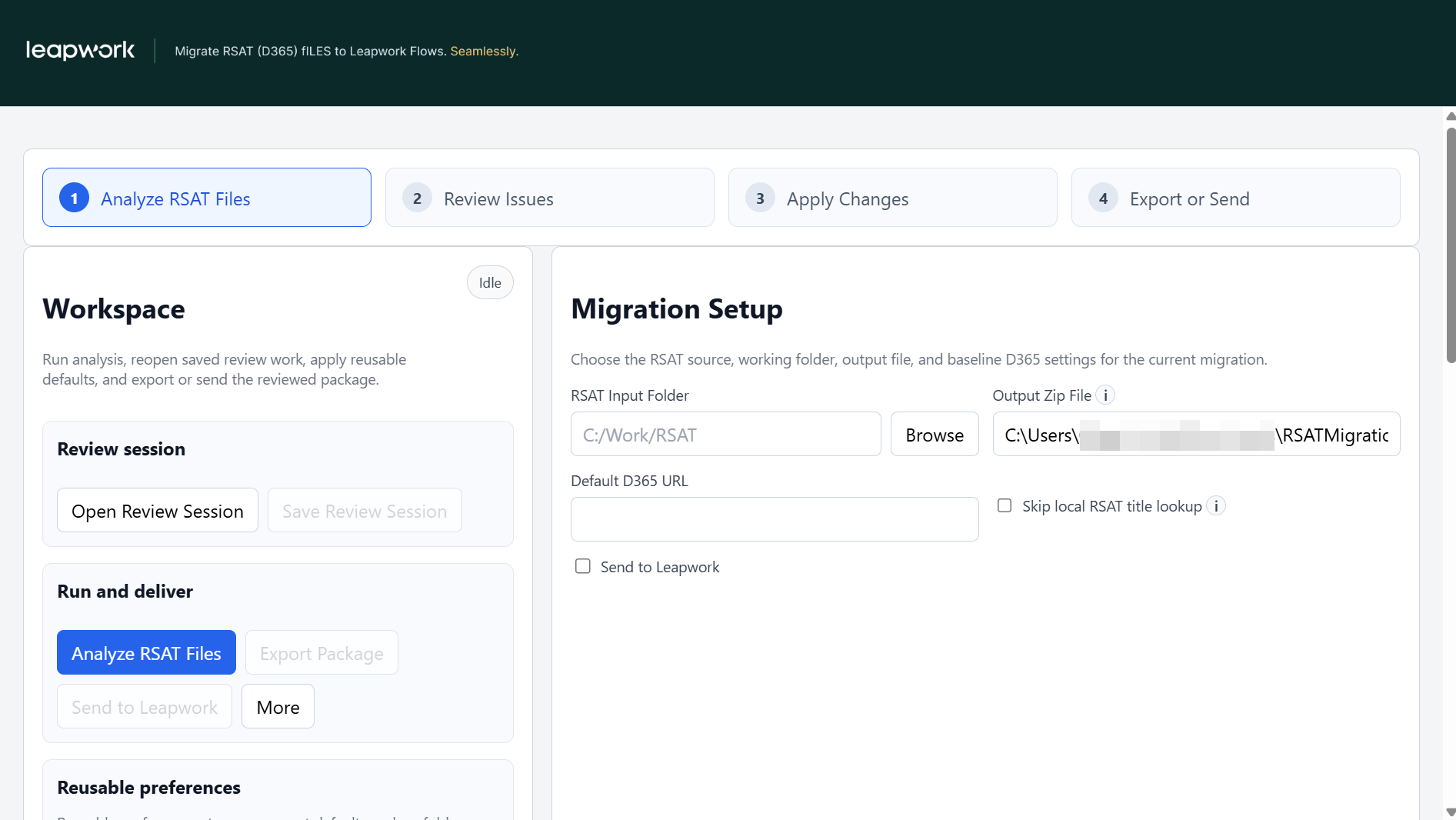
The RSAT Migration Tool has been updated with a guided, UI-based interface, replacing the previous command-line workflow.
Flow enhancements
Several Flow improvements focus on version history, canvas behavior, search, editing, and run list workflows.
-
Better support for working with frozen run lists and version history.
-
Improved canvas and editing experience in common maintenance workflows.
-
Ongoing search and navigation refinements to help users find and update the right assets faster.
Database cleanup scripts for Flow version history
Release 2026.2 includes database cleanup scripts for managing large Flow version-history datasets. For the full cleanup procedure, prerequisites, validation steps, and maintenance guidance.
Included scripts:
-
CleanupOldFlowRevisions.txt: Creates or updates the
dbo.CleanupOldFlowRevisionsstored procedure. The procedure keeps at least the latest 10 revisions by default, preserves revisions required by frozen run lists when enabled, rebuilds the affected revision-history tables with retained records, recreates keys, indexes, default constraints, and foreign keys, and swaps the staging tables into place. -
RevisionCount.txt: Captures row counts across revision-history tables before and after cleanup so administrators can verify the cleanup result.
-
RebuildIndex.txt: Rebuilds indexes with fragmentation greater than 20% to improve database performance before or after maintenance.
-
ReOrganiseIndex.txt: Reorganises indexes with fragmentation below 20% as a lighter maintenance option.
Recommended execution flow: stop the Controller service, take and verify a full database backup, rebuild or reorganise indexes, create or update the cleanup stored procedure, check for frozen run lists, record revision counts, execute the cleanup procedure, verify revision counts again, and shrink the database only if disk space must be reclaimed.
EXEC dbo.CleanupOldFlowRevisions
    @VersionsToKeep = 10,
    @KeepFrozenRunListFlows = 1,
    @DropBackupTables = 1;
Important: Run these scripts only during a planned maintenance window, with SQL Server administrative privileges, a verified database backup, and sufficient free disk space. For a 100 GB database, maintain at least 75 GB of free disk space before starting maintenance.
Storage-as-a-Service improvements
Cloud storage capabilities continue to mature to better support distributed execution and multi-user teams.
-
Improved upload, download, and file interaction behavior.
-
Better performance and usability in cloud storage scenarios.
-
Stronger support for teams using centralized assets in cloud-first setups.
🧩 Platform and ecosystem coverage
Electron automation support
Leapwork 2026.2 includes fixes and reliability improvements for Electron-based application capture and execution.
-
Improve support for recording and capturing in Electron applications.
-
Reduce blockers for teams automating modern desktop applications built on Electron.
Cloud and scheduler reliability
Execution stability has been improved across scheduler, agent distribution, cloud agents, and remote execution scenarios.
-
Better handling of agent allocation and schedule execution behavior.
-
Improved resilience when running at scale or under parallel workloads.
-
Reduced operational overhead for teams orchestrating scheduled regression suites.
🐞 Bugs & improvements
This release also includes a wide range of fixes across the platform. Highlights include:
-
AI and Mobile: Improved stability for mobile AI flow generation, mobile execution behavior, and flow recovery scenarios.
-
Flow: Fixes for version history behavior, run list interactions, editing edge cases, import flows, and multi-screen usability.
-
Web automation: Improvements in browser startup behavior, timeout handling, existing profile execution, and web execution reliability.
-
D365 F&O: Fixes for Fusion recorder actions, login behavior, RSAT migration outcomes, and validation scenarios.
-
Storage and cloud execution: Better handling of cloud storage ranges, performance, upload behavior, and LaaS execution stability.
-
Agents and schedules: Fixes for remote agent connectivity, Selenium Grid execution, schedule ordering, and reporting consistency.
-
Electron and desktop: Better recording and execution reliability for Electron and desktop automation scenarios.
-
Security: Multiple security-related hardening fixes are included as part of ongoing secure coding and audit-readiness work.
What’s next?
Leapwork 2026.2 continues the product direction introduced in earlier 2026 releases: practical AI assistance, lower-friction maintenance, stronger observability, and more reliable enterprise execution. The result is a platform that helps teams design faster, operate with more confidence, and scale automation more sustainably across business-critical processes.
If you have questions about upgrading to Leapwork 2026.2, contact your Customer Success Manager or speak to one of our Automation Specialists via the website chat.
Happy automating! 🤖