
Use the AI action block to describe, in natural language, what should happen in your flow and let Leapwork use AI to decide how to carry it out. The block takes a prompt, identifies the right element on the application to interact with and how, executes that interaction, and can reuse what it has learned to make later runs faster.
You typically use the AI action block when you want to express actions or decisions as text instead of building them from multiple low‑level UI or logic blocks.
When to use
Use the AI action block when you need to:
-
Describe a UI interaction in plain language, such as “Click the Login button” or “Type the order ID and press Enter”
-
Let AI decide which on‑screen element matches your prompt
-
Let AI decide how to interact with the element (for example, clicking, typing, or selecting)
-
Reuse successful AI‑driven interactions so that later runs execute faster
-
Use a single configurable block instead of chaining many smaller UI or logic blocks
If you only need simple, fully deterministic steps based on fixed selectors or rules, use the standard UI and logic blocks instead of the AI action block.
Location
You can find the AI action block in the AI section of the building blocks panel.
Open Add building block, expand AI, and select AI to add the AI action block to your flow. In the same AI category you can also see other AI‑related blocks, such as AI Extract, AI Generate, AI Transform, AI Validate, AI Vision Extract, and AI Vision Validate.
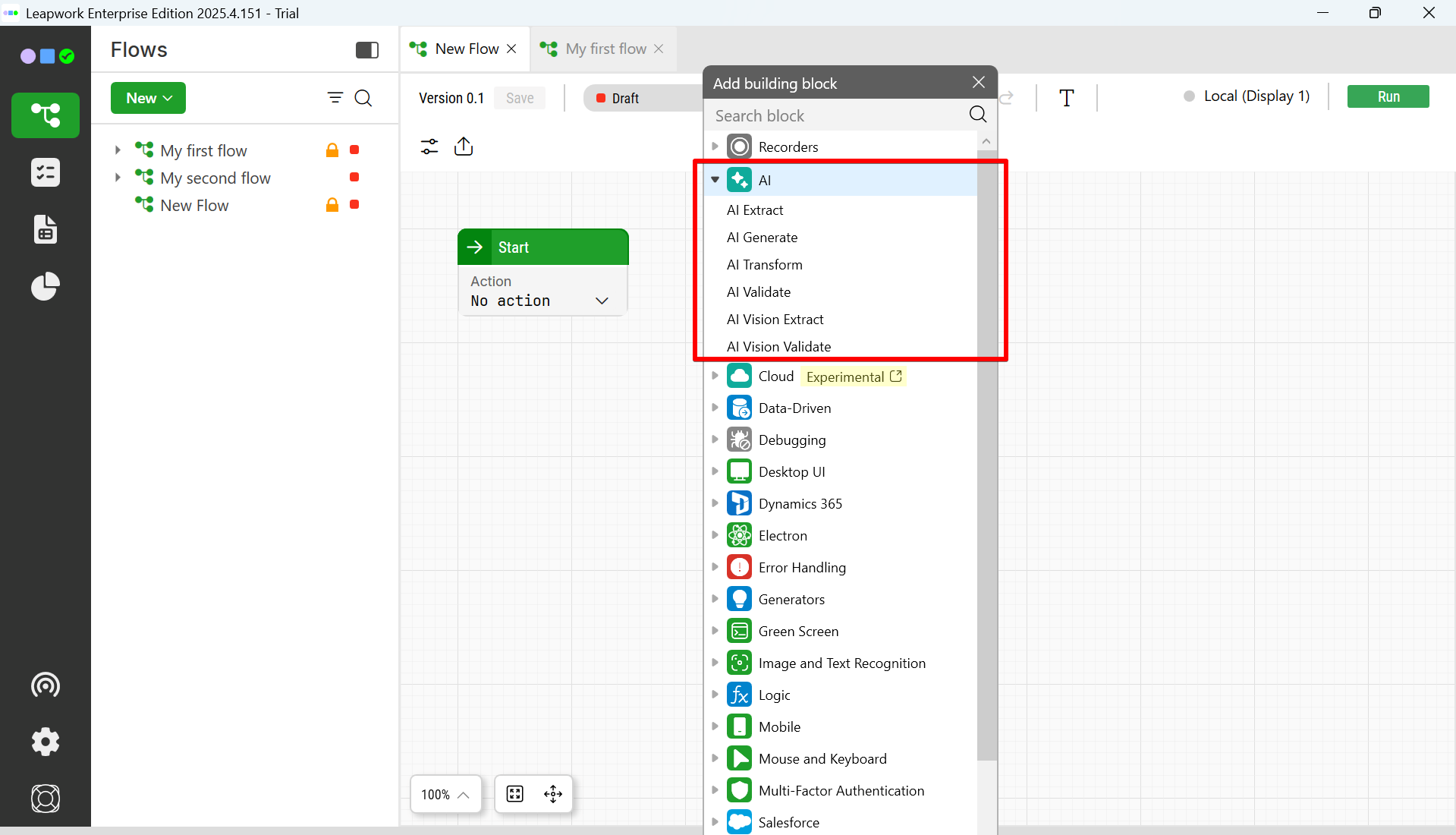
Drag the AI action block onto the canvas and connect it to the rest of your flow.
Inputs
The AI action block takes input from your flow and sends it to the AI system that decides which element to interact with and how to perform the requested action.
Prompt
The Prompt defines what you want the AI to do. It is the main instruction and can include:
-
Static instructions you write in the block
-
Dynamic values from earlier steps in the flow
Examples:
-
Click the Login button to sign in. -
Type the value from <OrderId> into the search field and press Enter. -
Open the first row with status "Failed".
The block resolves all input connectors before sending the final prompt to the AI system.
Context data
Context data is optional additional data sent along with the prompt. Use context when:
-
The AI should see information from previous steps in the flow
-
You want to give extra background that helps the AI choose the correct element
You can pass context from:
-
Previous building blocks
-
Files, HTTP responses, or UI elements that are already part of the flow
This helps the AI make better decisions without overloading the main prompt.
Other configuration
Depending on how AI is set up for your environment, the block may expose settings that control which underlying AI capability is used and how the request is sent. These settings are configured for your Leapwork installation and are not defined in LWW‑12858 or PPQ‑921.
Outputs
When the AI‑driven interaction completes, the AI action block exposes outputs that you can use in the rest of your flow.
Result
The Result is the main outcome of the AI‑driven step. It can describe, for example:
-
What element was chosen
-
What interaction was performed
-
Whether the requested action appears to have succeeded
You can connect the result to:
-
Conditions and logic blocks
-
Logging blocks
-
Other action blocks that depend on the AI‑driven step
Status and error information
The block exposes basic status information, such as:
-
Whether the AI request and interaction succeeded
-
Any error message when the call or interaction failed
You can use this information for retries, fallbacks, or logging so that failed AI steps are visible and can be handled in the flow.
How it works
When the flow reaches the AI action block, it processes the input and uses AI to decide how to act before passing control on to the next blocks.
-
The block resolves all incoming connectors and builds the final prompt (and optional context).
-
The block sends this information to the AI system.
-
The AI identifies the right element on the application to interact with and how to interact with it.
-
The block executes the decided interaction on the application.
-
The block exposes the outcome and any response details as outputs.
-
On subsequent runs, the block can reuse what it has already learned so that the same interaction executes faster.
The flow waits until the AI step finishes or until a timeout is reached. If the request fails or times out, the block exposes error information that you can use for handling in the flow.
Configuration
To configure an AI action block, you work from top to bottom in the block configuration:
-
Add the block to your flow and open its configuration.
-
Enter your Prompt and reference any values from the flow that the AI should consider.
-
(Optional) Add Context inputs for additional information that should be available to the AI.
-
Review any available AI‑related settings that are exposed in your environment (for example, which capability or connection to use).
-
Decide which outputs from the block you want to connect to the rest of the flow.
-
Save the configuration and connect the outputs to the next steps in your flow.
Once configured, you can run the flow and inspect the AI‑driven interaction in the run log to verify that the block behaves as expected.
Examples
Examples help you see typical ways to use the AI action block in real flows.
Example 1: Click the Login button
In this example, the AI action block:
-
Receives the current state of the application as context
-
Uses a prompt such as
Click the Login button -
Lets AI identify which element on the screen is the Login button and how to click it
-
Executes the click
Subsequent runs can reuse what the AI learned about this button so that the click happens faster.
Example 2: Open the first failed row
Here, the AI action block:
-
Receives information about the visible rows as context
-
Uses a prompt such as
Open the first row where the status is "Failed". -
Lets AI identify the relevant row and the correct interaction to open its details
-
Executes the action and passes control on to the next step in the flow
Limitations and considerations
The AI action block relies on AI to interpret prompts and choose elements, so results and behaviour can vary. Keep the following in mind:
-
Different runs of the same prompt can still lead to slightly different decisions
-
If the application UI changes significantly, the AI may no longer find the same element
-
The result quality depends on how clearly you write the prompt and what context you provide
-
If the underlying AI system is unavailable or times out, the block will fail and expose an error status
Design prompts carefully, add only the context that is needed, and build basic error‑handling into your flows to get reliable results from the AI action block