
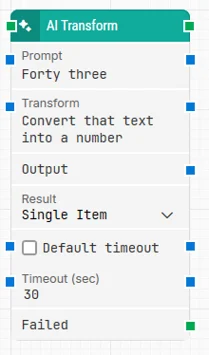
The Artificial Intelligence Transform block specializes in data transformation according to user-provided instructions, enabling complex and varied data manipulation within automated testing workflows. Typical transformations include format changes, data cleansing, conversions, and text translation.
This ensures that test data meets the criteria required for effective validation of automation scenarios.
Notes:
-
The screenshot on this page uses the Elegance Design, introduced in 2025.3. If you are using an earlier version, your layout may look different.
-
To use this block, cloud blocks must be activated for your tenant in the add-ons section of Customer Portal. Make sure this is enabled before adding the block to your flows.
-
AI accuracy is not guaranteed, as it relies on probabilities and the daily performance of OpenAI’s technology. Occasional inaccuracies may occur due to inherent limitations of the technology. For more details, please refer to OpenAI’s documentation.
Quick-start
-
Drag AI Transform onto the canvas.
-
Enter the data to transform in Input.
-
Specify the desired transformation in Transform (e.g., conversion, translation, or reformatting).
-
Define how the transformed data should be returned using Result (Single Item or Multiple Items).
-
Connect the green input and output connectors.
-
Run the flow when it’s ready.
Building block parameters
Resources
|
Topic |
Description |
|---|---|
|
Common questions about creating, running, and managing flows in Leapwork. |
|
|
Guidelines and solutions for identifying and fixing issues that occur when building or running flows in Leapwork. |
|
|
Customer portal section to activate your cloud blocks. |
|
|
Common guidelines for prompting, generating, validating, extracting, and transforming AI-driven test data in Leapwork’s AI Blocks. |