
The Time-based One-time Password (TOTP) block generates a unique, secure authentication code based on a Secret Key. It is used in MFA authentication flows where a time-based one-time password is required to complete a login or verification step.
Notes:
-
The user must be able to generate Secret Key for the account they’d like to use for TOTP MFA for one time setup.
-
The user must be able to install either one of the renowned providers authenticator apps.
-
Due to Okta’s removal of manual secret key enrollment, it is not possible to perform automated actions involving Okta, as users and third-party tools no longer have access to the shared secret required to generate valid TOTP codes.
Fully expanded, the TOTP block block shows the following properties:
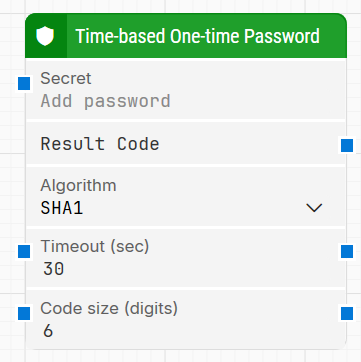
Note: The screenshot on this page uses the Elegance Design, introduced in 2025.3. If you are using an earlier version, your layout may look different.
Quick-start
-
Drag Time-based One-time Password onto the canvas.
-
Provide the Secret (either type it directly or connect it to the Secret input connector), select Algorithm, and connect Result Code to the next block that needs the TOTP value. Optionally adjust Timeout (sec) and Code size (digits).
-
Run the flow when it’s ready.
Building block parameters
Resources
|
Topic |
Description |
|---|---|
|
Common questions about creating, running, and managing flows in Leapwork. |
|
|
Guidelines and solutions for identifying and fixing issues that occur when building or running flows in Leapwork. |