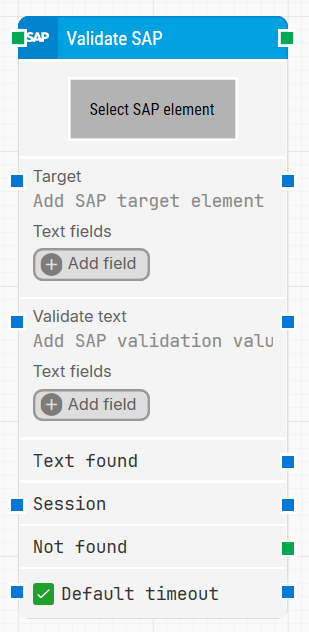
The Validate SAP building block validates SAP artifacts such as text, numbers, and other elements by locating a captured SAP element and validating it against an expected value.
Fully expanded, the Validate SAP block shows the following properties:
Note: The screenshot on this page uses the Elegance Design, introduced in 2025.3. If you are using an earlier version, your layout may look different.
Quick-start
Drag Validate SAP onto the canvas.
Connect the block in the flow and specify Select SAP Element (required). Then set Validate text and adjust Target if needed. Optionally configure Text fields and Session.
Run the flow when it’s ready.
Building block parameters
Parameters
Block header: The green input connector triggers the block to start executing. The green output connector triggers when the SAP element has been successfully found and validated. You can rename the block by double-clicking the header text and typing in a new title.
Select SAP Element: Required. Contains the locator for the SAP element to be found. Capture an SAP element by right-clicking the property and selecting Capture new element.
Target: Contains the SAP target value and is set as soon as the element has been captured. Wildcards can be used in Target to make the automation more flexible. To insert a wildcard, use Insert token and select wildcard.
Example: [5,"Lo(wildcard)"] fetches the fifth element that starts with Lo.
Text fields: Stores key–value pairs that let you insert dynamic tokens into Target via Insert token. Fields can be renamed by double-clicking them, and the corresponding tokens update automatically.
Validate text: Defines the expected text to validate in the SAP element.
Text fields: Stores key–value pairs that let you insert dynamic tokens into Validate text via Insert token. Fields can be renamed by double-clicking them, and the corresponding tokens update automatically.
Text found: Outputs the text that was found in the SAP element.
Session: Used to support SAP multi-session functionality.
Not found: This output connector triggers if the SAP element is not found before the timeout behavior completes. This is typically used to branch the flow or explicitly fail a case by linking it to a Fail block.
Default timeout: Controls whether the block uses the default timeout from the flow settings or a custom timeout value.
Timeout (sec): Sets the maximum time allowed to find and validate the SAP element before the block gives up and triggers Not found. This field is used when Default timeout is not selected.