
The Pass block is used to end an automation case run in the passed state. This block is essential to explicitly indicate that a flow has completed successfully.
Important: Without a Pass or Done block in a flow, Leapwork will automatically mark the end result as a Fail. Always include one of these blocks to signal successful completion.
Need an example? See the Introduction lesson.
Fully expanded, the Pass block shows the following properties:
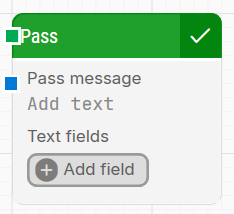
Note: The screenshot on this page uses the Elegance Design, introduced in 2025.3. If you are using an earlier version, your layout may look different.
Quick-start
-
Drag Pass onto the canvas.
-
Connect the block to the end of your flow to finalize the case in the Passed state.
-
(Optional) Define a Pass message and add fields to include dynamic values.
-
Run the flow when it’s ready.
Building block parameters
Resources
|
Topic |
Description |
|---|---|
|
Common questions about creating, running, and managing flows in Leapwork. |
|
|
Guidelines and solutions for identifying and fixing issues that occur when building or running flows in Leapwork. |