
Start‎

The Start block is the starting point of all automation cases, and it is always present:
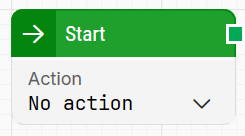
image-20260205-132846.png

Note: The screenshot on this page uses the Elegance Design, introduced in 2025.3. If you are using an earlier version, your layout may look different.

See the Introduction lesson to see the Start block in action.

Building block parameters

Parameters
  • Block header: The green output connector triggers as soon as the automation case is run. The block title (“Start”) can be renamed by double-clicking it and typing a new title.

  • Action: Selects what the Start block should do before proceeding. Options include:

    • No action: Starts the case without performing any window handling first.

    • Close all windows: Attempts to close all open windows by sending a close signal (similar to clicking the X). If a window does not close automatically (for example due to unsaved content and a popup), no further action is taken and windows are not force-closed.

    • Minimize all windows: Attempts to minimize all open windows by sending a minimize signal (similar to clicking the -).

Resources

Topic

Description

Flows FAQ

Common questions about creating, running, and managing flows in Leapwork.

Flows Troubleshooting

Guidelines and solutions for identifying and fixing issues that occur when building or running flows in Leapwork.