
Experimental Feature
This feature is Experimental and may change based on user feedback and testing. Share your thoughts via our chatbot to help us improve it.
The Extract Document Text block extracts text from supported documents and images using OCR (Optical Character Recognition). This is useful when you need to validate or reuse text from scanned PDFs or image files inside an automation flow (for example, extracting text from a scanned contract before checking an approval keyword). This feature is available starting from Release 2025.1.486.
Note:
-
To use this block, cloud blocks must be activated for your tenant in the add-ons section of Customer Portal. Make sure this is enabled before adding the block to your flows.
-
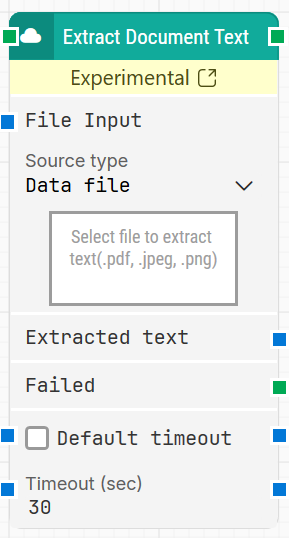
The screenshot on this page uses the Elegance Design, introduced in 2025.3. If you are using an earlier version, your layout may look different.
When fully expanded, the Extract Document Text block displays the following properties:
Quick-start
-
Drag Extract Document Text onto the canvas.
-
Connect the block in the flow and specify Source type, then provide the file in File Input.
-
Run the flow when it’s ready.
Building block parameters
Resources
|
Topic |
Description |
|---|---|
|
Common questions about creating, running, and managing flows in Leapwork. |
|
|
Guidelines and solutions for identifying and fixing issues that occur when building or running flows in Leapwork. |
|
|
Customer portal section to activate your cloud blocks. |