
Start SAP Session‎

The Start SAP Session block is used to start a new SAP session for an existing connection when working with SAP GUI automation. It creates a session context that other SAP blocks can reuse in the same flow.

Fully expanded, the Start SAP Session block shows the following properties:
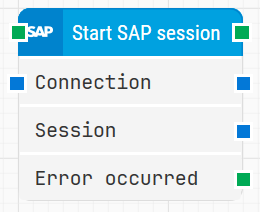
image-20260108-090748.png

Note: The screenshot on this page uses the Elegance Design, introduced in 2025.3. If you are using an earlier version, your layout may look different.

Quick-start

  1. Drag Start SAP Session onto the canvas.

  2. Connect the block in the flow and optionally specify basic parameters such as Connection and Session.

  3. Run the flow when it’s ready.

Building block parameters

Parameters
  • Block header: Shows the current name of the Start SAP Session block. You can rename it at any time by double-clicking the header and typing a new title to keep flows readable and organized.

  • Connection: The Connection parameter is used to pass the SAP connection details for an existing connection. Typically, this input is linked from a previous block that has already created or provided the SAP connection, so that the new session is opened against the correct SAP system.

  • Session: The Session parameter represents the SAP session started by this block. It is used to support SAP’s multi-session capability and can be passed to subsequent SAP blocks so they operate within this specific session.

  • Error occurred: The Error occurred output is triggered if the Start SAP Session block encounters an error during execution. You can use this connector to branch the flow to error-handling logic, logging, or cleanup steps when a session cannot be started successfully.

Resources

Topic

Description

Flows FAQ

Common questions about creating, running, and managing flows in Leapwork.

Flows Troubleshooting

Guidelines and solutions for identifying and fixing issues that occur when building or running flows in Leapwork.

SAP FAQ

Provides quick answers and guidance for common questions and issues when automating SAP applications with Leapwork.