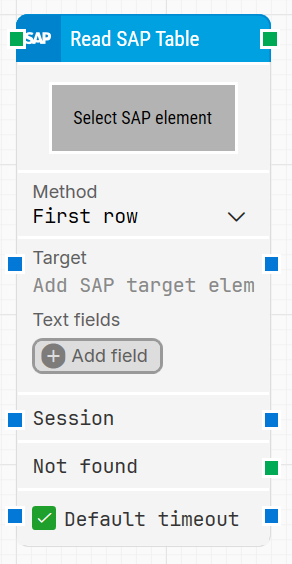
The Read SAP Table block is used to fetch a specified range of values from an SAP GUI table that Leapwork has captured. It reads the table structure (columns and rows) and returns values for the selected row or rows.
The Read SAP Table block primarily reads values from standard table fields. Fields implemented as interactive controls (for example, checkboxes or dropdowns) are treated separately and are not returned as part of the table values.
Fully expanded, the Read SAP Table block shows the following properties:
Note: The screenshot on this page uses the Elegance Design, introduced in 2025.3. If you are using an earlier version, your layout may look different.
Quick-start
Drag Read SAP Table onto the canvas.
Capture the table in Select SAP element, choose a Method (for example First row, Row index, or Iterate), and configure Target, Session, and timeout settings as needed.
Run the flow when it’s ready; use the column outputs and Not found to drive the rest of your SAP automation.
Building block parameters
Parameters
Block header: Shows the current name of the Read SAP Table block. You can rename it at any time by double-clicking the header and typing a new title. The green input connector starts execution when the flow reaches this block, and the green output connector triggers when the table values have been read successfully.
Select SAP element: Contains the locator for the SAP table element to read.
Right-click and select Capture new element to capture the table in SAP GUI.
Once the table is selected, its columns become available on the block, and their values can be fetched using the blue connectors on the exposed column fields.
Method: Defines how rows are selected when reading from the table:
First row: always reads from the first row in the available range.
Row index: reads from a specific row (for example, the 5th row).
Iterate: reads each row in the range one by one, allowing you to process all rows.
Target: Holds the SAP target value used together with the captured table to determine which data to read. This value is set when the table element is captured and can be combined with Text fields for dynamic data. The value can also be passed to or from other blocks via the blue connectors.
Text fields: Provides fields for external or dynamic values that can be used in Target.
Click Add field to create a new field.
To use a field value, right-click in the Target text area and choose Insert token, then select the field’s name.
Fields can be renamed by double-clicking them; any tokens using that field are updated automatically.
Session: Specifies the SAP session to use, supporting SAP’s multi-session functionality. You can provide a session value from an upstream block or reuse the session output from this block in downstream SAP blocks.
Not found: Green output connector that triggers if the SAP table element cannot be found before the timeout expires. This is typically used to branch the execution flow or explicitly fail a case by connecting it to a Fail block.
Default timeout: Controls how the timeout is determined:
When the checkbox is unchecked, you can specify a custom timeout value on the block, and the default is 10 seconds.
When the checkbox is checked, the block uses the Default timeout value defined in the flow settings.
Timeout (sec): The maximum time the block will spend trying to find and read from the SAP table before giving up and triggering Not found. This property is available when Default timeout is not selected.