
The Stopwatch building block measures elapsed time between different parts of an automation case. It can be used, for example, to measure how long an application takes to open or how long a business transaction takes to complete. In combination with a Compare block, it can also be used to assert that something completes within a specific time-frame.
Another example can be found in the Use the clipboard to insert text lesson, where the time it takes to insert text using different methods is measured using the Stopwatch block.
Fully expanded, the Stopwatch block shows the following properties:
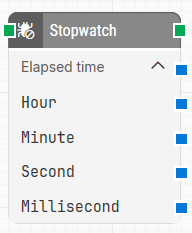
Note: The screenshot on this page uses the Elegance Design, introduced in 2025.3. If you are using an earlier version, your layout may look different.
Quick-start
-
Drag Stopwatch onto the canvas.
-
Connect the block in the flow. Trigger the block where you want to start (or reset) the timer, and use Elapsed time later in the flow.
-
Run the flow when it’s ready.
Building block parameters
Flow Example
The following is an example of an endlessly looping test case that resets a stopwatch every 65 seconds, outputting the total elapsed time as well as the current elapsed seconds and milliseconds.
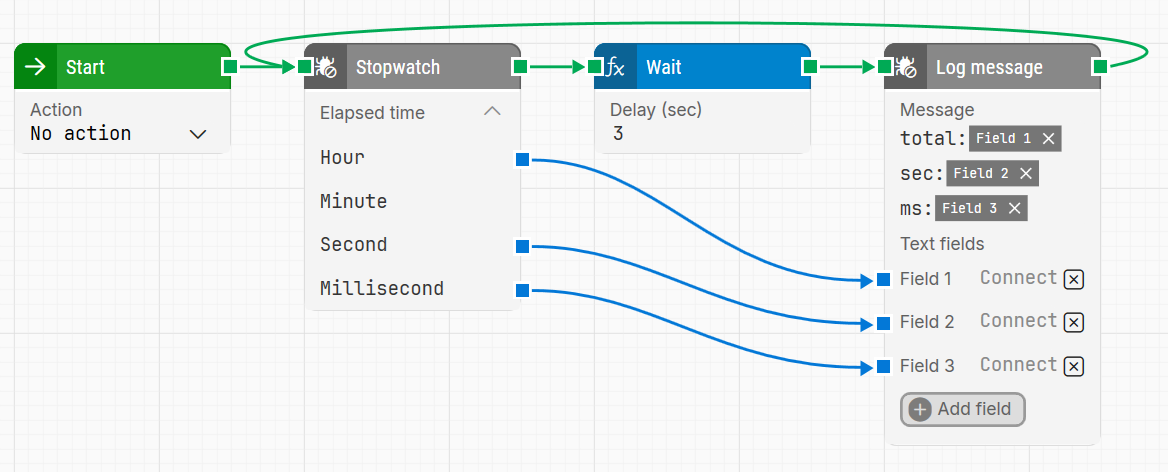
In the example, for each iteration, Field 1 will contain a timespan value like 00:01:05:0004123, while Field 2 will contain 5 and Field 3 will contain something like 0,4123.
When used as a number (for example in a Calculate block), timespans are converted to the total number of seconds and milliseconds. In this example, that would be 65,0004123.
Resources
|
Topic |
Description |
|---|---|
|
Common questions about creating, running, and managing flows in Leapwork. |
|
|
Guidelines and solutions for identifying and fixing issues that occur when building or running flows in Leapwork. |