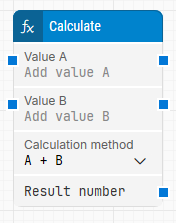
The Calculate block performs an arithmetic operation on two numbers. It can add, subtract, multiply, or divide Value A and Value B, and it can optionally round the result. The resulting number can be passed to other blocks in your flow. See the Use Numbers and Variables lesson for examples of how this works.
Fully expanded, the Calculate block shows the following properties:
Note: The screenshot on this page uses the Elegance Design, introduced in 2025.3. If you are using an earlier version, your layout may look different.
Quick-start
Drag Calculate onto the canvas.
In the block panel, specify Value A, Value B, and Calculation method.
Connect Result number to a block that uses or outputs the value, then run the flow when it’s ready.
Building block parameters
Parameters
Block header: Shows the current name of the Calculate block. You can rename it by double-clicking the header and typing a new title.
This block has no green input or output connectors in the header because it is not explicitly executed. It is used to calculate a value and provide the result to other blocks.
Value A: Specifies the first numeric value used in the calculation. You can either type the value directly in the field, or provide it dynamically by connecting an input from another block to Value A. This value must be provided for the block to produce a result.
Value B: Specifies the second numeric value used in the calculation. You can either type the value directly in the field, or provide it dynamically by connecting an input from another block to Value B. This value must be provided for the block to produce a result.
Calculation method: Selects the arithmetic operation to apply to Value A and Value B. The available methods are addition, subtraction, multiplication, and division.
Result number: Provides the result of the calculation so it can be used in other blocks.
Round result: Determines whether the result should be rounded to a specific number of decimals. Midpoint values are rounded to the nearest even number. For example, 4.45 rounded to one decimal becomes 4.4, and 4.35 rounded to one decimal also becomes 4.4.
Round decimals: Specifies how many decimal digits to round the result to when Round result is enabled.