
Close Windows

The Close windows block is used in Desktop automation to close or minimize all open windows on the desktop. When the block runs, it performs the selected action on every open window and then returns control to the rest of the flow.

Fully expanded, the block shows the following properties:
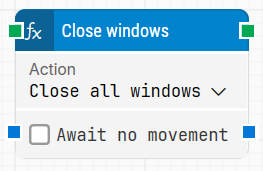
image-20260108-131638.png

Note: The screenshot on this page uses the Elegance Design, introduced in 2025.3. If you are using an earlier version, your layout may look different.

Quick-start

  1. Drag Close windows onto the canvas.

  2. Connect the block in the flow and optionally adjust parameters such as Action and Await no movement.

  3. Run the flow when it’s ready.

Building block parameters

Parameters
  • Block header: Shows the current name of the Close windows block. You can rename it at any time by double-clicking the header and typing a new title, which helps keep flows readable and organized.

  • Action: Defines what should happen to the open windows when the block executes. You select in the dropdown whether all windows should be closed or minimized, and the block will apply that action to every open window on the desktop.

  • Await no movement: When this option is selected, the block delays the close or minimize action until there has been no visible movement on the screen for a specified period (set in Await Timeout). This is useful when you want to wait for a screen update to finish, such as a page loading in a browser window. Regardless of this setting, the action will still be performed after a maximum wait of 30 seconds.

  • Await Timeout: Specifies, in seconds, how long the screen must remain without detected movement before the block proceeds when Await no movement is enabled.

Resources

Topic

Description

Flows FAQ

Common questions about creating, running, and managing flows in Leapwork.

Flows Troubleshooting

Guidelines and solutions for identifying and fixing issues that occur when building or running flows in Leapwork.