
‎ Loop

The Loop block creates an explicit loop in your flow, triggering its connected logic a defined number of times. It counts from a Minimum value to a Maximum value, incrementing by a configurable Step. On each iteration, the current counter is available as Current value, and when the loop is finished, the Completed connector indicates that no further iterations will run.

Fully expanded, the Loop block shows the following properties:
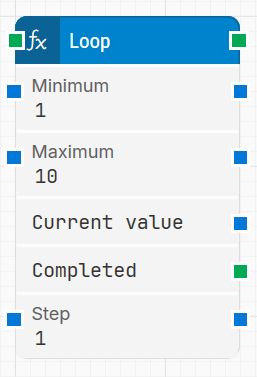
image-20260115-104335.png

Note: The screenshot on this page uses the Elegance Design, introduced in 2025.3. If you are using an earlier version, your layout may look different.

Quick-start

  1. Drag Loop onto the canvas.

  2. Connect the block where you need repeated logic and set the basic parameters Minimum, Maximum, and Step to define how many times the loop should run.

  3. Run the flow when it’s ready; use Current value inside the looped sequence and Completed to continue when all iterations are done.

Building block parameters

Parameters
  • Block header: Shows the current name of the Loop block. You can rename it at any time by double-clicking the header and typing a new title. The green input connector starts the loop when the flow reaches this block, and the green output connector triggers on every iteration.

  • Minimum: Sets the inclusive starting value for the loop counter. For example, in a loop from 1 to 10, the Minimum value is 1.

  • Maximum: Sets the inclusive end value for the loop counter. For example, in a loop from 1 to 10, the Maximum value is 10.

  • Current value: Holds the current value of the loop counter for the active iteration. In a loop from 1 to 10 with Step = 1, on the third iteration Current value is 3.
    When the loop finishes, Current value will be the last value used, typically the Maximum.

  • Completed: Green output connector that triggers once after the loop has finished all iterations. It activates when the loop reaches the Maximum value, or the closest possible value without exceeding it when the Step does not divide the range evenly.

  • Step: Defines how much Current value increases on each iteration. For example, in a loop from 1 to 10:

    • With Step = 1, the loop runs 10 times (1, 2, 3, 4, 5, 6, 7, 8, 9, 10).

    • With Step = 4, the loop runs 3 times (1, 5, 9), because the next value (13) would exceed the Maximum.

Resources

Topic

Description

Flows FAQ

Common questions about creating, running, and managing flows in Leapwork.

Flows Troubleshooting

Guidelines and solutions for identifying and fixing issues that occur when building or running flows in Leapwork.