The Database block executes an ODBC-compliant query against a database (for example Oracle, SQL Server, DB2, MySQL, MongoDB, or any other ODBC-compliant database). This is useful for driving automation cases with database data and validating outcomes based on query results.
See the Database lesson to see examples of how to use data from databases in test cases.
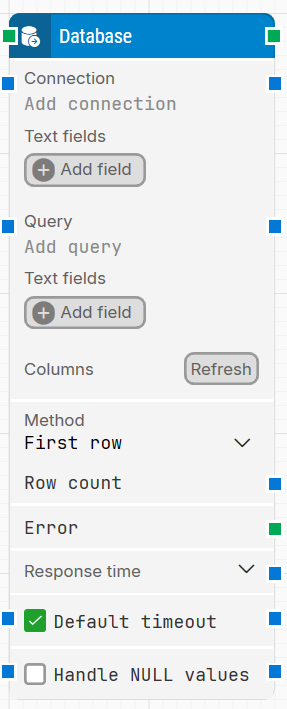
Fully expanded, the Database block looks like this:
Note: The screenshot on this page uses the Elegance Design, introduced in 2025.3. If you are using an earlier version, your layout may look different.
Quick-start
Drag Database onto the canvas.
Connect the block in the flow and optionally specify the basic parameters required for this block to operate: Connection, Query, Method.
Run the flow when it’s ready.
Building block parameters
Parameters
Block header: The green input connector triggers the block to start executing. The green output connector triggers when the database query has been executed and the result is ready. You can rename the block by double-clicking its title and entering a new name.
Connection: Specifies the name of a previously configured ODBC connection on the computer where the case will run. For some ODBC drivers, it may not be possible to store the user and/or password when setting up the ODBC connection. In that case, include them in the connection string, for example: DSN=ODBC_connectionName;UID=username;PWD=xyz.
Text fields (Connection): Stores key–value pairs that can be inserted as dynamic tokens into the Connection field via Insert token.
Query: The ODBC-compliant SQL query statement that will be executed on the database.
Text fields (Query): Stores key–value pairs that can be inserted as dynamic tokens into the Query field via Insert token.
Columns: Shows the columns returned by the query. Use Refresh to execute the query and update the list of returned columns.
Refresh: Executes the query and returns the columns defined by the query.
Note: You cannot click Refresh if the Query field contains any dynamic fields added via Add field. In this situation, the building block will always return an error.
Method: Controls how the query results are returned (as displayed in the block UI, for example First row).
Row count: Defines how many rows to return (as configured in the block UI).
Error: This output connector can be used to branch the flow when the block returns an error.
Response time: The time in milliseconds from the query is sent until the last byte of the response was received.
Default timeout: Controls whether the block uses the default timeout from the flow settings or a custom timeout value.
Timeout: The maximum time spent waiting for the database query to complete before giving up and continuing from the block’s normal (success) output connector.
Handle NULL values: When enabled, the block handles database NULL values according to the block’s configured behavior.