
The Connect to Session block is used to attach to an active terminal session during execution. This is required before interacting with mainframe or green screen interfaces using Leapwork’s terminal automation capabilities.
Note: A terminal session must already be active for this block to connect successfully. You can use desktop building blocks to build a sub-flow that starts the session automatically. Setup steps may vary depending on the terminal type, such as IBM i Access or Rumba+ Desktop.
The Green Screen Recorder and building blocks are available with Enterprise plans.
Fully expanded, the Connect to Session block shows the following properties:
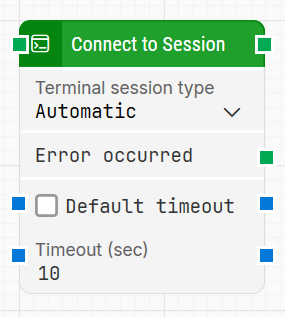
Note: The screenshot on this page uses the Elegance Design, introduced in 2025.3. If you are using an earlier version, your layout may look different.
Quick-start
-
Drag Connect to Session onto the canvas.
-
Specify the basic parameter required for this block to operate: Terminal session type.
-
Run the flow when it’s ready.
Building block parameters
Resources
|
Topic |
Description |
|---|---|
|
Common questions about creating, running, and managing flows in Leapwork. |
|
|
Guidelines and solutions for identifying and fixing issues that occur when building or running flows in Leapwork. |