
Read Table

The Read Table block fetches a specified range of values using a table construct that Leapwork has grabbed from the green screen. This can speed up test creation because Leapwork “invents” a table based on the screen content, reads column names, and then uses that structure to locate an occurrence and read the fields underneath it.

The Green Screen Recorder and green screen building blocks are available with Enterprise plans.

Fully expanded, the Read Table block shows the following properties:
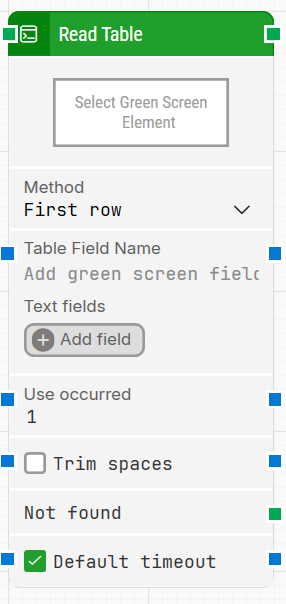
image-20260202-170705.png

Note: The screenshot on this page uses the Elegance Design, introduced in 2025.3. If you are using an earlier version, your layout may look different.

Quick-start

  1. Drag Read Table onto the canvas.

  2. Connect the block in the flow and specify the basic parameters required for this block to operate: Table Field Name, Method. Optionally set Use occurred and Trim spaces.

  3. Run the flow when it’s ready.

Building block parameters

Parameters
  • Block header: The green input connector triggers this block to begin execution. The green output connector is triggered when the table values have been fetched. You can rename the block by double-clicking the header text and typing a new title.

  • Method: Defines how the block selects rows from the table.

    • First row: Always selects the first row in the range.

    • Row index: Selects a specific row by its position in the range (for example, the 5th row).

    • Iterate: Reads all rows in the range. The top connector is triggered for each data row in the selected range.

  • Table Field Name: Defines the field Leapwork looks for to identify the beginning of the table that the block will work with.

  • Text fields: Stores key–value pairs that can be used as dynamic tokens in Table Field Name via Insert token.

  • Use occurred: Selects which occurrence to use when there are multiple matches for the table field.

  • Trim spaces: Removes whitespace before and after the fetched text.

  • Not found: Triggers if the field representing the table is not found before the timeout. This is typically used to branch the flow or explicitly fail a case by linking it to a Fail block.

  • Default timeout: Controls whether the block uses the default timeout from the flow settings or a custom timeout value.

Resources

Topic

Description

Flows FAQ

Common questions about creating, running, and managing flows in Leapwork.

Flows Troubleshooting

Guidelines and solutions for identifying and fixing issues that occur when building or running flows in Leapwork.