
The Release Key building block releases any previously pressed keys on the keyboard. This is useful when you have held down keys (for example with Press key) and need to release them again, such as when holding CTRL while dragging with the mouse.
See the Press and hold a key lesson for an example of how this works.
Fully expanded, the Release key block shows the following properties:
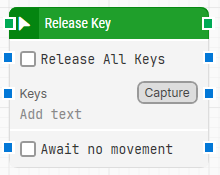
Note: The screenshot on this page uses the Elegance Design, introduced in 2025.3. If you are using an earlier version, your layout may look different.
Quick-start
-
Drag Release Key onto the canvas.
-
Connect the block in the flow and optionally specify Release All Keys, Keys, Await no movement.
-
Run the flow when it’s ready.
Building block parameters
Resources
|
Topic |
Description |
|---|---|
|
Common questions about creating, running, and managing flows in Leapwork. |
|
|
Guidelines and solutions for identifying and fixing issues that occur when building or running flows in Leapwork. |