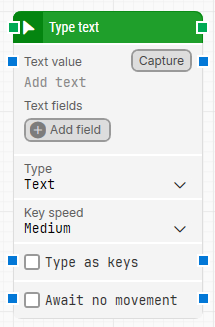
The Type text building block types text and captured keystrokes on the keyboard. Captured keystrokes are useful for using special keys and keyboard shortcuts in the system under test.
Fully expanded, the Type text block shows the following properties:
Note: The screenshot on this page uses the Elegance Design, introduced in 2025.3. If you are using an earlier version, your layout may look different.
Building block parameters
Parameters
Block header: The green input connector triggers the block to start executing. The green output connector triggers when the text has been typed. The block title (“Type text”) can be renamed by double-clicking it and typing a new title.
Text value: The text to type. It can include tokens for values provided via Text fields. To insert a token, right-click and select Insert token, then choose one or more field tokens.
Capture: Captures keystrokes into Text value, which makes it easier to include special keys and key combinations such as CTRL+C or ENTER. You can also type special keys manually by wrapping the key or combination in double percentage signs, for example %%CTRL+P%% or %%ENTER%%.
Text fields: Key–value fields that let you use external values in the typed text. To use a field value, insert its token into Text value via Insert token.
Add field: Adds a field that can be inserted as a token into Text value.
Type: Select Text for normal typing, or Password for entering secret information such as passwords. A password value can’t be read by other users.
Key speed: Sets typing speed. In some cases you may need to type more slowly to trigger events, such as on certain web pages.
Type as keys: Sends the text as keystrokes instead of characters. This is typically required for some terminal clients (for example Citrix, Remote Desktop, 3270 terminals) and some applications based on older frameworks.
Await no movement: Waits until there has been no movement on the screen for a specified period (for example 2 seconds) before typing. This is useful when waiting for screen updates such as a browser page load. Regardless of this checkbox, typing will proceed after waiting a maximum of 30 seconds.