
The Set Element Checkbox building block checks or unchecks checkbox fields in a Salesforce application. It is automatically created when you click a checkbox while recording with the Salesforce Fusion Recorder. It also supports checkbox actions inside grid elements, enabling automation directly in tabular interfaces.
Note: This block works only in browser sessions launched using the Salesforce Login block or within an active Salesforce recording session.
Fully expanded, the Set Element Combo Box block shows the following properties:
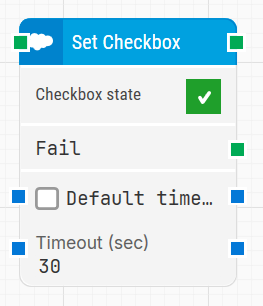
Note: The screenshot on this page uses the Elegance Design, introduced in 2025.3. If you are using an earlier version, your layout may look different.
Quick-start
-
Use the Salesforce Fusion Recorder and interact with a checkbox in the Salesforce UI so the recorder generates the Set Element Checkbox step.
-
Stop the recording, review and optionally adjust the generated step (for example, Checkbox state and timeout-related settings), then save the recording so the full recorded flow is added to the canvas.
-
Run the flow when it’s ready.
Building block parameters
Resources
|
Topic |
Description |
|---|---|
|
Common questions about creating, running, and managing flows in Leapwork. |
|
|
Guidelines and solutions for identifying and fixing issues that occur when building or running flows in Leapwork. |
|
|
Frequently asked questions about Salesforce |
|
|
How to use the Salesforce Fusion Recorder |