
The Close browser building block closes any open browser windows that were launched during an automation flow for Salesforce applications. It is typically used to clean up the test environment, reset browser state, or ensure that no unwanted sessions remain open between or after runs.
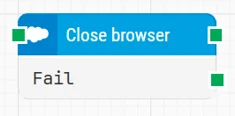
Note: The layout shown in some documentation is part of the Elegance Design, introduced in Leapwork 2025.3. Earlier versions may display a different layout.
Quick-start
-
Drag Close browser onto the canvas.
-
Connect the block in the flow. Optionally, connect Fail to an alternate cleanup or error-handling path.
-
Run the flow when it’s ready.
Building block parameters
Resources
|
Topic |
Description |
|---|---|
|
Common questions about creating, running, and managing flows in Leapwork. |
|
|
Guidelines and solutions for identifying and fixing issues that occur when building or running flows in Leapwork. |
|
|
Frequently asked questions about Salesforce |
|
|
How to use the Salesforce Fusion Recorder |