
The Set Element Dropdown building block selects a value from a dropdown menu in a Salesforce application (including dropdowns inside grid/table views). It is automatically created when you select a dropdown value while recording with the Salesforce Fusion Recorder. This block works only in browser sessions launched using the Salesforce Login block or within an active Salesforce recording session.
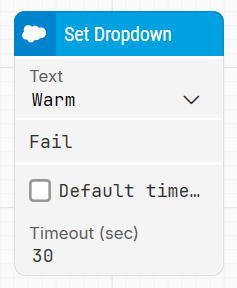
Note: The layout shown in some documentation is part of the Elegance Design, introduced in Leapwork 2025.3. Earlier versions may display a different layout.
Quick-start
-
Start a recording session using the Salesforce Fusion Recorder.
-
Log in to Salesforce using the Salesforce Login block.
-
Interact with a dropdown menu in the application (e.g., select a value).
-
Stop the recording and save the automatically generated blocks, including Set Dropdown.
-
Run the flow when it’s ready.
Building block parameters
Resources
|
Topic |
Description |
|---|---|
|
Common questions about creating, running, and managing flows in Leapwork. |
|
|
Guidelines and solutions for identifying and fixing issues that occur when building or running flows in Leapwork. |
|
|
Frequently asked questions about Salesforce |
|
|
How to use the Salesforce Fusion Recorder |