
The Salesforce Select Row building block selects a specific row inside a table or grid in a Salesforce application. It is automatically created when you select a row during recording with the Salesforce Fusion Recorder, and it lets your flow interact with data at row level (for example clicks, edits, validations, or actions within a specific row context). This block works only in browser windows launched using the Login block or within the current Salesforce recording session.
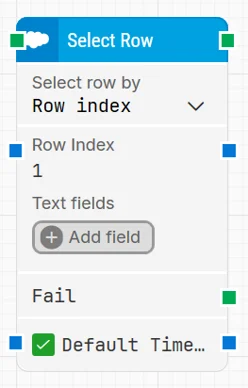
Note: The layout shown in some documentation is part of the Elegance Design, introduced in Leapwork 2025.3. Earlier versions may display a different layout.
Quick-start
-
Drag Select Row onto the canvas.
-
Connect the block in the flow and specify the basic parameters required for this block to operate: Select row by and the corresponding Row identifier / Row index / Row text field.
-
Run the flow when it’s ready.
Building block parameters
Resources
|
Topic |
Description |
|---|---|
|
Common questions about creating, running, and managing flows in Leapwork. |
|
|
Guidelines and solutions for identifying and fixing issues that occur when building or running flows in Leapwork. |
|
|
Frequently asked questions about Salesforce |
|
|
How to use the Salesforce Fusion Recorder |