
D365 Close Browser

The Close browser building block closes browser windows that were launched during an automation flow in Dynamics 365 Finance & Operations. It is typically used to clean up the test environment, reset browser state, or ensure no sessions remain open between or after runs.
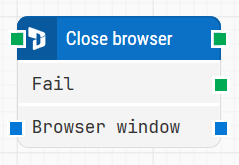
image-20260207-135428.png

Note: The screenshot on this page uses the Elegance Design, introduced in 2025.3. If you are using an earlier version, your layout may look different.

Building block parameters

Parameters
  • Block header: The green input connector triggers the block to execute when the flow reaches it. The green output connector triggers once the browser window has been successfully closed. The block title (“Close browser”) can be renamed by double-clicking it and typing in a new title.

  • Fail: Triggers if the browser cannot be closed within the configured timeout period, so the flow can continue on an alternate path or run cleanup logic when the close operation fails.

  • Browser window: Specifies which browser instance should be closed. By default, the block targets the active browser session launched by Leapwork during the flow. If multiple browser sessions exist, the block closes the instance defined by this property.

Resources

Topic

Description

Flows FAQ

Common questions about creating, running, and managing flows in Leapwork.

Flows Troubleshooting

Guidelines and solutions for identifying and fixing issues that occur when building or running flows in Leapwork.

Fusion Recorder FAQ

Frequently asked questions about Fusion Recorder