
The Set Dropdown block is used to select a value from a dropdown list inside a Dynamics 365 Finance & Operations (D365 F&O) web application. It is automatically generated when the user selects a value during a D365 recording session using the Fusion Recorder.
This block supports selecting values either by visible text or by index position, making it adaptable to dropdowns with stable labels or dynamic content. It works with both standard dropdowns and combo boxes, and supports static selections as well as dynamic inputs from other blocks.
Note: This block only works in browser windows launched using the Login block or within an active D365 recording session.
Fully expanded, the D365 Set Element Dropdown block shows the following properties:
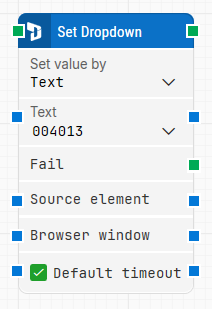
Note: The screenshot on this page uses the Elegance Design, introduced in 2025.3. If you are using an earlier version, your layout may look different.
Quick-start
-
Launch the D365 Fusion Recorder and interact with a dropdown or combo box to automatically generate this block.
-
Set how the dropdown should be selected by choosing Set value by (Text or Index).
-
Enter a fixed value or connect the input dynamically using Text or index-based input.
-
Save the recording to place the block onto the canvas with your configuration.
Building block parameters
Resources
|
Topic |
Description |
|---|---|
|
Common questions about creating, running, and managing flows in Leapwork. |
|
|
Guidelines and solutions for identifying and fixing issues that occur when building or running flows in Leapwork. |
|
|
Frequently asked questions about Fusion Recorder |