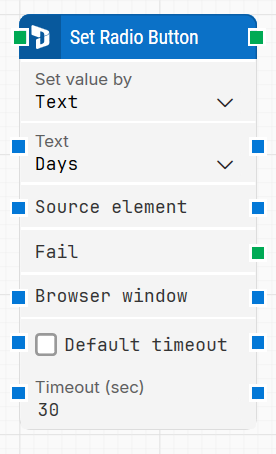
The Set Radio Button block selects a specific option from a group of radio buttons within a Dynamics 365 Finance & Operations (D365 F&O) application. It is generated automatically when a user selects a radio button using the D365 Fusion Recorder, enabling automation flows to reproduce the same selection reliably.
This block is only compatible with browser windows launched through a Login block or within the same D365 recording session.
Fully expanded, the D365 Set Element Radio Button block shows the following properties:
Note: The screenshot on this page uses the Elegance Design, introduced in 2025.3. If you are using an earlier version, your layout may look different.
Quick-start
Start the D365 Fusion Recorder and interact with the target radio button in the D365 application.
When you're done recording actions, save the flow. If this block is part of the recording, it will appear automatically on the canvas.
Optionally configure parameters such as Set value by, Text or Index, Source element, and Timeout. Run the flow when everything is finalized.
Run the flow when it’s ready.
Building block parameters
Parameters
Block header: Shows the current name of the Set Radio Button block, usually based on the selected option (e.g., “Set Recurrence pattern”). You can rename it by double-clicking the header and entering a custom title.
Set value by: Specifies how the target radio button should be selected. Two modes are available:
Text: Selects the radio button based on the visible label. This is the default and works well when labels are consistent.
Index: Selects the option based on its position in the group (e.g., 1 for first). This is useful when text labels are dynamic or inconsistent.
When Index is selected, a field appears to enter the desired index, with both input and output connectors enabled for dynamic selection.
Text: Used when Set value by = Text. This dropdown contains the available radio button labels, captured during recording. You can change the selected option directly from the list.
Index: Used when Set value by = Index. This field specifies which option (by position) to select. It supports dynamic input from other blocks and can also output its value to downstream blocks.
Source element: Optionally restricts the search to a specific parent container or form. This helps disambiguate when multiple similar radio groups exist on the page.
Fail: Triggers if the radio button group cannot be found before the timeout expires. Use this to handle errors or trigger fallback logic in the flow.
Browser window: Indicates which browser window instance the block should act on.
Default timeout: Controls how the timeout is determined:
If unchecked, a fixed timeout of 10 seconds is used.
If checked, the timeout defined in the flow’s Max. run time setting is applied instead.
Timeout (sec): Sets the maximum number of seconds to wait for the radio button group to become available. Only visible if Default timeout is unchecked.