
The Toggle Button block is used to control toggle switches in Dynamics 365 Finance & Operations (D365 F&O) web applications. Toggles are commonly used to enable or disable options, and this block allows you to explicitly define the desired state, ON or OFF, as part of your automation.
Note: This block is only available in browser sessions launched using the Login block or when recording through the D365 Fusion Recorder. It cannot be added manually via the standard block menu.
The block is created automatically when the user interacts with a toggle during a D365 recording session. Once captured, the toggle state and other properties can be reviewed and adjusted as needed before saving the recording.
Fully expanded, the D365 Set Toggle Button blockshows the following properties:
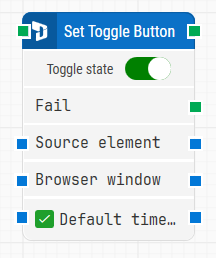
Note: The screenshot on this page uses the Elegance Design, introduced in 2025.3. If you are using an earlier version, your layout may look different.
Quick-start
-
Launch the D365 Fusion Recorder and begin recording.
-
Interact with a toggle control in the application (e.g., enable or disable a setting).
-
Review and adjust the toggle state directly within the recorder interface.
-
Save the recording to insert the Toggle Button block into the canvas.
Building block parameters
Resources
|
Topic |
Description |
|---|---|
|
Common questions about creating, running, and managing flows in Leapwork. |
|
|
Guidelines and solutions for identifying and fixing issues that occur when building or running flows in Leapwork. |
|
|
Frequently asked questions about Fusion Recorder |