
The Get UI Attribute block retrieves a specific attribute from a desktop UI element, typically found using the Find UI Element block, in an already open application window.
It is commonly used in desktop UI automation to extract values such as visibility, selection state, text, or accessibility labels from UI controls.
This block does not trigger execution or flow branching. Instead, it acts as a passive data extractor, supplying attribute values to downstream blocks.
When fully expanded, the Get UI Attribute block displays the following properties:
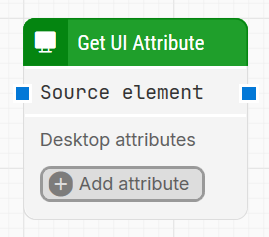
Note: The screenshot on this page uses the Elegance Design, introduced in 2025.3. If you are using an earlier version, your layout may look different.
Quick-start
-
Drag Get UI Attribute onto the canvas.
-
Connect Source element input and output.
-
Select one or more Desktop attributes.
-
Run the flow when it’s ready.
Building block parameters
Parameters
-
The Block Header: The title of the block (“Set UI Element Value”) can be changed by double-clicking on it and typing in a new title.
-
Source element: Provides the UI element from which the attribute will be retrieved. Usually connected to the Element found output of a Find UI Element block. Can be reused in other downstream blocks.
-
Desktop attributes: Specifies the name of the UI attribute to retrieve from the source element. The dropdown includes system-defined attributes such as
Name,Value,IsSelected,HelpText, and others.
Example: SelectingIsSelectedon a radio button will returnTrueif it is selected andFalseif it is not.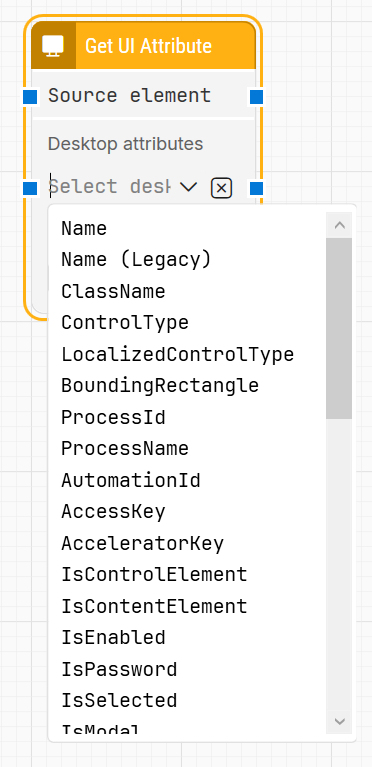
-
Attribute value: Outputs the value of the specified UI attribute. The value type depends on the attribute and may be a string, boolean, or numeric value. This output can be connected to other blocks as input.
-
Exists: Returns whether the specified attribute exists on the source element. Useful for validating conditions before proceeding in the flow.
-
Trueif the attribute is present, even if it does not contain a value. -
Falseif the attribute is not available on the element.
-
Resources
|
Topic |
Description |
|---|---|
|
Common questions about creating, running, and managing flows in Leapwork. |
|
|
Guidelines and solutions for identifying and fixing issues that occur when building or running flows in Leapwork. |